
<–References Go to ToC AI Modules–>
| 1 Introduction
2 The A‑User Architecture Reference Model |
6 Context Description (CXC) | 11 Personality Alignment (PAL)
|
1 Introduction
Technical Specification: Pursuing Goals in the Metaverse (MPAI‑PGM) – Autonomous User Architecture (PGM‑AUA) specifies the architecture, the functions, and the interfaces by which an Autonomous User (A‑User) operating in a metaverse instance (M‑Instance) interacts with another User in the same or in another M‑Instance.
An M‑Instance is a virtual space populated by Processes, such as Users, as specified by Technical Specification: MPAI Metaverse Model (MPAI‑MMM) – Technologies (MMM‑TEC).
Processes operate under the responsibility of a human. Users act as operational mediators between responsible humans and the M‑Instance. Users may exercise varying degrees of autonomy, including considerable or complete autonomy.
The User with which an A‑User interacts may be:
- Another A‑User, or
- A User under the direct control of a human, referred to as a Human‑User (H‑User).
An A‑User performs the following typical functions:
- Captures textual, audio, and visual information originated by, or surrounding, the User with which it interacts.
- Derives the User State, representing a structured description of the User’s observable cognitive, emotional, and interactional condition.
- Produces an appropriate multimodal response rendered through a Speaking Avatar, expressing a stance vis‑à‑vis the Space and the User.
- Performs Actions and Process Actions in the M‑Instance, as specified by the MMM‑TEC standard.
The degree of autonomy exhibited by an A‑User is determined by the level of human intervention governing its operation.
Internally, an A‑User:
- Perceives multimodal signals produced by:
- the responsible human outside the M‑Instance, and
- a User within the M‑Instance, which may be an A‑User or an H‑User.
- Constructs an explicit description of the Space and derives the User State from perceptual and contextual evidence.
- Constructs a structured interaction context and submits it for deliberation.
- Determines, through deliberative processing, the appropriate communicative behaviour of the A‑User vis‑à‑vis the Space and the User.
- Produces spoken content and a corresponding A‑User State that is congruent with the derived User State.
- Executes Actions and Process Actions through its Speaking Avatar as specified by MMM‑TEC.
- Monitors logical, contextual, or governance constraints and escalates to the responsible human when autonomous resolution is not possible.
2 The A‑User Architecture Reference Model
The A-User:
- Operates as an instruction-driven system composed of several interacting sub-processes, orchestrated by a central controller.
- The sub-processes are implemented as AI Modules (AIMs) organised in an AI Workflow (AIW) executed in an AI Framework (AIF) according to Technical Specification: AI Framework (MPAI-AIF) V3.0.
Figure 1 provides the Reference Model of the A-User Architecture.
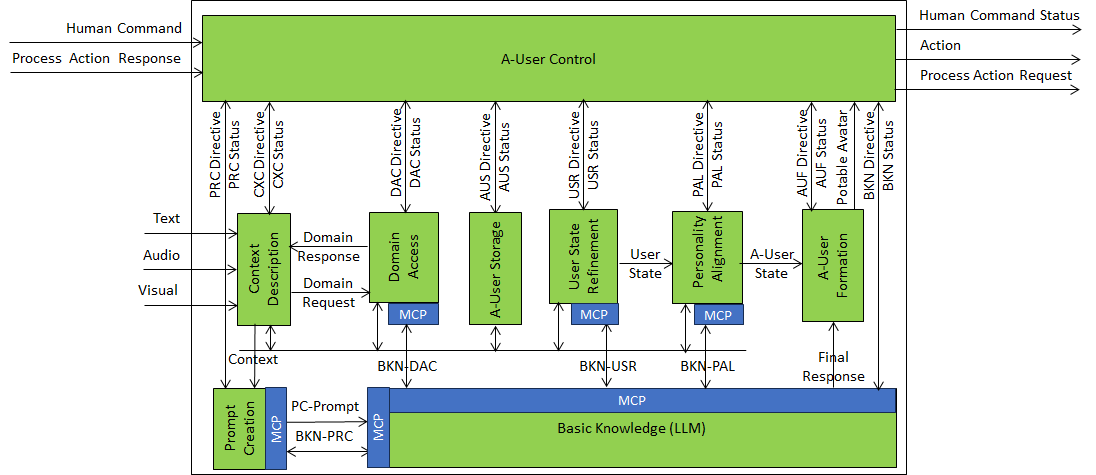
Figure 1 – Autonomous User Architecture
Context Description is the A-User front-end. It provides a perceptual representation of the Space around the A-User, in the form of Audio Scene Descriptors and Visual Scene Descriptors, and derives a first‑pass User State from perceptual and contextual evidence. Domain information requested from Domain Access enables the semantic and contextual interpretation required to produce these descriptions.
Prompt Creation uses the descriptors and the first‑pass User State produced by Context Description, together with any textual information, stored references, and the Interaction History, to construct and maintain a structured representation (the PC‑Prompt) capturing the current situation of the A-User vis-à-vis the Space and the User. This representation is submitted to Basic Knowledge to initiate deliberative processing.
Basic Knowledge receives the PC‑Prompt from Prompt Creation and determines the appropriate communicative behaviour of the A-User. To this end, Basic Knowledge may query Prompt Creation for reformulation, Domain Access for applicable rules and constraints, User State Refinement for an improved User State, and Personality Alignment for the A‑User State coherent with the A-User’s long-term behavioural profile.
User State Refinement improves the stability and temporal coherence of the User State, while Personality Alignment is the sole producer of the A-User State that the A-User should assume to respond appropriately to the User.
Basic Knowledge produces the Final Response, a Text Object to be uttered by the A-User, and provides it to A‑User Formation for rendering and to A‑User Control for information. The A-User State accompanying the utterance is provided by Personality Alignment.
A-User Formation synthesises a speaking avatar that utters the Final Response produced by Basic Knowledge and expresses the A-User State produced by Personality Alignment through speech, facial expression, and gesture.
A-User Control coordinates the activities of the A-User AIMs by issuing Directive messages and receiving Status messages.
3 Types of AI Modules
The A-User’s AIMs belong to the following classes:
(1) Control AIMs
- A-User Control (AUC)
- Receives Human Commands from the responsible Human.
- Governs the runtime operation of the A‑User.
- Issues Directive messages to AIMs.
- Receives Status messages from AIMs.
- Acts in the M-Instance by rendering and animating its speaking avatar.
- Performs Actions and Process Actions in the M‑Instance, holding the A‑User’s Rights and Wallet and applying the M‑Instance Rules.
- Governs the rendering and animation of the speaking avatar through A‑User Formation.
(2) Perception AIMs
- Context Description (CXC)
- Captures media data (Text, Audio, Visual, and 3D Model) from an M‑Location.
- Produces the Audio Scene Descriptors and Visual Scene Descriptors of the captured Space, performs their audio‑visual alignment, and derives a first‑pass User State.
- Obtains Domain information from Domain Access.
- Domain Access (DAC)
- Provides controlled access to the domain knowledge required by Context Description.
- Exposes domain constraints, object classes, and explicit relations governing the structure and rules of the domain.
- Provides object affordances (the possible actions that an object offers, based on its physical properties), including allowed actions and their contextual conditions.
(3) Interpretation AIMs
- Prompt Creation (PRC)
- Using the descriptors and first‑pass User State from Context Description, provides the PC‑Prompt as an interpreted input to Basic Knowledge (BKN).
- Basic Knowledge (BKN)
- Performs semantic interpretation and reasoning by engaging Prompt Creation, Domain Access, User State Refinement (USR), and Personality Alignment (PAL).
- Uses MCP‑based semantic interactions under A-User Control.
- Provides an interpreted, execution‑ready outcome, the Final Response, to A‑User Formation (AUF) and to A-User Control.
(4) Semantic Provider AIMs
- Domain Access (DAC)
- Provides the domain‑specific meaning of entities, relations, actions, and constraints so that the Basic Knowledge LLM can represent information using concepts consistent with the domain model.
- Defines and exposes the canonical semantics (classes, roles, relations, and affordances) that Basic Knowledge uses to ensure consistency across reasoning AIMs.
- User State Refinement (USR)
- Constructs an authoritative but ephemeral User State by integrating evidence from A-User Storage (AUS) and M-Instance Services (e.g., Authenticate).
- Supplies the User State to Basic Knowledge to support reasoning and to Personality Alignment to support alignment of the A-User’s Personality with that of the User.
- Personality Alignment (PAL)
- Is the sole producer of the ephemeral A‑User State, constructed by aligning the A-User’s Personality with the User State and the current context.
- Provides the A‑User State to A‑User Formation to add behaviour and expression to the avatar, and to Basic Knowledge on request.
(5) Execution AIMs
- A‑User Formation (AUF)
- Renders the multimodal output of the A-User in accordance with the Final Response and the A‑User State.
- Produces speech, gesture, facial expression, gaze, and body motion realising the Final Response.
- Executes behaviour under A-User Control governance without performing semantic interpretation or reasoning.
(6) Storage AIMs
- A‑User Storage (AUS)
- Stores and exposes authorised Interaction History elements under the governance of A-User Control.
4 Interaction Paradigms between AIMs
The A‑User Architecture AIMs exchange information using two interaction paradigms that differ in terms of determinism, statefulness, and semantic dependency.
Operational Interfaces support stateless, deterministic runtime information exchange.
Semantic Interfaces, implemented using the Model Context Protocol (MCP), support session‑level semantic grounding, clarification, and alignment.
For example, queries issued by the Audio Scene Description or Visual Scene Description SubAIMs of Context Description to Domain Access are operational in nature and do not depend on prior exchanges.
4.1 Operational Interfaces
Operational Interfaces define a lightweight, deterministic interaction paradigm used by AIMs to exchange specific information required for runtime operation, coordination, and validation within the A‑User Architecture.
An operational interaction consists of a structured, typed request issued by an AIM and a corresponding structured, typed response. Each interaction is self‑contained and stateless.
Operational interfaces:
- Do not preserve conversational or semantic context.
- Do not rely on memory of prior exchanges.
- Do not support clarification loops or iterative refinement.
Operational interfaces are used when:
- An AIM requires explicit information, constraints, or validation to perform its function.
- The scope of ambiguity is local and does not require contextual interpretation.
- The requested information can be provided as facts, constraints, affordances, or status.
Operational interfaces are used uniformly across:
- Context Description – Domain Access
- A‑User Control – AIMs
Typical examples include:
- Context Description querying Domain Access for audio or visual object classification constraints, affordance constraints, or processing parameters.
- A‑User Control issuing Directives and receiving Status messages from AIMs.
Operational interfaces support runtime operation and coordination, but SHALL NOT perform semantic interpretation, deliberation, or communicative behaviour determination.
4.2 Semantic Interfaces (MCP)
Semantic Interfaces, implemented using the Model Context Protocol (MCP), support interactions that require semantic interpretation, contextual alignment, or controlled refinement of meaning across multiple exchanges.
Semantic interfaces are session‑oriented. Intermediate assumptions, bindings, and semantic commitments MAY be preserved across successive exchanges within the same session.
Semantic interfaces are used when:
- Semantic meaning must be established or refined rather than retrieved.
- Interpretation depends on context evolution across multiple interactions.
- Multiple semantic sources must be consulted in a coordinated manner.
Typical examples include:
- Prompt Creation initiating semantic interaction with Basic Knowledge.
- Basic Knowledge querying Prompt Creation to refine contextual structuring.
- Basic Knowledge querying Domain Access for domain rules, constraints, and normative semantics.
- Basic Knowledge querying User State Refinement and Personality Alignment for User State and A‑User State semantics.
Semantic interfaces provide meaning, structure, and contextual grounding. They SHALL NOT be used for operational coordination, perceptual exchange, or task execution.
4.3 Reactive vs Deliberative Execution
To ensure high responsiveness while preserving semantic correctness, the A‑User Architecture distinguishes between reactive execution and deliberative execution.
Reactive execution supports low‑latency, time‑critical A‑User behaviour. It enables immediate responses based exclusively on previously produced results, including:
- The Audio Scene Descriptors and Visual Scene Descriptors.
- The User State.
- The A‑User State.
Reactive execution:
- Operates without initiating Model Context Protocol (MCP) interactions.
- Relies on cached or last‑known semantic results.
- Supports rapid conversational turn‑taking and micro‑behaviours (e.g., gaze, posture, or acknowledgements).
- Is governed by A‑User Control and executed by A‑User Formation.
Reactive execution is the default mode for time‑critical behaviour.
Deliberative execution supports behaviour selection that requires semantic interpretation:
- Uses MCP‑based semantic interactions.
- Is centred on Basic Knowledge, interacting with Prompt Creation, Domain Access, User State Refinement, and Personality Alignment.
- May incur additional latency due to multi‑step semantic processing.
- Produces the Final Response and the updated A‑User State.
Much as the brain receives what the eyes send without altering it, the Audio Scene Descriptors and Visual Scene Descriptors are not modified during deliberative execution.
Deliberative execution is initiated by A‑User Control and may proceed independently of reactive execution, thus continuing to support real‑time behaviour.
5 A‑User Control (PGM‑AUC)
A‑User Control (AUC) governs the life-cycle and runtime coordination of the A‑User by issuing Directives to AIMs, receiving their Status messages, and ensuring that autonomous operation remains consistent with human commands, M‑Instance Rules, and the A‑User’s Rights.
A‑User Control is the sole interface between the A-User and the M-Instance; it holds the A-User’s Rights and Wallet, knows the M-Instance Rules, issues Process Action Requests and interprets Process Action Responses, and performs MM/MU/UM Actions. The other AIMs operate internally and have no direct metaverse effect.
A‑User Control holds goal authority but not epistemic capability. It carries the objectives given to it by the responsible human or by specification and asserts them authoritatively, but it does not itself perform semantic interpretation, deliberation, or behaviour determination. That understanding resides in the dedicated interpretation and deliberation AIMs. The role of A‑User Control is to orchestrate and supervise the execution of the AIMs that collectively produce a speaking avatar exhibiting an A‑User State and uttering speech appropriate for the interaction context.
Consequently, a Directive is binding as to the goal it sets and the constraints it imposes, but advisory as to the conclusion: an AIM that reasons decides its own conclusion, and an AIM that executes attempts the goal subject to the conditions of the world. No AIM may decline the goal, but any AIM may report that the goal was not achieved, or was achieved differently, and the reason. Accordingly, a Status is not merely a record of completion but a decision-and-outcome report stating the goal the AIM understood, the outcome reached, and a structured reason. A‑User Control mediates the resulting outcomes related to execution, oversight, and governance, independently of the specific human interface used.
A Directive may also convey to the receiving AIM the outcome of Process Actions performed by A‑User Control in the M‑Instance, including the PA Status returned, the Complements received, and any resulting constraint on the goal, so that the AIM deliberates with knowledge of the current M‑Instance state. Whether such information is conveyed is at the discretion of A‑User Control; the form in which it is conveyed is specified.
A‑User Control does not impose a fixed schedule on the AIMs it cannot direct in detail. It sets goals and constraints, lets each AIM work, inspects the reported outcome, and may issue a further Directive with a revised goal or a proposed correction. Every Directive is answered, and the initiative to issue one always rests with A‑User Control. In this way, A‑User Control bounds and steers the A‑User’s behaviour by exception rather than by micromanagement, judging each AIM’s report against the objective it was given rather than against a correctness it is not equipped to assess.
Human–A‑User Control interactions may include:
- Initiation or termination of A‑User activity.
- Authorisation or denial of specific actions.
- Escalation handling when conflicts cannot be resolved autonomously.
- Adjustment of autonomy level or execution constraints. For example, Context Description scanning the environment may be stopped because A‑User Control sets a different priority, such as analysing in detail the last scene captured.
A‑User Control governs the A‑User life-cycle by acting under one or more of the following Instruction Types. Each Instruction defines an operational phase under which A‑User Control issues Directives to a specific set of AIMs. The operation of the A‑User described below evokes that of the human brain, in that A‑User Control orchestrates several active elements just as attentional processes orchestrate human sensory and cognitive processes.
- Perception and Environment Description (PED): Configure perceptual subsystems to sense the responsible human in the Universe, the User in the M‑Instance, or the contents of the relevant M‑Location.
- Goal and Language Acquisition (GLA): Capture and segment the multi-modal expressions of the responsible human and/or the User. These processes assign identity and spatial relationships to the objects in the scene and enable understanding of the User.
- Prompting and Knowledge Query (PKQ): Enable structured contextual representation and semantic grounding of perceptual and User State information. The A‑User is now in a position to make sense of what it perceives and interprets.
- Goal and Intent Interpretation (GII): Based upon the results of the previous Instruction, trigger deliberative processing to determine the appropriate communicative behaviour of the A‑User. A‑User Control can now hold the goal and the stance the A‑User should take towards the relevant elements of the environment.
- Policy, Rights, and Feasibility (PRF): Validate the intended behaviour with respect to human commands, governance Rules, User State constraints, and domain feasibility conditions, and establish the A‑User Storage access rights enforced for the session. A‑User Control knows that the A‑User’s actions must comply with various constraints.
- Plan Construction and Execution (PCE): Orchestrate execution of the behaviour, based on the Statuses reported by the AIMs, including speech and actions. A‑User Control can now execute the actions after taking the constraints into account.
- Conflict Management and Escalation (CME): Detect unresolved inconsistencies or conflicts and escalate to the responsible human when required. Various impediments may be encountered and modifications to the action may be determined.
- Avatar Formation and Rendering (AFR): Enable synthesis and rendering of the speaking avatar from the Final Response already produced by Basic Knowledge and the A‑User State provided by Personality Alignment. The A‑User’s avatar is formed and can be rendered.
Table 1 identifies the AIMs that receive a Directive when A‑User Control acts under a specific Instruction. An X indicates that the AIM (row) receives a Directive under the Instruction (column).
The acronyms in the first row of Table 1 refer to the Instructions described above. Under PEC and GLA, A‑User Control directs Context Description to capture the scene and assign identity and spatial relationships to its objects, supported by Domain Access for spatial and environment feasibility. Under PKQ, Directives are sent to the AIMs that ground perception and User State semantically: Context Description , which contributes the first‑pass User State; Prompt Creation, which represents the available spatial and User information in a form the reasoning core can use; Basic Knowledge, which holds the reasoning capability; and Domain Access and User State Refinement, which contribute generic and User‑specific information. Under GII, deliberation determines the goal and the stance. Under AFR, A‑User Formation renders the speaking avatar using the Final Response produced by Basic Knowledge and the A‑User State provided by Personality Alignment, for instance happiness or anger. A‑User Storage is configured under PRF with the session’s storage scopes, retention and life-cycle policy, and the access rights it enforces.
Directives are typically issued in the order of the columns in Table 1.
Table 1 – Instructions and affected AIMs
| PED | GLA | PKQ | GII | PRF | PCE | CME | AFR | |
| CXC (Context Description) | X | X | X | – | – | – | – | – |
| PRC (Prompt Creation) | – | – | X | X | X | X | X | – |
| BKN (Basic Knowledge – LLM) | – | – | X | X | X | X | X | – |
| DAC (Domain Access) | – | X | X | X | X | X | X | – |
| USR (User State Refinement) | – | – | X | X | X | X | X | – |
| PAL (Personality Alignment) | – | – | – | X | X | X | X | X |
| AUF (A-User Formation) | – | – | – | – | – | X | X | X |
| AUS (A-User Storage) | – | – | – | – | X | X | X | – |
Note: Directives issued to Context Description under the PED and GLA Instructions do not engage the reasoning LLM, because Context Description must operate in real time. The semantic grounding it contributes under PKQ, namely the first‑pass User State, is derived by signal processing and Domain Access, not by the reasoning core. Prompt Creation, by contrast, engages the LLM through an MCP interface, because sufficient time is available to receive the results of LLM reasoning.
6 Context Description (CXT)
The function of Context Description (PGM-CXT) is to capture perceptual information from the environment surrounding the User and to produce a coherent, enriched description of the Space together with a first‑pass User State. Context Description operates on audio and visual information in real time, without the benefit of the deliberative information that becomes available later.
Context Description performs the following operations:
- Captures media data (Text, Audio, Visual, and 3D Model) produced by the responsible human in the Universe or by the User in the M‑Instance, ensuring temporal synchronisation and modality coherence of the captured perceptual data.
- Describes the captured Space by producing:
- the Audio Scene Descriptors, through modality‑specific processing including spatial, environmental, and salience‑related enrichment, with object identity;
- the Visual Scene Descriptors, through modality‑specific processing including depth, occlusion, possible actions (affordances), salience‑related enrichment, and object identity.
- Aligns the audio and visual descriptions, establishing coherent multi-modal object correspondence within the environment.
- Derives a first‑pass User State from the perceptual evidence and the available Domain information.
- Requests Domain information by querying Domain Access for the semantics relevant to spatial environments (e.g., office, workshop, or kitchen), audio and visual object interpretation and affordances, the User State, and the contextual constraints governing interpretation.
- Produces outputs:
- the Audio Scene Descriptors and Visual Scene Descriptors, with their audio‑visual alignment information, sent to Prompt Creation;
- the first‑pass User State, sent to Prompt Creation;
- the Domain Request sent to Domain Access;
- the CXC Status, reporting the scope and outcome of processing to A‑User Control.
The internal decomposition of Context Description into SubAIMs, including the Audio and Visual Scene Description SubAIMs, the audio‑visual alignment, the User State derivation, and the interface that governs its interaction with A‑User Storage, is specified in the AI Modules sections.
7 Prompt Creation (PRC)
The function of Prompt Creation is to assemble, organise, and expose a structured representation of the A‑User’s understanding of the current situation regarding the Space and the User, and to submit this representation to Basic Knowledge for deliberation.
Prompt Creation does not perform perception, semantic interpretation, reasoning, or behaviour determination. Rather, its role is to bind together perceptual, state, contextual, and Historical Information into a coherent representation, the PC‑Prompt, suitable for deliberative processing by Basic Knowledge.
Prompt Creation receives the following inputs:
- The Audio Scene Descriptors and Visual Scene Descriptors, with their audio‑visual alignment information, produced by Context Description.
- The first‑pass User State produced by Context Description.
- Relevant references to Space‑ and User‑related information retained in A‑User Storage, including persistent attributes, long‑term Context, and previously established facts.
- The Interaction History associated with the current session.
Prompt Creation performs the following operations:
- Assembles the descriptors, the first‑pass User State, stored references, and Interaction History into the PC‑Prompt, capturing the current Context understanding of the A‑User.
- Ensures that spatial, referential, and temporal relationships across modalities are coherent within the PC‑Prompt.
- Initiates and mediates semantic (MCP‑based) interactions as required by Basic Knowledge, ensuring session continuity for multi‑stage clarification.
- Responds to requests from Basic Knowledge by re‑structuring, refining, or clarifying elements of the PC‑Prompt, including resolving references to Space or User attributes.
Prompt Creation may be activated by:
- A Directive from A‑User Control to construct or update the PC‑Prompt.
- A request from Basic Knowledge to refine, restructure, or clarify elements of an existing PC‑Prompt.
- Changes in the descriptors, the User State, or the Interaction History that require updating of the PC‑Prompt.
Prompt Creation acts as a Context Representation Provider. It is the sole AIM responsible for assembling the descriptors, the User State, stored references, and Interaction History into a coherent situation representation.
8 Basic Knowledge (BKN)
During a Goal and Intent Interpretation Instruction, the Basic Knowledge LLM executes an iterative deliberative processing pipeline to determine the appropriate communicative behaviour of the A‑User with respect to the Context.
- Basic Knowledge receives the PC‑Prompt from Prompt Creation. This representation includes:
- The Audio Scene Descriptors and Visual Scene Descriptors and the first‑pass User State produced by Context Description.
- Relevant references to Context‑related information stored in A‑User Storage.
- The Interaction History associated with the current session.
- Basic Knowledge reasons over this representation to determine:
- the communicative stance the A‑User should assume, and
- the spoken or acted response appropriate to the current situation.
- Throughout this process, Basic Knowledge integrates semantics from multiple supporting AIMs through the following interaction loops.
Loop 1 – Context Structuring (Prompt Creation)
Basic Knowledge may query Prompt Creation via MCP to refine, restructure, or clarify elements of the PC‑Prompt, including spatial, referential, or temporal relationships. Prompt Creation does not introduce new semantics, but restructures available information.
Loop 2 – Domain Semantics (Domain Access)
Basic Knowledge queries Domain Access via MCP to obtain domain rules, constraints, possible actions (affordances), and semantics required to interpret entities, relations, and feasible actions within the Context.
Loop 3 – User Semantics (User State Refinement)
Basic Knowledge queries User State Refinement via MCP to obtain a refined or temporally stabilised User State. When authorised by A‑User Control, User State Refinement integrates information from A‑User Storage and M‑Instance services (e.g., Rights and/or preferences) to provide the best available User State.
Loop 4 – A‑User State and Personality Alignment (PAL)
Basic Knowledge queries Personality Alignment via MCP for the A‑User State that aligns the A‑User’s Personality with the User State, the interaction context, and long‑term behavioural constraints. Personality Alignment, the sole producer of the A‑User State, receives User State when ready. Persistent updates of the User State or A‑User State are stored in A‑User Storage as governed by A‑User Control.
Upon completion of deliberative processing, Basic Knowledge produces the Final Response, a Text Object to be uttered by the A‑User, and provides it to A‑User Formation for rendering and to A‑User Control for information. The accompanying A‑User State is provided by Personality Alignment.
9 Domain Access (DAC)
Domain Access provides authoritative domain‑level semantics to (1) capture‑level semantic grounding and (2) deliberative reasoning. These two uses are logically distinct: capture‑level domain access is situational and is not goal‑directed, while reasoning‑level domain access is goal‑directed and deliberative.
Domain Access supplies object classes, relations, possible actions (affordances), constraints, and behavioural expectations derived from domain knowledge, without performing perception or reasoning as such.
- Provides Domain Semantics to Context Description and Basic Knowledge, including object and event classes, relations, possible actions (affordances), scene constraints, and expected behaviours.
- Supports domain grounding of perceptual and situational elements, enabling consistent interpretation of entities, actions, and relations detected or inferred by other AI Modules.
- Exposes two interaction interfaces, corresponding to the two interaction paradigms:
- A Directed Semantic Query Interface, used by Context Description for single‑shot semantic grounding and validation without session continuity.
- A Dialogic Semantic Interface based on the Model Context Protocol (MCP), used by Basic Knowledge for multi-turn semantic clarification and integration (Prompt Creation, Basic Knowledge, User State Refinement, and Personality Alignment) for multi‑turn semantic clarification and integration.
- Returns structured, typed domain knowledge, including confidence and constraint information, suitable for direct consumption by perception pipelines or for semantic reasoning via MCP.
- Does not maintain perception state, user state, or session state beyond that required for MCP interactions, and does not modify perceptual or user descriptors produced by other AI Modules.
10 User State Refinement (USR)
User State Refinement acts as the semantic authority for user modelling during deliberative processing. It transforms distributed internal and external user‑related evidence into a coherent, queryable User State suitable for reasoning and Personality alignment.
User State Refinement derives and provides authoritative, session‑level user semantics by consolidating user‑related evidence originating from other AI Modules under the governance of A‑User Control:
- Consumes user‑related evidence from A‑User Storage, including:
- the first‑pass User State produced by Context Description;
- user‑related semantic interpretations generated by perception‑ and interpretation‑level AI Modules;
- Interaction History and previously authorised user‑related records.
- Draws additional user‑related information from authorised M‑Instance services, when available and permitted by A‑User Control, including:
- identity and role information obtained from authentication or identity services;
- persistent or ephemeral user profile attributes managed by the M‑Instance.
- Refines the User State by integrating behavioural cues, interaction patterns, session‑level preferences, historical fragments, and authorised M‑Instance information, producing an authoritative but ephemeral User State valid for the current deliberative context.
- Provides the refined User State to Basic Knowledge to support determination of the A‑User’s communicative behaviour, and to Personality Alignment upon request, enabling derivation of the A‑User State.
- Can refine the first‑pass User State produced by Context Description and can continue interpreting User semantics, based on Directives received from A‑User Control and on authorised access to A‑User Storage.
11 Personality Alignment (PAL)
Personality Alignment acts as the semantic authority for aligning Personality, ensuring that the A‑User’s behaviour and responses are consistent with the active Personality while remaining based upon the User State.
Personality Alignment is the sole producer of the A‑User State, which it derives by aligning the A‑User’s Personality with the User State and with communicative, expressive, and behavioural constraints. The resulting A‑User State is authoritative but ephemeral.
- Consumes User semantics from User State Refinement, including the authoritative, session‑level User State required to perform Personality alignment.
- Draws Personality‑related evidence from A‑User Storage, including previously authorised A‑User State fragments, Personality preferences, and Personality indicators derived from interactions.
- May draw additional Personality‑related information from M‑Instance services when permitted by A‑User Control, including externally defined Personality profiles, role‑ or context‑specific Personality constraints, and policy‑driven expressive or behavioural guidelines.
- Constructs and refines the A‑User State by integrating Personality traits, communicative modulation rules, expressive and behavioural constraints, and User‑specific adaptations provided by User State Refinement.
- Provides the A‑User State to A‑User Formation for rendering and to Basic Knowledge on request.
12 A‑User Formation (AUF)
A‑User Formation implements the externally perceptible behaviour of the A‑User within the M‑Instance. It renders the Final Response produced by Basic Knowledge and the A‑User State produced by Personality Alignment into synchronised multi-modal avatar behaviour, without performing semantic reasoning or user modelling.
- Consumes the Final Response produced by Basic Knowledge and the A‑User State produced by Personality Alignment.
- Synthesises speech output from the Final Response, including prosody, rhythm, and timing, aligned with the expressive intent carried by the A‑User State.
- Renders facial expressions, eye gaze, and head pose consistent with the communicative, emotional, and attentional content of the A‑User State.
- Produces gestures and full‑body avatar motion, including posture and movement, aligned with speech and interaction context.
- Synchronises multi-modal outputs across speech, facial animation, gaze, and body motion to ensure coherent and natural avatar behaviour.
- Executes the final plan steps as observable Persona Actions within the M‑Instance.
- Passes execution status information to A‑User Control, reporting progress, completion, or execution anomalies related to avatar behaviour.
13 A‑User Storage (AUS)
A‑User Storage is an AI Module that can store and read evidence and information within the A‑User Architecture. It records and exposes authorised Interaction History elements related to perception, user‑related evidence, and Personality adaptations. Its operation is controlled by A‑User Control.
13.1 Governance
A‑User Control is the sole authority governing access to A‑User Storage. It authorises:
- Which AI Modules may write to A‑User Storage.
- Which categories of information may be recorded.
- Which persistence scope (temporary, session‑bound, or longer‑term) applies.
- Which AI Modules may read specific stored Interaction History elements.
A‑User Control enforces these policies throughout the A‑User life cycle.
13.2 Information Stored in A‑User Storage
Subject to authorisation by A‑User Control, A‑User Storage may store:
- Perceptual context snapshots and scene descriptors produced by Context Description.
- User‑related evidence and authorised fragments derived from interactions.
- Fragments related to Personality along with authorised adaptations.
- Interaction History and associated session metadata.
- Metadata associated with stored information (Trace).
- Process Action outcomes and associated M‑Instance state changes recorded by A‑User Control.
13.3 AI Module Write Access
The following AI Modules may write to A‑User Storage under explicit authorisation by A‑User Control:
- A‑User Control writes the outcomes of Process Actions performed in the M‑Instance, including Process Action Requests issued, Process Action Responses received with their PA Status, and the resulting changes to Rights or Wallet, together with their associated metadata.
- Context Description writes perceptual context snapshots and scene descriptors, including their associated metadata.
- Prompt Creation may record specific data, references, and session metadata related to the PC‑Prompt.
- User State Refinement may record authorised User‑related evidence fragments or updates, but does not store the authoritative User State unless explicitly authorised by A‑User Control.
- Personality Alignment may record authorised A‑User State fragments.
- Basic Knowledge may record authorised reasoning outcomes, annotations, or decisions as structured data when required for orchestration, traceability, or audits.
13.4 AI Module Read Access
The following AI Modules may read from A‑User Storage, subject to A‑User Control policy:
- A‑User Control reads all stored data for orchestration, governance, auditing, and life cycle management of user interactions.
- Context Description reads spatial and User information from previous sessions.
- Prompt Creation reads Interaction History elements such as scene descriptors, context snapshots, and user‑related evidence in order to assemble the PC‑Prompt.
- Basic Knowledge reads authorised data to support deliberation, semantic integration, and traceability.
- User State Refinement reads user‑related evidence, interaction history, and authorised profile fragments to derive the authoritative but ephemeral User State.
- Personality Alignment reads authorised user semantics and Personality‑related fragments to construct the A‑User State.