
<- Security API Go to ToC Profiles->
1 Architecture
Remote Controller Access specifies a remote HTTP-based protocol that exposes the MPAI AIF Basic API functionality for use by a Remote Client (a remote HTTP 1.1 Client). The following API specification describes the minimum profile of Request and Response Messages.
Figure 1 depicts the global architecture of an System enabling MPAI as a Service (MaaS) allowing Remote Client Application (RCA) to select and run AI Workflows (AIW) instances.
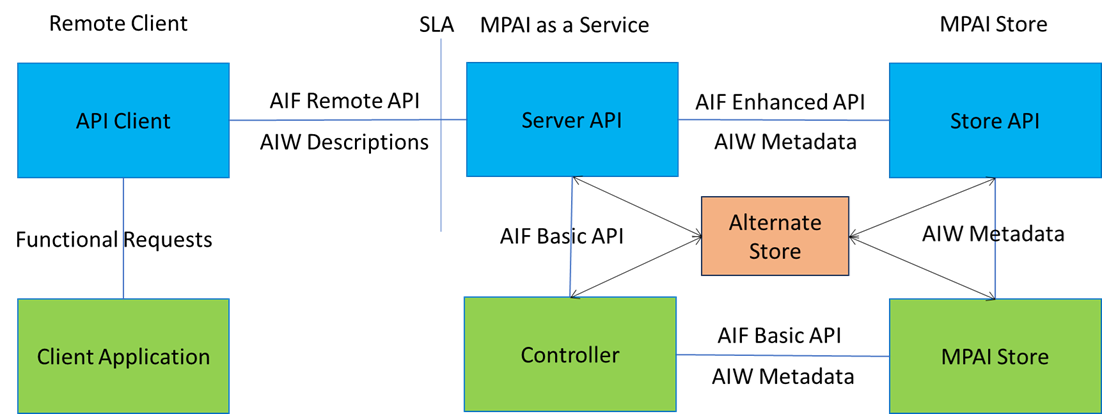
Figure 1 – Reference architecture of an MaaS
The RCA issues HTTP(s) Requests to the Server API through the local API Client. These Requests comprise AIF Controller instance management and AIW instance management (Sections 3 and 5 below) and AIM Port message exchange (Section 4 below) as required to satisfy the MaaS needs of the RCA.
The Server API, in response to the received Requests, will negotiate through the Store API the selection of appropriate AIW Descriptions and with the Controller Instance (CI) performs subsequent AIW instance management using the AIF API (Start/Pause/Resume/Stop). CI retrieves AIW from the MPAI Store for instantiation as requested by the Server using the AIF API (Get and parse archive).
2 Workflow
2.1 Creation of infrastructure
Creation of infrastructure is the responsibility of the deployment/control plane to avoid access to the application data plane by the control plane and vice-versa. The REST API protocol is used to specify the steps.
2.1.1 Connection to the SCI
Service Controller Instance (SCI) specifies the required security protocols that the Remote Client Application (RCA) must employ for authentication and authorisation purposes. AIF includes an exemplary list of security protocols (basic, digest, bearer).
The connection is required by all subsequent points and must be secured using one of the proposed security schemes described in End Point Open API.
2.1.2 Creation of an AIF Controller instance
RCA ask the AIF endpoint for the creation of one or more AIF Controller instances to which all subsequent AIF API requests will be issued.
The objective of Controller instance creation is the acquisition of a Remote Controller Instance identity for use in subsequent API request to identify a Controller among many to which the message is directed.
2.1.3 Workflow discovery
RCA submits a request to the Server API for Workflow matching and discovery. The resulting collection of Work Descriptions is returned to the RCA for ultimate selection.
2.1.4 Launch of the desired AI Workflow
RCA submits a request to the AIF Controller through the AIF Endpoint for the launch of the desired AIW(s).
The objective of Workflow launch is the acquisition of a Remote Workflow Instance identity for use in subsequent API request to identify a Workflow among many with which input/output messages will be exchanged.
2.2 Message Exchange
Application data exchange is the responsibility of the application data plane thus ensuring non-exposure of application data to the control plane. The REST API protocol is used to specify the steps.
2.2.1 Delivery of messages to the input ports of the AI Workflow
RCA submits requests to the above-identified AIF Controller, through the AIF Endpoint for the delivery of AIF Messages containing application data to the desired input port(s) of the above-identified and launched AIW(s).
2.2.2 Reception of messages from the output ports of the AI Workflow
RCA may submit requests to the above-identified AIF Controller through the AIF Endpoint for the reception of AIF Messages from the desired output port(s) of the above-identified and launched AIW(s). The RCA makes provision for asynchronous delivery of the response when required.
2.3 Termination of infrastructure
The deployment/control plane is responsible for the avoidance of access to the application data plane by the control plane and vice-versa. The REST API protocol is used to specify the steps.
2.3.1 Termination of the AI Workflow
RCA submits requests to the AIF Controller through the AIF Endpoint for the termination of the above-identified AIW(s).
2.3.2 Release of the AIF Controller
RCA submits requests to the AIF Endpoint for the termination of the above-identified AIF Controller(s).
3 MPAI-AIF Basic API
3.1 Introduction
The following clauses apply, where appropriate, to all API specifications described here.
- The Service Level Agreement (SLA) must be negotiated and agreed between the RCA and the MPAI as a Service Provider prior to the subsequent use of the Server API exposed by the Service Provider.
- The application security paradigm, described by the SLA, MUST be chosen from the standard HTTP security paradigms (BASIC, DIGEST, BEARER) but is not normative.
- The example HTTP request and response messages only include essential and normative information, allowing for interoperability and subsequent derivational extensions.
- Only the relevant HTTP headers are shown. These MUST be accompanied by all HTTP headers required by the HTTP 1.1 standard and all those required to satisfy the features of the security paradigm that is employed.
- All API requests MUST use the most recent version of Transport Layer Security (TLS), and client certificate exchange MAY be necessary based on the server’s security requirements.
- The term {cid} represents the ID of a Controller Instance returned by a successful request to the Controller Instance Creation API specified below.
- The term{wid} represents the ID of a Workflow Instance returned by a successful request to the Workflow Instance Start API specified below.
- Any ID format may be used for all SCI and Workflow Instance IDs exchanged between the RCA and the HTTP Server of the MaaS. However, use of UUIDs is recommended.
- Standard HTTP status codes MUST be used to communicate eventual failure of an API request (302, 400, 401, 403, 404, 500 etc) and MUST be used in accordance with their standard meaning.
- In all API Requests, other than the initial SCI Creation Request, a value returned in the optional prefix field of the SCI Creation Response message, MUST be used in place of the default /MPAI/AIFU prefix.
3.2 Preparation of the infrastructure
3.2.1 Initialise the Controller Instance
All API Calls that are performed subsequent to the Call MUST be with respect to an SCI Identifier returned by a successful invocation of this Call.
3.2.1.1 REQUEST
| POST /MPAI/AIFU/Controller HTTP/1.1 ACCEPTS: application/json |
3.2.1.2 RESPONSE
| HTTP/1.1 201 CREATED CONTENT-TYPE: application/json CONTENT-LENGTH: <size of body>{“id”: “xxxxxxxx-xxxx-xxxx-xxxx-xxxxxxxxxxxxx”} |
For enhanced security reasons, the Response returned by the Controller Initialisation Request MAY return an alternative mapping of the standard collection of MPAI AIFU route prefix to the Controller Instance specific route prefix. This route prefix mapping, if returned, MUST be used in place of the standard /MPAI/AIFU/ prefix in all subsequent Requests issued for the corresponding SCI.
HTTP/1.1 201 CREATED
CONTENT-TYPE: application/json
CONTENT-LENGTH: <size of message>
{“id”: “xxxxxxxx-xxxx-xxxx-xxxx-xxxxxxxxxxxxx”, “prefix”:”/alternative/endpoint/prefix”}
3.2.2 Discover Workflow
The process ensures that the required Workflow is actually available (Workflow exists in the relevant MPAI Store or in the SCI environment) and accessible to the intended Remote Client Application (as described by the terms of the SLA).
When successful, the URL of the Workflow Description will be returned providing the client application with the required input and output port type information allowing preparation and integration of data for subsequent message exchange.
3.2.2.1 REQUEST
POST /MPAI/AIFU/{cid}/Workflow HTTP/1.1
ACCEPTS: application/json
CONTENT-TYPE: application/json
CONTENT-LENGTH : <size of body>
{ “name”: “myworkflow” }
3.2.2.2 RESPONSE
HTTP/1.1 200 OK
CONTENT-TYPE: application/json
CONTENT-LENGTH : <size of body>
{
“controller”: “xxxxxxxx-xxxx-xxxx-xxxx-xxxxxxxxxxxxx”,
“name”: “myworkflow”,
“url”: <workflow description URL>
}
3.2.3 Upload AI Workflow
This operation is necessary if the preceding step fails. It ensures that the required AIW is now available in the MPAI Store and accessible by SCIs of the associated SLA.
3.2.3.1 REQUEST
POST /MPAI/AIFU/{cid}/Upload HTTP/1.1
ACCEPTS: application/json
CONTENT-TYPE: application/json
CONTENT-LENGTH : <size of body>
{ “name”: “myworkflow”, “url”: <workflow description URL> }
3.2.3.2 RESPONSE
HTTP/1.1 200 OK
CONTENT-TYPE: application/json
CONTENT-LENGTH : <size of body>
{
“controller”: “xxxxxxxx-xxxx-xxxx-xxxx-xxxxxxxxxxxxx”,
“id”: “wwwwwwww-wwww-wwww-wwww-wwwwwwwwwwww”,
“name”: “myworkflow”,
}
3.2.4 Start AI Workflow
This operation requests the SCI to initiate the AIW. This assumes that the preceding check and upload calls would return the corresponding AIW Identifier.
3.2.4.1 REQUEST
POST /MPAI/AIFU/{cid}/AIW/Start HTTP/1.1
ACCEPTS: application/json
CONTENT-TYPE: application/json
CONTENT-LENGTH : <size of body>
{“workflow”: “myworkflow”}
3.2.4.2 RESPONSE
HTTP/1.1 200 OK
CONTENT-TYPE: application/json
CONTENT-LENGTH : <size of body>
{
“controller”: “xxxxxxxx-xxxx-xxxx-xxxx-xxxxxxxxxxxxx”,
“id”: “wwwwwwww-wwww-wwww-wwww-wwwwwwwwwwww”,
“name”: “myworkflow”,
“state”: “ACTIVE”,
“change”: <date string of state change>
}
3.2.5 Pause AI Workflow
This operation requests the SCI to suspend the AIW.
3.2.5.1 REQUEST
GET /MPAI/AIFU/{cid}/AIW/{wid}/Pause HTTP/1.1
ACCEPTS: application/json
3.2.5.2 RESPONSE
HTTP/1.1 200 OK
CONTENT-TYPE: application/json
CONTENT-LENGTH : <size of body>
{
“controller”: “xxxxxxxx-xxxx-xxxx-xxxx-xxxxxxxxxxxxx”,
“id”: “wwwwwwww-wwww-wwww-wwww-wwwwwwwwwwww”,
“name”: “myworkflow”,
“state”: “PAUSED”,
“change”: <date string of state change>
}
3.2.6 AI Workflow Status
This operation requests the current status of the AIW.
3.2.6.1 REQUEST
GET /MPAI/AIFU/{cid}/AIW/{wid} HTTP/1.1
ACCEPTS: application/json
3.2.6.2 RESPONSE
HTTP/1.1 200 OK
CONTENT-TYPE: application/json
CONTENT-LENGTH : <size of body>
{
“controller”: “xxxxxxxx-xxxx-xxxx-xxxx-xxxxxxxxxxxxx”,
“id”: “wwwwwwww-wwww-wwww-wwww-wwwwwwwwwwww”,
“name”: “myworkflow”,
“state”: <current status>,
“change”: <date string of state change>
}
3.2.7 Resume AI Workflow
This operation requests the SCI to resume the paused AIW.
3.2.7.1 REQUEST
GET /MPAI/AIFU/{cid}/AIW/{wid}/Resume HTTP/1.1
ACCEPTS: application/json
3.2.7.2 RESPONSE
HTTP/1.1 200 OK
CONTENT-TYPE: application/json
CONTENT-LENGTH : <size of body>
{
“controller”: “xxxxxxxx-xxxx-xxxx-xxxx-xxxxxxxxxxxxx”,
“id”: “wwwwwwww-wwww-wwww-wwww-wwwwwwwwwwww”,
“name”: “myworkflow”,
“state”: “ACTIVE”,
“change”: <date string of state change>
}
3.3 Operation of the infrastructure
Input and output data messages will be sent and received by the RCA through the SCI to and from the input and output ports of the corresponding AIW or AIM.
The data carried in the HTTP Body section of these Input and Output messages, will be formatted in strict accordance with the standard byte serialisation, corresponding to the declared type of the involved ports, exposed specifically for this purpose in the Workflow Description.
3.3.1 Send Input Data
These operations allow delivery of input data messages prepared by the RCA to the input Port(s) of the AI Workflow.
3.3.1.1 REQUEST
POST /MPAI/AIFU/{cid}/AIW/{wid}/Input/{pid} HTTP/1.1
CONTENT-TYPE: MPAI/port-data
CONTENT-LENGTH : <size of body>
<MPAI port data bytes formatted in accordance with the expected input serialisation>
3.3.1.2 RESPONSE
HTTP/1.1 200 OK
3.3.2 Receive Output Data
These operations allow reception by the RCA of data messages delivered by the output Port(s) of the AI Workflows of the SCI.
3.3.2.1 REQUEST
GET /MPAI/AIFU/{cid}/AIW/{wid}/Output/{pid} HTTP/1.1
3.3.2.2 RESPONSE
HTTP/1.1 200 OK
CONTENT-TYPE: MPAI/port-data
CONTENT-LENGTH : <size of body>
<MPAI port data bytes formatted in accordance with the expected output serialisation>
3.4 Termination of the infrastructure
3.4.1 Terminate AI Workflow
This operation ensures release of the AI Workflow that was instantiated by the SCI.
3.4.1.1 REQUEST
GET /MPAI/AIFU/{cid}/AIW/{wid}/Stop HTTP/1.1
3.4.1.2 RESPONSE
HTTP/1.1 200 OK
3.4.2 Delete Remote Controller Instance
This operation ensures release of the SCI.
3.4.2.1 REQUEST
DELETE /MPAI/AIFU/Controller/{cid} HTTP/1.1
3.4.2.2 RESPONSE
HTTP/1.1 200 OK
.