
Function
Ref. Model
I/O Data
SubAIMs
JSON MData
Profiles
Ref. Software
Conformance
Performance
1 Functions
The Connected Autonomous Operation (CAV‑CAO) AIM:
- Converses with humans by understanding their utterances, e.g., “take me home” or “show me the environment you see”.
- Senses the environment where it is located or traverses.
- Plans a Route enabling the CAV to reach a requested destination.
- Builds digital representations of the environment.
- Exchanges elements of the environment representation with other CAVs and CAV‑Aware entities.
- Makes decisions about how to execute the Route.
- Actuates the motion of a CAV to implement the decisions.
| Receives | Text Object | Text data from User. |
| Audio Object | Environment audio. | |
| Visual Object | Environment visual. | |
| LiDAR Object | LiDAR generated by CAV received from environment. | |
| RADAR Object | RADAR generated by CAV received from environment. | |
| Offline Map Object | Offline map data. | |
| Ultrasound Object | Ultrasound generated by CAV received from environment. | |
| GNSS Object | GNSS data. | |
| Point of View | User‑selected Point of View. | |
| Spatial Data | Spatial data from sensors. | |
| Weather Data | Weather data from sensors. | |
| Ego‑Remote HCI Message | Message received from Remote HCI. | |
| Ego‑Remote AMS Message | Message received from Remote AMS. | |
| Brake Response | Brake response from MAS. | |
| Motor Response | Motor response from MAS. | |
| Wheel Response | Wheel response from MAS. | |
| Produces | Text Object | Text data to User. |
| Speech Object | Speech to User. | |
| Audio Object | Audio to User/Environment. | |
| Visual Object | Visual to User. | |
| LiDAR Object | LiDAR from Ego CAV. | |
| RADAR Object | RADAR from Ego CAV. | |
| Ultrasound Object | Ultrasound from Ego CAV. | |
| AMS Data | AMS Data to external application. | |
| Ego‑Remote HCI Message | Message sent to Remote HCI. | |
| Ego‑Remote AMS Message | Message sent to Remote AMS. | |
| Brake Command | MAS Command sent to Brakes. | |
| Motor Command | MAS Command sent to Motors. | |
| Wheel Command | MAS Command sent to Wheels. |
2 Reference Model
Figure 1 depicts the Reference Model of the Connected Autonomous Operation (CAV‑CAO) AIM.
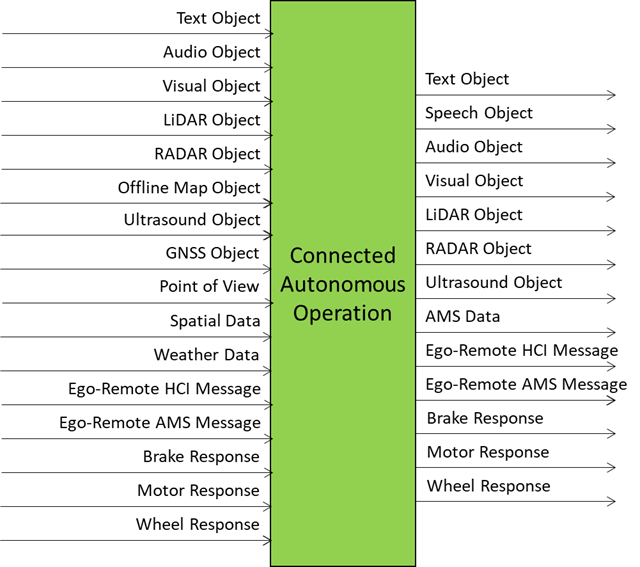
Figure 1 – Reference Model of the Connected Autonomous Operation (CAV‑CAO) AIM
3 I/O Data
Table 1 specifies the Input and Output Data of the Connected Autonomous Operation (CAV‑CAO) AIM.
| Input | Description |
|---|---|
| Text Object | Text data from User. |
| Audio Object | Environment audio. |
| Visual Object | Environment visual. |
| LiDAR Object | LiDAR generated by CAV received from environment. |
| RADAR Object | RADAR generated by CAV received from environment. |
| Ultrasound Object | Ultrasound generated by CAV received from environment. |
| Offline Map Object | Offline map data. |
| GNSS Object | GNSS data. |
| Point of View | User‑selected Point of View. |
| Spatial Data | Spatial data from sensors. |
| Weather Data | Weather data from sensors. |
| Ego‑Remote HCI Message | Message received from Remote HCI. |
| Ego‑Remote AMS Message | Message received from Remote AMS. |
| Brake Response | Brake response from MAS. |
| Motor Response | Motor response from MAS. |
| Wheel Response | Wheel response from MAS. |
| Output | Description |
| Text Object | Text data to User. |
| Speech Object | Speech to User. |
| Audio Object | Audio to User/Environment. |
| Visual Object | Visual to User. |
| LiDAR Object | LiDAR generated by CAV. |
| RADAR Object | RADAR generated by CAV. |
| Ultrasound Object | Ultrasound generated by CAV. |
| AMS Data | AMS Data to external application. |
| Ego‑Remote HCI Message | Message sent to Remote HCI. |
| Ego‑Remote AMS Message | Message sent to Remote AMS. |
| Brake Command | MAS Command sent to Brakes. |
| Motor Command | MAS Command sent to Motors. |
| Wheel Command | MAS Command sent to Wheels. |
4 SubAIMs
4.1 Functions of SubAIMs
Table 2 describes the functions of the Connected Autonomous Operation (CAV‑CAO) SubAIMs.
| SubAIM | Function |
|---|---|
| Human‑CAV Interaction | Recognises human owner/renter, responds to humans’ commands and queries, converses with humans, manifests itself as a perceptible entity, exchanges information with the Autonomous Motion Subsystem in response to humans’ requests, and communicates with other CAVs or CAV‑Aware entities. |
| Environment Sensing Subsystem | Senses the environment’s electromagnetic and acoustic information, receives Ego CAV’s Spatial Attitude and Weather Data, requests location‑specific data from Offline Map(s), produces the best estimate of the Ego CAV Spatial Attitude, sensor‑specific Scene Descriptors and Alerts, Basic Environment Descriptors, and requests/receives elements of the Full Environment Descriptors to/from Remote AMSs. |
| Autonomous Motion Subsystem | Converses with HCI (and HCI with humans) to provide a Route, requests and provides FED subsets to selected Remote CAVs, produces Full Environment Descriptors, generates Paths and Trajectories, checks Trajectory implementation considering Alerts from ESS, issues commands to and processes responses from MAS, stores data received/produced in AMS Memory. |
| Motion Actuation Subsystem | Transmits Weather Data and Spatial Attitude of the CAV to ESS, receives AMS‑MAS Messages from AMS, translates AMS‑MAS Messages into Brake, Motor, and Wheel Commands, packages and sends Brake, Motor, and Wheel Responses from its actuators to AMS. |
4.2 Operation
The operation of a CAV unfolds according to the following workflow, which is a representative description of the functions performed.
| Entity | Action |
|---|---|
| Human | Requests the HCI to take them to a destination. |
| HCI | 1. Authenticates human(s). 2. Interprets the request of humans. 3. Issues commands to the AMS. |
| AMS | 1. Requests ESS to provide the current Point of View. |
| ESS | 1. Computes and sends the Basic Environment Descriptors (BED) to the AMS. |
| AMS | 1. Computes and sends Route(s) to HCI. |
| HCI | 1. Sends travel options to Human. |
| Human | 1. May integrate/correct their instructions. 2. Issues commands to HCI. |
| HCI | 1. Communicates Route selection to AMS. |
| AMS | 1. Sends the BED to the AMSs of other CAVs. 2. Computes the Full Environment Descriptors (FED). 3. Decides best motion to reach the destination. 4. Issues appropriate commands to the MAS. |
| MAS | 1. Executes the Command. 2. Sends response to the AMS. |
| Human | 1. Interacts and holds conversations with other humans on board the HCI. 2. Issues commands to the HCI. 3. Requests HCI to render the FED. 4. Navigates the FED. 5. Interacts with humans in other CAVs. |
| HCI | Communicates with the HCIs of Remote CAVs on matters related to human passengers. |
4.3 I/O Data of SubAIMs
Table 4 gives the Input and Output Data of the Connected Autonomous Operation (CAV‑CAO) SubAIMs.
4.4 AIMs and JSON Metadata
Table 5 provides the links to the AIM specifications and JSON schemas. AIM1 indicates the Composite AIM and AIM2 its SubAIMs.
| AIM1 | AIM2 | Name | JSON |
|---|---|---|---|
| CAV‑CAO | Connected Autonomous Operation | X | |
| MMC‑HCI | Human‑CAV Interaction | X | |
| CAV‑ESS | Environment Sensing Subsystem | X | |
| CAV‑AMS | Autonomous Motion Subsystem | X | |
| CAV‑MAS | Motion Actuation Subsystem | X |
5 JSON Metadata
https://schemas.mpai.community/CAV2/V1.1/AIMs/ConnectedAutonomousOperation.json
6 Profiles
No Profiles.
7 Reference Software
Not part of this specification.
8 Conformance Testing
Table 6 provides the Conformance Testing Method for the Connected Autonomous Operation (CAV‑CAO) Composite AIM. Conformance Testing of the individual SubAIMs is given by the individual AIM specifications.
If a schema contains references to other schemas, conformance of data for the primary schema implies that any data referencing a secondary schema shall also validate against the relevant schema, if present, and conform with the Qualifier, if present.
| Receives | Text Object | Shall validate against Text Object schema. |
| Audio Object | Shall validate against Audio Object schema. | |
| Visual Object | Shall validate against Visual Object schema. | |
| LiDAR Object | Shall validate against LiDAR Object schema. | |
| RADAR Object | Shall validate against RADAR Object schema. | |
| Ultrasound Object | Shall validate against Ultrasound Object schema. | |
| Offline Map Object | Shall validate against Offline Map Object schema. | |
| GNSS Object | Shall validate against GNSS Object schema. | |
| Point of View | Shall validate against Point of View schema. | |
| Spatial Data | Shall validate against Spatial Data schema. | |
| Weather Data | Shall validate against Weather Data schema. | |
| Ego‑Remote HCI Message | Shall validate against Ego‑Remote HCI Message schema. | |
| Ego‑Remote AMS Message | Shall validate against Ego‑Remote AMS Message schema. | |
| Brake Response | Shall validate against Brake Response schema. | |
| Motor Response | Shall validate against Motor Response schema. | |
| Wheel Response | Shall validate against Wheel Response schema. | |
| Produces | Text Object | Shall validate against Text Object schema. |
| Speech Object | Shall validate against Speech Object schema. | |
| Audio Object | Shall validate against Audio Object schema. | |
| Visual Object | Shall validate against Visual Object schema. | |
| LiDAR Object | Shall validate against LiDAR Object schema. | |
| RADAR Object | Shall validate against RADAR Object schema. | |
| Ultrasound Object | Shall validate against Ultrasound Object schema. | |
| AMS Data | Shall validate against AMS Data schema. | |
| Ego‑Remote HCI Message | Shall validate against Ego‑Remote HCI Message schema. | |
| Ego‑Remote AMS Message | Shall validate against Ego‑Remote AMS Message schema. | |
| Brake Command | Shall validate against Brake Command schema. | |
| Motor Command | Shall validate against Motor Command schema. | |
| Wheel Command | Shall validate against Wheel Command schema. |
9 Performance Assessment
Not part of this specification.