
<-References Go to ToC Reference Model ->
| Introduction | Human-CAV Interaction | Environment Sensing Subsystem |
| Autonomous Motion Subsystem | Motion Actuation Subsystem | Data exchange in AIMs |
1 Introduction
Figure 1 characterises the type of environment that the vehicle may be requested to traverse.
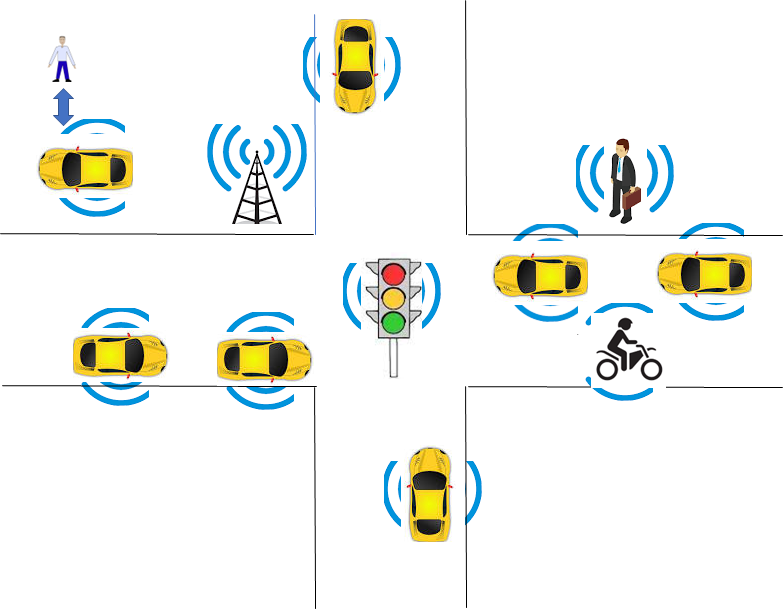 |
| Figure 1 – An example of an environment traversed by a CAV |
The environment is populated by humans, CAVs, and objects, such as vehicles, roadside units, and traffic lights, that are “CAV-aware”, i.e., can understand information transmitted. Humans may carry devices that are CAV-aware.
Figure 2 depicts the four Subsystems composing a CAV. Each Subsystem is implemented as an AI Workflow conforming with Technical Specification AI Framework (MPAI-AIF) V3.0.
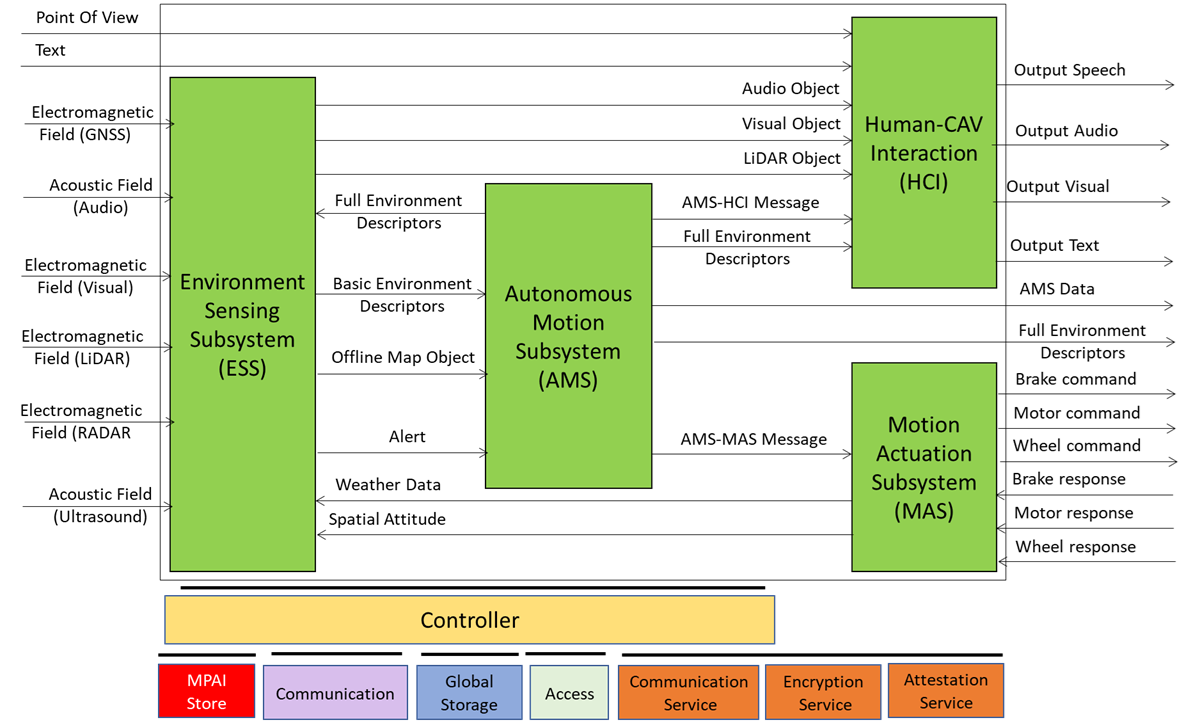
Figure 2 – The Reference Model of a CAV
The various functionalities inside a Subsystem are implemented as AI Modules conforming with MPAI-AIF V3.0. However, their disposition is not normative as they may be located in other subsystem, on condition that the interfaces specified by CAV-TEC are preserved.
A human approaching a CAV requests the Human-CAV Interaction Subsystem (HCI) to be taken to a Point of View using a combination of Audio, Visual, and LiDAR signals. A remote process can make a similar request to the CAV.
Either request is passed to the Autonomous Motion Subsystem (AMS), which requests the Environment Sensing Subsystem (ESS) to provide the current Point of View of CAV. With this information from ESS (the current Point of View), the Destination Point of View, and the possibility to access Offline Maps, the AMS can propose one or more Routes, one of which the human or process can select.
With the human aboard, the AMS continuously receives environment information from the ESS – possibly complemented with information received from other CAVs in range – and instructs the Motion Actuation Subsystem to make appropriate motions.
2 Human-CAV Interaction
The operation of the HCI in its interaction with humans and the rest of the CAV is best explained using the CAV-HCI Reference Model of Figure 3.
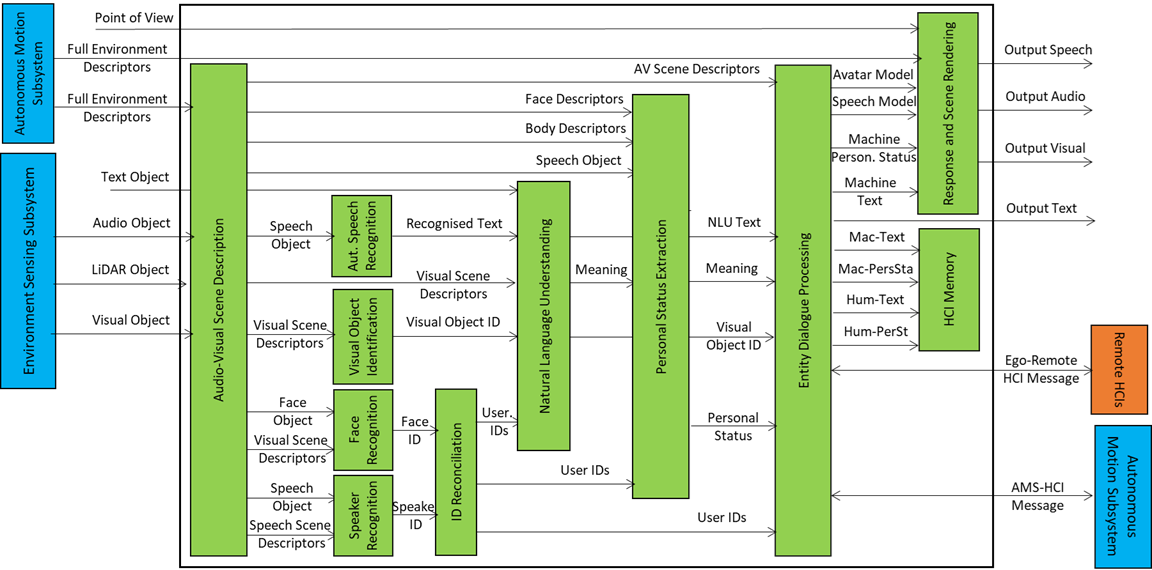
Figure 3 – Reference Model of CAV-HCI
The Audio-Visual Scene Description (AVS) monitors the environment and produces Audio-Visual Scene Descriptors from which it extracts Speech Scene Descriptors and from these, Speech Objects corresponding to any speaking humans in the environment surrounding the CAV. Visual Scene Descriptors may also be extracted in the form of Face and Body Descriptors of all humans present.
The CAV activates Automatic Speech Recognition (ASR) to have the speech of each human recognised and converted into Recognised Text. Each Speech Object is identified according to their position in space. The CAV also activates the Visual Object Identification (VOI) that is able to produce the Instance IDs of Visual Objects as indicated by humans.
Natural Language Understanding (NLU) processes the Speech Objects, produces Refined Text, and extracts Meaning from the Text of each input Speech. This process is facilitated by the use of the IDs of the Visual Objects provided by VOI.
Speaker Identity Recognition (SIR) and Face Identity Recognition (FIR) help the CAV to reliably obtain the Identifiers of the humans the HCI is interacting with. If the Face ID(s) provided by FIR correspond to the ID(s) provided by SIR, the CAV may proceed to attend to further requests. Especially with humans aboard, Personal Status Extraction (PSE) provides useful information regarding the humans’ state of mind by extracting their Personal Status.
The CAV interacts with humans through Entity Dialogue Processing (EDP). When a human requests to be taken to a Destination, the EDP interprets and communicates the request to the Autonomous Motion Subsystem (AMS). A dialogue may then ensue where the AMS may offer different choices to satisfy potentially different human needs (e.g., a long but comfortable Route or short but less predictable).
Then, while the CAV moves to the Destination, the HCI may converse with the humans, show the Full Environment Descriptors developed by the AMS to the passengers, and communicate information about the CAV from the Ego AMS or more generally from the HCIs of remote CAVs.
The HCI responds using the two main EDP outputs: Text and Personal Status. These are used by the Response and Scene Rendering (RSR) to produce the Portable Avatar representing the HCI conveying Speech, Face, and Gesture synthesised to render Audio, Speech, and Visual information using the HCI Portable Avatar. Alternatively, RSR can also be used to display the Full Environment Descriptors produced by the AMS from the Point of View selected by the human.
The HCI interacts with passengers in several ways:
- By responding to commands/queries from one or more humans at the same time, e.g.:
- Commands to go to a waypoint, park at a place, etc.
- Commands with an effect in the cabin, e.g., turn off air conditioning, turn on the radio, call a person, open a window or door, search for information, etc.
- By conversing with and responding to questions from one or more humans at the same time about travel-related issues, e.g.:
- Humans request information, e.g., time to destination, route conditions, weather at destination, etc.
- Humans ask questions about objects in the cabin.
- By following the conversation on travel matters held by humans in the cabin if
- The passengers allow the HCI to do so, and
- The processing is carried out inside the CAV.
3 Environment Sensing Subsystem
The operation of the Environment Sensing Subsystem (ESS) is best explained using the Reference Model of the CAV-ESS subsystem depicted in Figure 4.
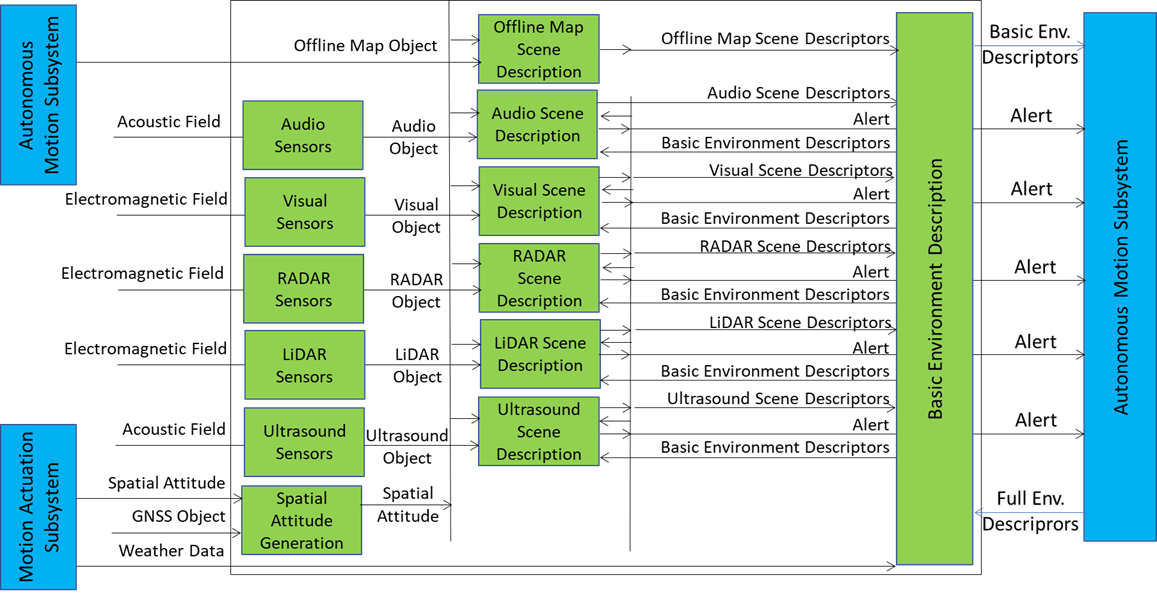
Figure 4 – Reference Model of CAV-ESS
When the CAV is activated in response to a request by a human owner or renter or by a process, Spatial Attitude Generation continuously computes the CAV’s Spatial Attitude relying on the initial Motion Actuation Subsystem’s Point of View, and information from the Global Navigation Satellite Systems (GNSS), if available.
An ESS may be equipped with a variety of Environment Sensing Technologies (EST). CAV-TEC assumes they are Audio, LiDAR, RADAR, Ultrasound, and Visual. CAV-TEC assumes that a CAV implementation supports may only support a subset of the ESTs. Offline Map is considered as an EST.
An EST-specific Scene Description receives EST-specific Data Objects, produces EST specific Scene Descriptors which are integrated into the Basic Environment Descriptors (BED) by the Basic Environment Description using
- All available sensing technologies.
- Weather Data.
- Road State
- The Full Environment Descriptors of previous instants produced by the AMS.
Note that, although in Figure 4 each sensing technology is processed by an individual EST, an implementation may combine two or more Scene Description AIMs to handle two or more ESTs, provided the relevant interfaces are preserved. An EST-specific Scene Description may need to access the BED of previous instants and may produce Alerts that are immediately communicated to AMS.
The Objects included in the BEDs may carry Annotations specifically related to traffic signalling, e.g.: Point of View of traffic signals in the environment, Traffic Policemen, Road signs (lanes, turn right/left on the road, one way, stop signs, words painted on the road), Traffic signs – vertical signalisation (signs above the road, signs on objects, poles with signs), Traffic lights, Walkways, and Traffic sounds (siren, whistle, horn).
4 Autonomous Motion Subsystem
The operation of the Autonomous Motion Subsystem (AMS) is best explained using the Reference Model of the CAV-AMS subsystem depicted in Figure 5.
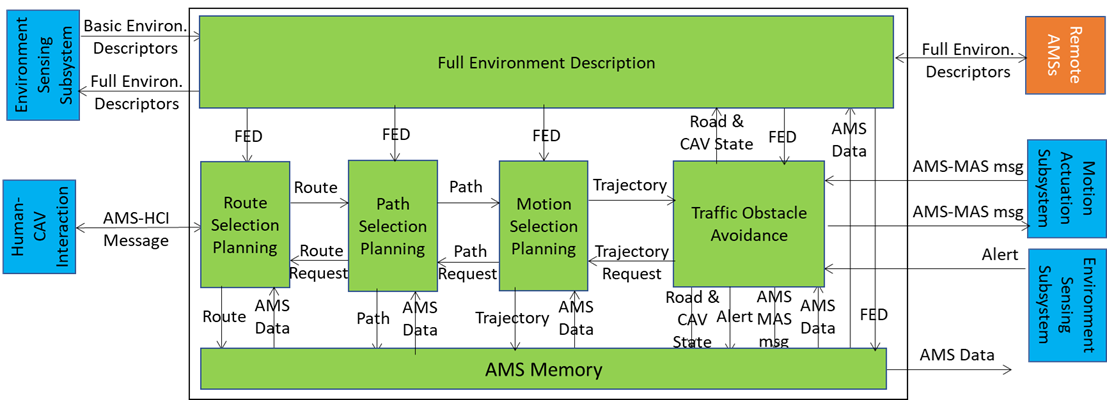
Figure 5 – Reference Model of CAV-AMS
When the HCI sends the AMS a request of a human or a process to move the CAV to a Destination, Route Planning uses the Basic Scene Descriptors from the ESS and produces a set of Waypoints starting from the current Point of View to the Destination.
When the CAV is in motion, Route Planning causes Path Selection Planning to generate a set of Points of Views to reach the next Waypoint. Full Environment Description may request the AMSs of Remote CAVs to send (subsets of) their Scene Descriptors and integrates all sources of Environment Descriptors into its Full Environment Descriptors (FED), and may also respond to similar requests from Remote CAVs.
Motion Selection Planning generates a Trajectory to reach the next Point of View in each Path. Traffic Obstacle Avoidance receives the Trajectory and checks if any Alert was received that would cause a collision with the current Trajectory. If a potential collision is detected, Traffic Obstacle Avoidance requests a new Trajectory from Motion Planner, otherwise Traffic Obstacle Avoidance issues an AMS-MAS Message to Motion Actuation Subsystem (MAS).
The MAS sends an AMS-MAS Message to AMS informing it about the execution of the AMS-MAS Message received. The AMS, based on the received AMS-MAS Messages, may discontinue the execution of the earlier AMS-MAS Message, issue a new AMS-MAS Message, and inform Traffic Obstacle Avoidance. The decision of each element of the chain may be recorded in the AMS Memory (“black box”).
5 Motion Actuation Subsystem
The operation of the Motion Actuation Subsystem (MAS) is best explained using the Reference Model of the CAV-MAS subsystem depicted in Figure 6.
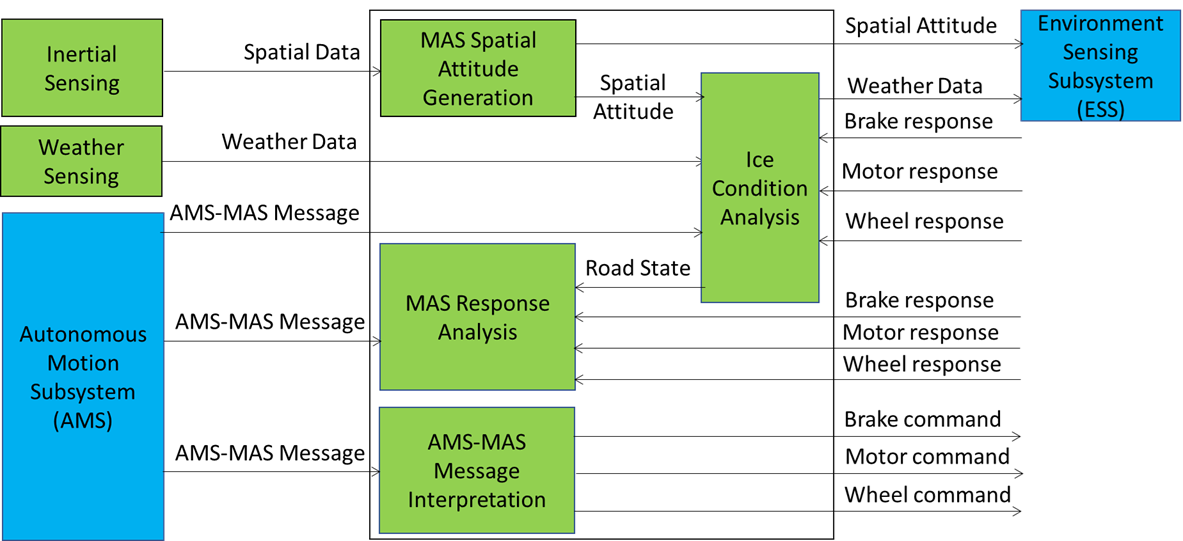
Figure 6 – Reference Model of CAV-AMS
When the AMS Message Interpretation AIM receives an AMS-MAS Message from the AMS, it interprets the Messages, partitions it into commands, and sends commands to the Brake, Motor, and Wheel mechanical subsystems. CAV-TEC is silent on how the three mechanical subsystems process the commands but specifies the format of the responses issued to and received by the AMS Message Interpretation AIM. The result of the interpretation is sent as an AMS-MAS Message to AMS.
MAS includes more AIMs:
- Inertial Sensing includes a variety of devices – Odometer, Speedometer, Accelerometer, and Inclinometer – and produces Spatial Data.
- Spatial Attitude Generation computes the initial Ego CAV’s Spatial Attitude using the Spatial Data provided by Inertial Sensing. This initial Spatial Attitude is sent to the ESS.
- Weather Sensing includes a variety of devices – thermometre, hygrometre, anemometre, etc. – and produces Weather Data,
- Ice Condition Analysis augments the Weather Data by analysing the Brake, Motor, and Wheel mechanical subsystems’ responses and sends the augmented Weather Data to the ESS.
6. Data exchange in AIMs
A CAV acquires Data from its ESS sensors, one or more Global Navigation Satellite System (GNSS), other CAV or CAV-aware equipment, and remote Devices. It is vitally important for the AIMs of a CAV to be have full understanding of the value of the data they receive. CAV-TEC V1.1 utilises yje Accuracy information when available inside the Data and the Data Exchange Metadata.
The Data Exchange Metadata can be distributed in two modes:
- When one/all of the CAV-TEC V1.1 implementation’s AIMs is/are “started up”.
- During operation, when an AIM is informed that the state of Data changes.
The information may be generated by an AIM and sent to the Controller. The Controller then distributes the information to the AIM affected by the change of the state of Data.
For instance, if the CAV is traversing an environment with privacy control, the Communication Subsystem alerts the Controller and the Controller will distribute the new Privacy state to the appropriate AIMs.
Any further of the state of Data will be communicated in the same way.