
Function
Ref. Model
I/O Data
SubAIMs
JSON MData
Profiles
Ref. Software
Conformance
Performance
1 Functions
The Context Capture (PGM‑CXC) AIM is the A‑User’s active perceptual interface to the spatial environment. It collects and structures multimodal contextual information – text, audio, visual, and spatial – and supports runtime reorientation under CXC Directives issued by A‑User Control, which may reflect Human Commands. The PGM‑CXC AIM operates in real time without LLM involvement and without MCP interactions.
The PGM‑CXC AIM provides initial Audio Scene Descriptors and Visual Scene Descriptors including object localisation, user gaze/gesture alignment, and spatial layout information. Each CXC Directive carries a SessionID assigned by A‑User Control, enabling CXC to tag all produced descriptors with session and capture sequence information. A‑User Control governs all A‑User Storage access: it instructs Context Capture which content to retrieve from A‑User Storage before capture (e.g. prior descriptors for delta capture, Portable Avatar for User materialisation) and which content to store after capture (e.g. produced descriptors and CXC Status for session history).
| Receives | Audio Object | Audio signals from the scene including speech and environmental sounds. |
| Visual Object | Visual signals from the scene. | |
| CXC Directive | Control instructions from A‑User Control specifying modality prioritisation, acquisition parameters, framing rules, and session identification. | |
| Produces | Audio Scene Descriptors | Initial Audio Scene Descriptors. |
| Visual Scene Descriptors | Initial Visual Scene Descriptors. | |
| CXC Status | Scene‑level metadata describing capture outcomes, per-modality results, and confidence measures. |
2 Reference Model
Figure 1 depicts the Reference Model of the Context Capture (PGM‑CXC) AIM.
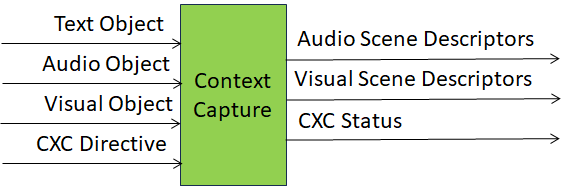
Figure 1 – The Context Capture (PGM‑CXC) AIM
3 I/O Data
Table 1 specifies the Input and Output Data of the Context Capture (PGM‑CXC) AIM.
| Input | Description |
|---|---|
| Audio Object | Captured audio signals from the scene, covering speech, environmental sounds, and paralinguistic cues. |
| Visual Object | Visual signals from the scene, encompassing gestures, facial expressions, and environmental imagery. |
| CXC Directive | Control instructions from A‑User Control specifying modality prioritisation, acquisition parameters, framing rules, session identification, and A‑User Storage access instructions. |
| Output | Description |
| Audio Scene Descriptors | Initial Audio Scene Descriptors (no Enhancement). |
| Visual Scene Descriptors | Initial Visual Scene Descriptors (no Enhancement). |
| CXC Status | Scene‑level metadata describing capture outcomes, per-modality results, A‑User Storage operation outcomes, and confidence measures. |
4 SubAIMs
4.1 Reference Model
Figure 1 gives the Reference Model of the Context Capture (PGM-CXC) Composite AI Module implementing the Context Capture functionality.
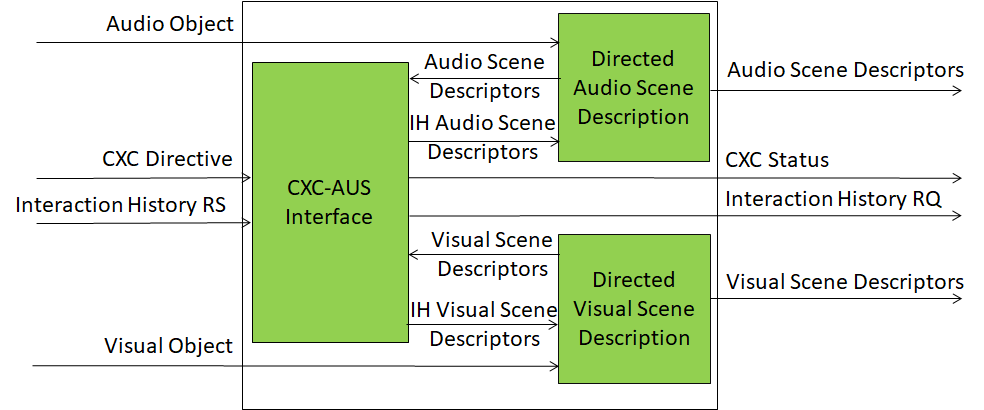
Figure 2 – Reference Model of the Context Capture (PGM-CXC) Composite AI Module
4.2 Operation
The Context Capture AIM is activated by a CXC Directive issued by A‑User Control. The CXC Directive carries a SessionID and CaptureIndex identifying the capture’s position within the current session. Where the CXC Directive includes AUSRead instructions, Context Capture retrieves the specified content from A‑User Storage before executing capture — for example, retrieving prior Audio or Visual Scene Descriptors to support delta or update capture, or retrieving the Avatar to ground User materialisation in the visual scene. Audio and Visual Objects are then processed in parallel by the Directed Audio Scene Description (PGM‑DAS) and Directed Visual Scene Description (PGM‑DVS) SubAIMs respectively, which produce the initial Audio Scene Descriptors (ASD0) and Visual Scene Descriptors (VSD0). Both SubAIMs receive a modality-specific CXC Directive and each produces a CXC Status upon completion. Where the Directive includes AUSWrite instructions, CXC stores the specified content — typically ASD0, VSD0, and the CXC Status — to A‑User Storage after execution. The composite CXC Status reported to A‑User Control includes both modality capture outcomes and AUS operation outcomes.
4.3 Functions of SubAIMs
Table 2 gives the functions of the Context Capture (PGM‑CXC) SubAIMs.
| SubAIM | Function |
|---|---|
| Directed Audio Scene Description | Receives Audio Objects and an Audio CXC Directive and produces initial Audio Scene Descriptors and an Audio CXC Status. |
| Directed Visual Scene Description | Receives Visual Objects and a Visual CXC Directive and produces initial Visual Scene Descriptors and a Visual CXC Status. |
4.4 I/O Data of SubAIMs
Table 3 gives the Input and Output Data of the Context Capture (PGM‑CXC) SubAIMs.
4.5 AIMs and JSON Metadata
Table 4 provides the links to the AIM specifications and JSON schemas. AIM1 indicates the Composite AIM and AIM2 its SubAIMs.
| AIM1 | AIM2 | Name | JSON |
|---|---|---|---|
| PGM‑CXC | Context Capture | X | |
| PGM‑DAS | Directed Audio Scene Description | X | |
| PGM‑DVS | Directed Visual Scene Description | X |
5 JSON Metadata
https://schemas.mpai.community/PGM1/V1.0/AIMs/ContextCapture.json
6 Profiles
No Profiles.
7 Reference Software
Not part of this specification.
8 Conformance Testing
Table 5 provides the Conformance Testing Method for the Context Capture (PGM‑CXC) Composite AIM. Conformance Testing of the individual SubAIMs is given by the individual AIM specifications.
If a schema contains references to other schemas, conformance of data for the primary schema implies that any data referencing a secondary schema shall also validate against the relevant schema, if present, and conform with the Qualifier, if present.
| Receives | Audio Object | Shall validate against Audio Object schema. Audio Data shall conform with Audio Qualifier. |
| Visual Object | Shall validate against Visual Object schema. Visual Data shall conform with Visual Qualifier. | |
| CXC Directive | Shall validate against CXC Directive schema. | |
| Produces | Audio Scene Descriptors | Shall validate against Audio Scene Descriptors schema. |
| Visual Scene Descriptors | Shall validate against Visual Scene Descriptors schema. | |
| CXC Status | Shall validate against CXC Status schema. |
9 Performance Assessment
Not part of this specification.