
A Standard for Interoperable Representation of Digital Humans
The Portable Avatar Format (MPAI‑PAF) standard provides a unified way to represent virtual entitities as digital humans and everything needed for rendering as intended by the sender — its appearance, its speech, its face and body movement, and the context it belongs to. It enables consistent reuse of these tools across MPAI Technical Specifications, and supports complete workflows such as Avatar-Based Videoconference.
The PAF Approach
MPAI‑PAF defines:
- Standard Data Types, with reference to Qualifiers where needed, to represent avatars, their descriptors, their animation, and their context.
- AI Modules (AIMs) to describe, interpret, synthesise, and render them.
This creates a shared language for digital human representation, reusable across conversational systems, videoconferencing, and metaverse environments.
Some Data Types
PAF V1.6 specifies eight Data Types. Three carry most of the weight:
- PAF‑PAV – Portable Avatar: the standard’s central object. It aggregates an Avatar together with its Context, so that a receiver can render the avatar exactly as the sender intended, with no prior agreement between the two implementations. It is what a system actually transmits.
- PAF‑FDO – Face Descriptors Object: a structured description of a face — its expression and the movement that animates it — independent of how any particular renderer will draw it.
- PAF‑BDO – Body Descriptors Object: the corresponding description for the body, gestures included.
The remaining Data Types — PAF‑AVT Avatar, PAF‑AMO Animation Object, PAF‑MCO MoCap Object, and PAF‑ACC Accessory — cover the model itself, the data that animates it, motion capture input, and the objects an avatar carries or wears.
Some AI Modules (AIMs)
PAF V1.6 specifies twenty‑two AIMs, several of them Composite. They fall into three groups:
- Describing — PAF‑GFD Generative Face Description and PAF‑GBD Generative Body Description turn observed humans into descriptors.
- Interpreting — PAF‑PFI PS‑Face Interpretation and PAF‑PBI PS‑Body Interpretation read Personal Status from a face or a body; PAF‑FIR Face Identity Recognition identifies who is being seen.
- Producing and rendering — PAF‑PSD Personal Status Display (Composite) produces a Portable Avatar from a machine’s text and Personal Status; PAF‑SAF Portable Avatar Formation forms it from a machine’s speech and text, and PAF‑AVR Audio‑Visual Scene Rendering and PAF‑RSR Response and Scene Rendering turn it back into something a human can see and hear.
Alongside these, PAF‑PMX and PAF‑PDX multiplex and demultiplex a Portable Avatar, and a family of Composite AIMs — PAF‑AVS Avatar Videoconference Server, PAF‑VCT Videoconference Client Transmitter, PAF‑VCR Videoconference Client Receiver — assemble a complete avatar-based videoconference setting.
Conformance and Validation
Interoperability is ensured by:
- JSON Schema validation of all Data Types.
- Qualifiers specifying sub-type, format, and the schema any attribute validates against.
This guarantees that systems exchange syntactically consistent and structurally valid data. Conformance can be checked by a person with a JSON validator, or by software performing the same steps.
Performance Assessment
PAF supports multidimensional evaluation of Data and AIMs, such as:
- Quality – for instance, the accuracy with which a synthetic face reproduces an emotion.
- Bias – for instance, whether a Face Identity Recognition AIM performs unevenly across skin colours.
- Legal compliance – adherence to a given legal standard.
- Ethical compliance – conformity to a target ethical standard.
This allows systems to be assessed beyond functional correctness.
Open and Flexible Design
MPAI‑PAF is built on:
- Modular components (AIMs) specified only by function and interfaces.
- Shared, extensible Data Types.
- Versioned compatibility — superseded Data Types and AIMs may still be used where the version is explicitly signalled.
- Broad MPAI-standard integration — PAF AIMs also consume Data Types from MPAI-OSD, MPAI-MMC and others.
It enables continuous innovation while maintaining interoperability at each innovation step.
Benefits
MPAI‑PAF V1.6 enables:
- Developers to build interoperable avatar systems from basic processing modules.
- Researchers to innovate on face, body, and rendering implementations against a fixed interface.
- System designers to combine description, interpretation, and rendering components from different suppliers.
- Industry to deploy scalable, standards-based avatar and videoconferencing solutions.
- Users to be represented, and to see others represented, in a form that travels between systems.
Conclusion
MPAI-PAF V1.6 provides a unified set of tools to represent digital humans, combining avatars, descriptors, animation, and context into a consistent and extensible framework. By integrating standard Data Types, AI Modules, and reference implementations, MPAI-PAF establishes a versatile foundation for interoperable digital human representation across application domains.
This is the public page of the Portable Avatar Format (MPAI-PAF) standard project providing technical information. Also see the MPAI-PAF homepage.
MPAI-PAF specifies the Portable Avatar Format, including AvatarID, time, Visual Environment and the Spatial Attitude of the Avatar, the Model, the Body and Face Descriptors, the Language Preference, the Speech, the Text, and the Personal Status.
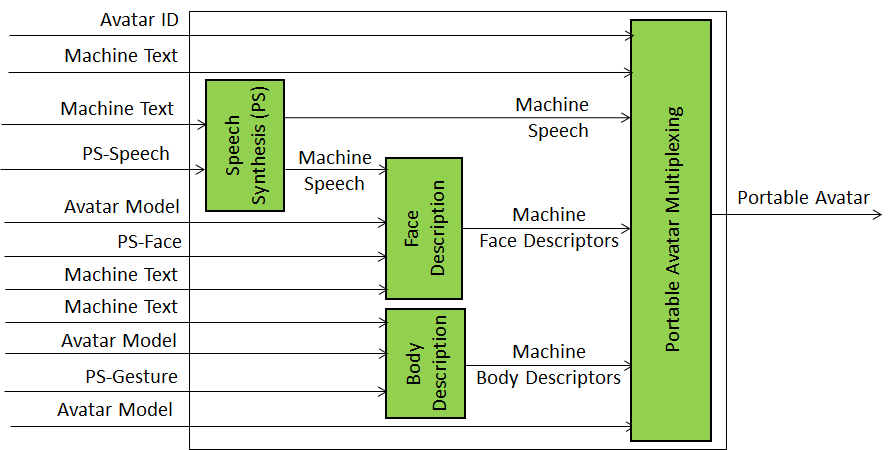 |
Personal Status Display generates a Portable Avatar from Text and Personal Status (PS) that 1) utters speech with the intended PS, 2) displays a face whose lips move in sync with the text and shows the intended PS, and 3) displays a body making gestures that accompany the Text and show the intended PS. |
| Figure 1 – Personal Status Display | |
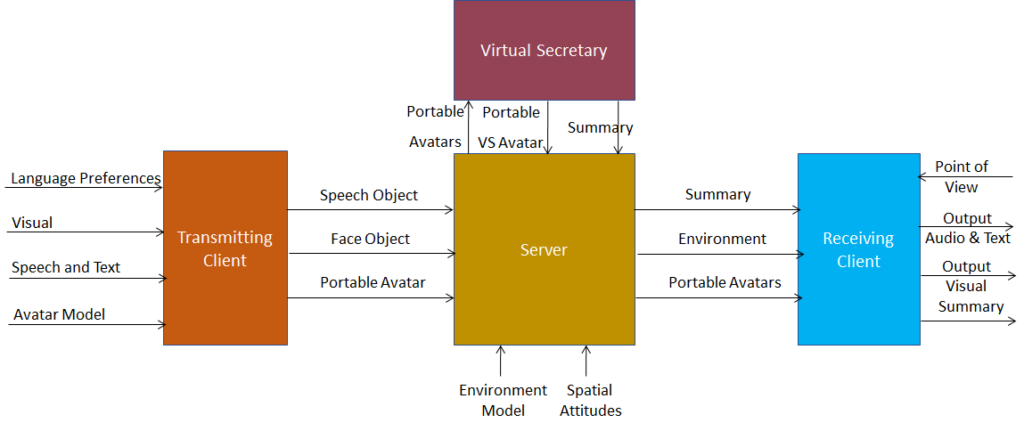 |
Avatar-Based Videoconference is a system where digital twins of humans, embodied in speaking avatars having a high level of similarity, in terms of voice and appearance, with their human twins, are directed by the humans. Participants at a location use a client connected to the server which is optionally augmented by a Virtual Secretary. |
| Figure 2 – Avatar-Based Videoconference (ABV) | |
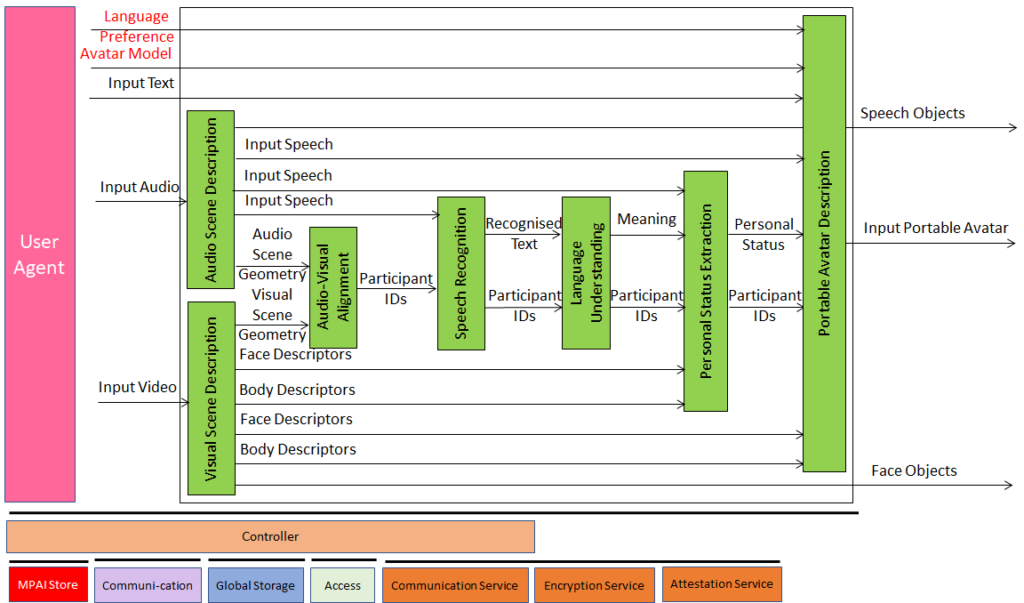 |
At the start of the videoconference, the Transmitting Client receives each participant’s Avatar Model and spoken language preferences. Subsequently, it receives the audio and video information of a physical meeting room.
Each Client extracts visual and speech data for authentication purposes and constantly generates Portable Avatars using the participant’s Personal Status to improve the accuracy of the participant description. |
| Figure 3 – Avatar-Based Videoconference (Transmitting Client) | |
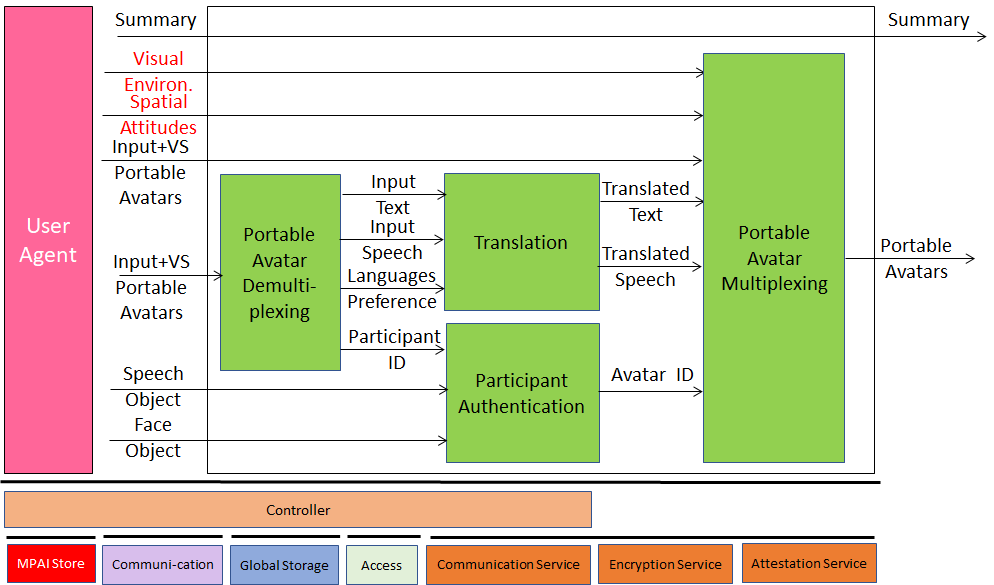 |
The ABV Server authenticates participants, selects the Visual Environment, receives the Portable Avatars and distributes the Portable Avatars containing Environment, Avatar Model and Spatial Attitude in the Environment. Subsequently, the ABV Server translates the text and the utterances of the individual participants into Text and Speech in the languages selected by the participants. |
| Figure 4 – Avatar-Based Videoconference (Server) | |
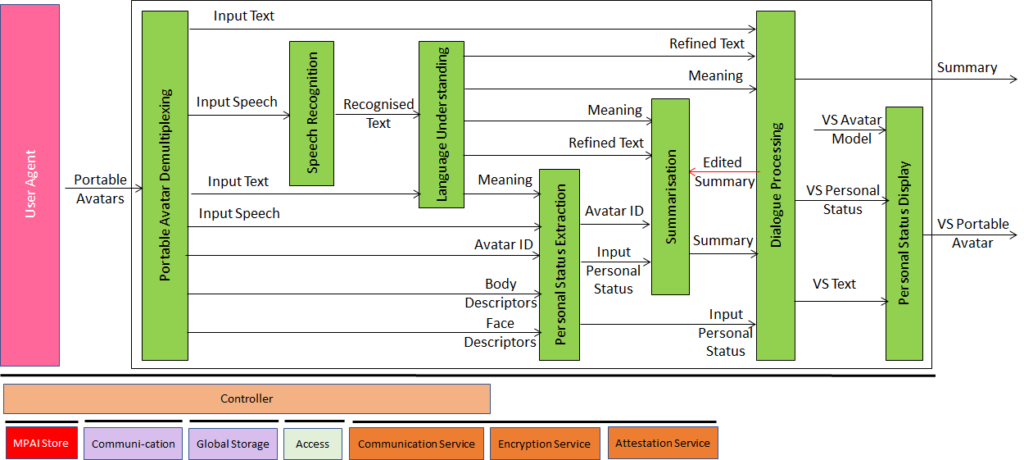 |
The Virtual Secretary (VS) is a human-like speaking avatar not representing a human who takes note of what is being said at the meeting taking the avatars’ PSs into account. The avatars participating in the ABV can make comments to the VS, answer questions, etc. The VS sends a Personal Avatar that includes its Personal Status data. The ABV Server composes the Virtual Secretary in the ABV. |
| Figure 5 – Avatar-Based Videoconference (Virtual Secretary) | |
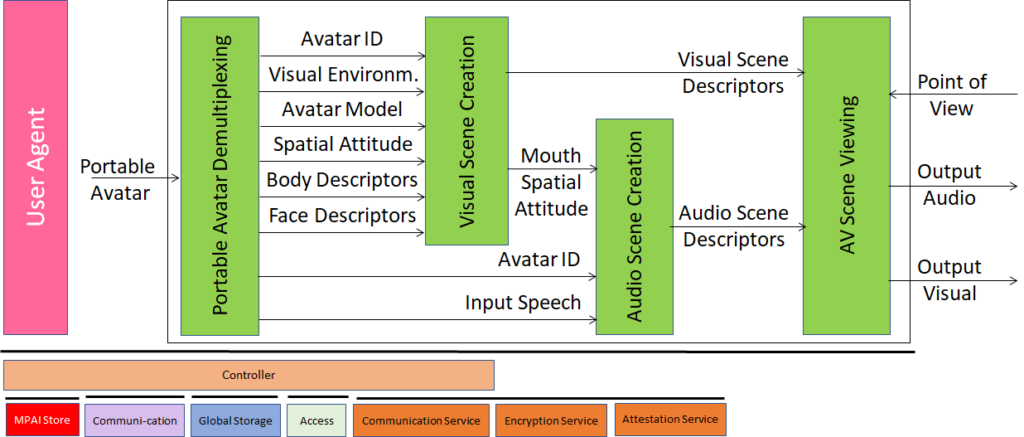 |
Each Receiving Client arranges the participating avatars as instructed by the ABV Server and attaches the speech of each participant to the mouth of the corresponding avatar with the appropriate Spatial Attitude. A participant may select a point of view that coincides with their avatar’s point of view or a different one and see the meeting participants as the ABV Server has arranged them. |
| Figure 6 – Avatar-Based Videoconference (Receiving Client) | |
The current goal is to develop a Reference Software implementation of the MPAI-PAF Technical Specification.
If you wish to participate in this work, you have the following options:
- Join MPAI
- Keep an eye on this page.
Return to the MPAI-PAF page.