<-MPAI Store Go to ToC Zero Trust and Profiles ->
1 Reference Model
Figure 1 depicts the Reference Model of the Workflow Description.
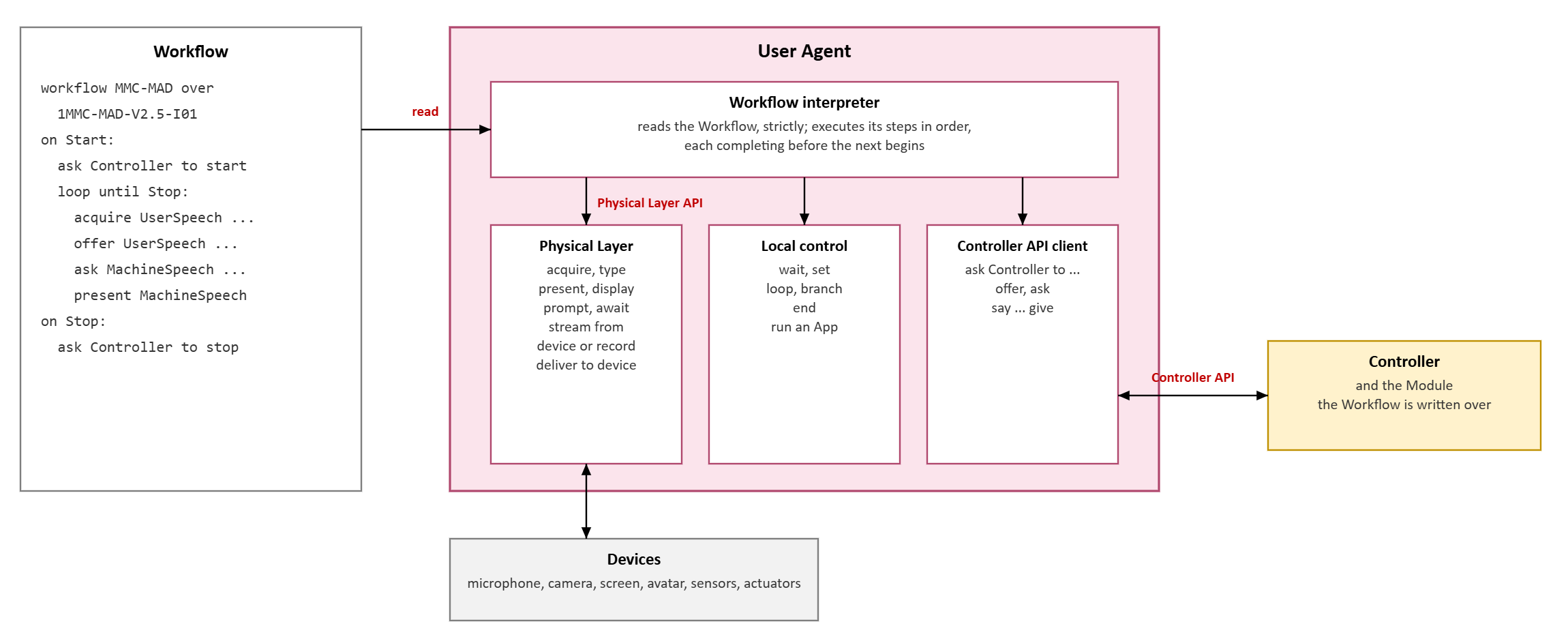
Figure 1 – Reference Model of the Workflow Description
A Workflow is the text a User Agent interprets: what the Application does, and in what order, written once against one Module. It is written in the Workflow Description Language (WDL). Every step either acts on the real world, through the Physical Layer, or requests the Controller, through the Controller API, or directs the User Agent itself; never more than one of these. A step completes before the next begins.
2 Structure
A Workflow begins with the line
workflow <name> over <AIM Instance Identifier>
which names the Workflow and the Module it is written against, by the AIM Instance Identifier of its AIM Instance Metadata. The steps follow in three blocks:
on Start:– what is done when the Workflow starts;on Stop:– what is done when it stops;on Degraded:– what is done, according to the context of the Application, after a request of the Controller has failed or when an AIM is not ALIVE. A Workflow that stops its Module there ends.
A step that opens a block – loop, branch – owns every following line indented further than itself, or, in the second notation, every line up to its closing brace; } else { closes one branch and opens the other. A line that does not begin with a step is the continuation of the line before it, so that a long text may run over several lines. A line beginning with # is a comment.
A Workflow is read strictly: a line that begins with a word the reader does not know is an error naming the line number, not a line skipped. A Workflow obtained from a Service and run by an interpreter fails where it is wrong, not where the consequence shows.
3 Data
A datum is written
<Label> (<Data Type>[:<Port Number>])
for example UserText (OSD-BTO-V1.5:2). The Data Type and the Port Number identify a boundary Port of the Module; where the Port Number is omitted it is 1. The label is for the reader, and for substitution into text: it never addresses a Port and never crosses an interface. A datum may be given a value, a literal text = "...", or, where it is acquired, the Qualifier wanted = { ... }.
4 Steps
Table 1 specifies the steps of the WDL.
Table 1 – Steps of the Workflow Description Language
| Step | Meaning | Through |
ask Controller to start, stop, pause, resume |
Acts on the Module. | Controller API |
ask Controller to stop AIM <A> |
Stops one AIM of the Module. | Controller API |
ask Controller for status |
Obtains the status of each AIM of the Module, with what it reported, into the variable Status. | Controller API |
offer <datum> |
Gives the Controller a datum for a boundary Input Port. | Controller API |
ask <datum>, ... |
Closes the exchange and takes back the named boundary Output Ports. | Controller API |
say (<type>[:n]) "<words>" give (<type>), ... |
Offers the words at the Input Port the Module declares for them, asks for the named Outputs – speech, face descriptors – and presents them. The step ends when the words have been spoken. | Controller API, Physical Layer API |
acquire <datum> [= {Qualifier}] [via VAD] [or <datum> ...] |
Obtains a datum from the real world as the Qualifier asks, for speech with voice activity deciding when it ends. With or, waits for all the alternatives and keeps the first to arrive. | Physical Layer API |
type <datum> |
Obtains a text typed by the person. | Physical Layer API |
present <label>, ..., display <label>, prompt "..." |
Renders data or a text. present returns when the rendering has finished. | Physical Layer API |
await "<word>" |
Waits for the person to act; the word is shown on the control the person uses. | Physical Layer API |
stream <datum> from device "<D>" |
Writes each datum the device D produces to the boundary Input Port, for the life of the Workflow (continuous execution). | Physical Layer API, Controller API |
stream <datum> from record "<R>" [at x<k>] |
Plays the track of the record R to the boundary Input Port for the life of the Workflow, paced by the stamps of the record, at k times its rate. Every stream of one record starts together, on one clock. | Physical Layer API, Controller API |
deliver <datum> to device "<D>" |
Delivers each datum the boundary Output Port gives to the device D, for the life of the Workflow (continuous execution). The User Agent owns the act, and can interlock it. | Controller API, Physical Layer API |
wait, set |
Waits; sets a variable. | User Agent |
loop until Stop: |
Repeats its block until the Workflow is stopped. | User Agent |
branch on <label> [contains "<text>"] { ... } else { ... } |
Follows the first block where the datum is present or true, or contains the text; the second otherwise. | User Agent |
end |
Leaves the enclosing loop. | User Agent |
run <label> |
Runs the Application the datum names: the User Agent obtains its Workflow, gives it a Controller of its own, interprets it, and returns when it ends. | User Agent |
Each request of the Controller is one call of the Controller API (Basic API). For example, offer is MPAI_AIFU_MODULE_Input_Write, and ask is MPAI_AIFU_MODULE_Output_Read of each Port named. Each act on the real world is one call of the Physical Layer API (User Agent).
5 Example
The Workflow of the MPAI Conversation Service, over the Module 1MMC-MAD-V2.5-I01 of MPAI-MMC:
workflow MMC-MAD over 1MMC-MAD-V2.5-I01

on Start:

    ask Controller to start

    offer Welcome (OSD-BTO-V1.5:1) = "Welcome to the MPAI Conversation Service.
        Please wait a few seconds while the models load."
    ask   WelcomeSpeech (OSD-BSO-V1.5), WelcomeFaceDescriptors (PAF-FDO-V1.6)
    present WelcomeSpeech, WelcomeFaceDescriptors

    offer Ready (OSD-BTO-V1.5:1) = "I am ready. Tell me what is on your mind."
    ask   ReadySpeech (OSD-BSO-V1.5), ReadyFaceDescriptors (PAF-FDO-V1.6)
    present ReadySpeech, ReadyFaceDescriptors

    offer Farewell (OSD-BTO-V1.5:1) = "Thank you for the conversation. Goodbye."
    ask   FarewellSpeech (OSD-BSO-V1.5), FarewellFaceDescriptors (PAF-FDO-V1.6)

    loop until Stop:

        acquire UserSpeech (OSD-BSO-V1.5) via VAD
             or UserText   (OSD-BTO-V1.5)
        branch on UserText {
            offer UserText (OSD-BTO-V1.5:2)
        } else {
            offer UserSpeech (OSD-BSO-V1.5:1)
        }
        ask   MachineSpeech (OSD-BSO-V1.5), MachineFaceDescriptors (PAF-FDO-V1.6),
              Memory (MMC-SUM-V2.5)
        present MachineSpeech, MachineFaceDescriptors

        # The conversation's memory goes back with the next turn and nowhere
        # else: it starts empty with this conversation and ends with it.
        offer Memory (MMC-SUM-V2.5)

on Stop:

    present FarewellSpeech, FarewellFaceDescriptors

    ask Controller to stop
6 Requirements
Table 2 – Requirements of the Workflow Description
| # | Requirement |
| WDL-1 | A Workflow shall name the one Module it is written against, and no other. |
| WDL-2 | A Workflow shall address data by Data Type and Port Number; a label shall not address a Port. |
| WDL-3 | A step shall either act on the real world, request the Controller, or direct the User Agent, and shall complete before the next begins. |
| WDL-4 | An interpreter shall refuse a Workflow containing a line it does not recognise, naming the line. |
| WDL-5 | A Workflow shall not depend on the AIMs of the Module or on the Channels between them. |
The constructs specified in this chapter are the complete Workflow Description Language. A reader rejects any line it does not recognise, stating its line number. The WDL is versioned with MPAI-AIF: a Workflow Description conforms to the WDL of the version of MPAI-AIF it is written for, and the WDL of MPAI-AIF V3.0 is the one specified here.