
Functions
Ref. Model
I/O Data
SubAIMs
JSON MData
Profiles
Ref. Software
Conformance
Performance
1 Functions
The Human-CAV Interaction (CAV-HCI) AIM:
| Receives | Basic Audio Object | From the cabin, through the User Agent. |
| Point of View | From the cabin. | |
| Basic Offline Map Object | The Offline Map. | |
| AMS-HCI Message Response | From the Autonomous Motion Subsystem. | |
| Ego-Remote HCI Message | From Remote CAVs in range. | |
| Produces | AMS-HCI Message Request | To the Autonomous Motion Subsystem. |
| Basic Speech Object | To the passengers. | |
| Basic Text Object | To the passengers. | |
| Recognised Text | To the passengers. | |
| Face Descriptors | To the passengers. | |
| User ID | Outside the CAV. | |
| Ego-Remote HCI Message | To Remote CAVs in range. |
The AIM is the CAV’s interface with the humans in its cabin. It provides these services:
The dialogue about where to go. It hears the passengers, understands the Destination they ask for – checked against the named places of the Offline Map before anything is sent – and requests it of the Autonomous Motion Subsystem; it proposes the Routes the AMS gives, sends the Route the passenger agrees to, relays Suspend, Resume and Stop, and tells the Route’s state and the arrival.
User identification. It recognises who speaks by the voice and who is in the cabin by the face, and reconciles the two into one User ID.
Personal Status. It extracts the passengers’ Personal Status – from their text, speech, face and gesture – and takes it into account in what it answers.
The Portable Avatar. It renders what the CAV says as speech, text and a face, with the CAV’s own Personal Status.
Remote CAVs. It exchanges Ego-Remote HCI Messages with the HCIs of the CAVs in range.
Other services – translation of what the passengers say, for instance – may be added with the corresponding AIMs of MPAI-MMC.
2 Reference Model
Figure 1 depicts the Reference Model of the Human-CAV Interaction (CAV-HCI) AIM.
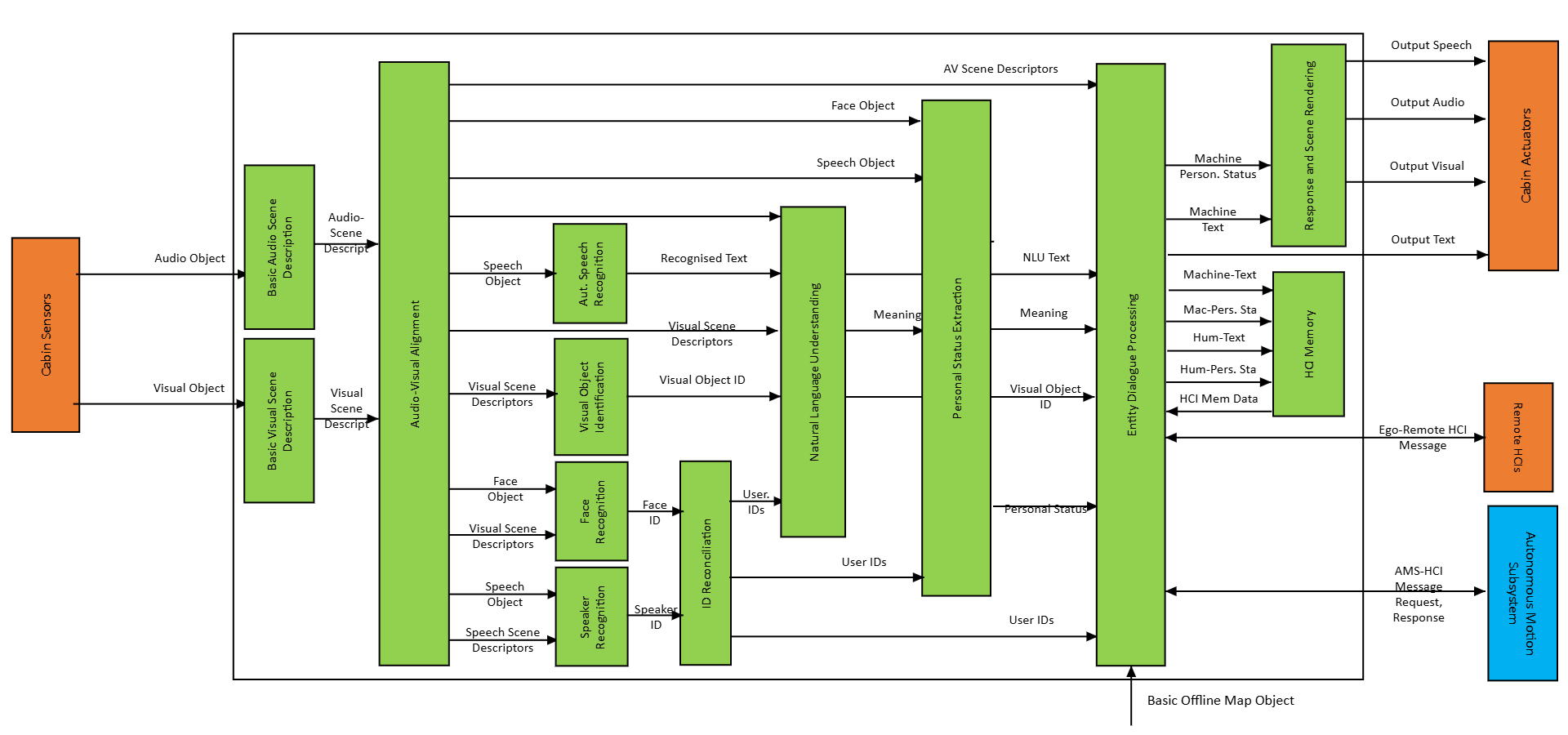
Figure 1 – The Human-CAV Interaction (CAV-HCI) AIM
3 I/O Data
Table 1 specifies the Input and Output Data of the Human-CAV Interaction (CAV-HCI) AIM.
| Input | Data Type | Description |
|---|---|---|
| Basic Audio Object | Basic Audio Object | What the passengers say. |
| Point of View (optional) | Point of View | Where the passenger looks from. |
| Basic Offline Map Object | Basic Offline Map Object | The named places the passenger may ask for. |
| AMS-HCI Message Response | AMS-HCI Message Response | The Routes proposed, the Route’s state (Route Status), the arrival. |
| Ego-Remote HCI Message (optional) | Ego-Remote HCI Message | What another CAV’s HCI sends. |
| Output | Data Type | Description |
| AMS-HCI Message Request | AMS-HCI Message Request | The Destination, the Route selected, the Route Command. |
| Basic Speech Object | Basic Speech Object | What the CAV says. |
| Basic Text Object | Basic Text Object | What the CAV says, as text. |
| Recognised Text (optional) | Basic Text Object | What the CAV heard. |
| Face Descriptors (optional) | Face Descriptors Object | The face of the CAV’s avatar. |
| User ID (optional) | Instance Identifier | Who the passenger is. |
| Ego-Remote HCI Message (optional) | Ego-Remote HCI Message | What the CAV’s HCI sends. |
4 SubAIMs
4.1 Functions of SubAIMs
Table 2 specifies the Functions of the SubAIMs of the Human-CAV Interaction (CAV-HCI) AIM.
| SubAIM | Function |
|---|---|
| Basic Audio Scene Description | Describes the cabin’s Basic Audio Object as Basic Audio Scene Descriptors. |
| Basic Visual Scene Description | Describes the cabin’s Basic Visual Object as Basic Visual Scene Descriptors. |
| Basic LiDAR Scene Description | Describes the cabin’s LiDAR Object, where the cabin has one. |
| Audio Qualifier Conversion | Converts a Basic Audio Object from one Audio Qualifier to another. |
| Audio-Visual Alignment | Aligns the Identifiers of Speech, Audio and Visual Objects with the same Spatial Attitude. |
| Audio Scene Object Identification | Classifies each audio object of the scene. |
| Visual Scene Object Identification | Tags the faces among the visual objects of the scene. |
| Automatic Speech Recognition | Recognises what the passenger says. |
| Natural Language Understanding | Extracts the meaning of what was said. |
| Audio Instance Identification | Identifies a non-speech audio object. |
| Visual Instance Identification | Identifies a visual object. |
| Speaker Identity Recognition | Identifies the speaker from the speech. |
| Face Identity Recognition | Identifies a face. |
| Identity Reconciliation | Reconciles the Face ID and the Speaker ID into a single User ID. |
| Personal Status Extraction | Extracts the passenger’s Personal Status from text, speech, face and gesture. |
| Entity Dialogue Processing | Holds the dialogue with the passenger and with the AMS: understands the Destination with a language model, checks it against the named places of the Offline Map, proposes the Routes, tells the Route’s state and the arrival. |
| Response and Scene Rendering | Renders the CAV’s answer as a Portable Avatar: speech, text and face. |
4.2 Operation
The cabin’s audio is described and aligned with what is seen; the passenger’s speech is recognised and its meaning extracted; the passenger’s identity and Personal Status are recognised where the cabin sees the passenger.
Entity Dialogue Processing holds the dialogue: it understands the Destination, asks about a place named ambiguously, tells a place the map does not have, and sends the AMS-HCI Message Request; with the AMS-HCI Message Response it proposes the Routes, and tells the Route’s state and the arrival. What it says is rendered by Response and Scene Rendering.
4.3 I/O Data of SubAIMs
Table 3 specifies the Input and Output Data of the SubAIMs.
| SubAIM | Input | Output |
|---|---|---|
| Basic Audio Scene Description | Basic Audio Object – Basic Audio Object Spatial Attitude – Spatial Attitude Basic Environment Descriptors – Basic Environment Descriptors |
Basic Audio Scene Descriptors – Basic Audio Scene Descriptors Alert – Alert |
| Basic Visual Scene Description | Basic Visual Object – Basic Visual Object Spatial Attitude – Spatial Attitude Basic Environment Descriptors – Basic Environment Descriptors |
Basic Visual Scene Descriptors – Basic Visual Scene Descriptors Alert – Alert |
| Basic LiDAR Scene Description | Basic LiDAR Object – Basic LiDAR Object Spatial Attitude – Spatial Attitude Basic Environment Descriptors – Basic Environment Descriptors |
Basic LiDAR Scene Descriptors – Basic LiDAR Scene Descriptors Alert – Alert |
| Audio Qualifier Conversion | Input Audio Object – Basic Audio Object | Output Audio Object – Basic Audio Object |
| Audio-Visual Alignment | Speech Scene Descriptors – Basic Speech Scene Descriptors Audio Scene Descriptors – Basic Audio Scene Descriptors Visual Scene Descriptors – Basic Visual Scene Descriptors LiDAR Scene Descriptors – Basic LiDAR Scene Descriptors |
Aligned Audio Scene Descriptors – Basic Audio Scene Descriptors Aligned Visual Scene Descriptors – Basic Visual Scene Descriptors Basic Audio Scene Geometry – Basic Audio Scene Geometry Basic Visual Scene Geometry – Basic Visual Scene Geometry |
| Audio Scene Object Identification | Audio Scene Descriptors – Basic Audio Scene Descriptors | Basic Speech Object – Basic Speech Object Audio Object – Basic Audio Object |
| Visual Scene Object Identification | Visual Scene Descriptors – Basic Visual Scene Descriptors | Visual Object – Basic Visual Object |
| Automatic Speech Recognition | Language Selector – Selector Auxiliary Text – Text Object Speaker ID – Instance Identifier Speech Overlap – Speech Overlap Image Speech – Basic Speech Object Response Speech – Basic Speech Object |
Recognised Text – Basic Text Object Speech Descriptors – Speech Descriptors Object Text Question – Basic Text Object |
| Natural Language Understanding | Input Text – Basic Text Object Recognised Text – Basic Text Object |
Text Descriptors – Text Descriptors Object Refined Text – Basic Text Object Text Personal Status – Text Personal Status |
| Audio Instance Identification | Input Audio Object – Basic Audio Object | Audio Object ID – Instance Identifier |
| Visual Instance Identification | Target Visual Object – Basic Visual Object | Visual Instance ID – Instance Identifier |
| Speaker Identity Recognition | Auxiliary Text – Text Object Basic Speech Object – Basic Speech Object Speech Overlap – Speech Overlap Speech Scene Geometry – Speech Scene Geometry Audio Scene Descriptors – Basic Audio Scene Descriptors |
Speaker ID – Instance Identifier |
| Face Identity Recognition | Auxiliary Text – Text Object Visual Object – Basic Visual Object Visual Scene Geometry – Visual Scene Geometry Visual Scene Descriptors – Basic Visual Scene Descriptors |
Face ID – Instance Identifier Bounding Box – Bounding Box |
| Identity Reconciliation | Face ID – Instance Identifier Speaker ID – Instance Identifier |
User ID – Instance Identifier Personal Status – Entity Personal Status Response – Basic Text Object Identification – boolean |
| Personal Status Extraction | Text Object – Text Object Text Descriptors – Text Descriptors Basic Speech Object – Basic Speech Object Speech Descriptors – Speech Descriptors Object Face Object – Basic Visual Object Face Descriptors – Face Descriptors Object Body Object – Visual Object Gesture Descriptors – Gesture Descriptors Object Text Personal Status – Text Personal Status |
Personal Status – Entity Personal Status |
| Entity Dialogue Processing | Summary – Summary Text Object – Basic Text Object Text Descriptors – Text Descriptors Object Personal Status – Entity Personal Status User ID – Instance Identifier Visual Object IDs – Instance Identifier Audio Object IDs – Instance Identifier Visual Scene Geometry – Basic Visual Scene Geometry Audio Scene Geometry – Basic Audio Scene Geometry Audio-Visual Scene Descriptors – Basic Audio-Visual Scene Descriptors Memory Text – Basic Text Object Memory Personal Status – Entity Personal Status AMS-HCI Message Response – AMS-HCI Message Basic Offline Map Object – Basic Offline Map Object Ego-Remote HCI Message – Ego-Remote HCI Message |
Machine Text Object – Basic Text Object Machine Personal Status – Entity Personal Status Edited Summary – Summary HCI Memory Data – HCI Memory Data AMS-HCI Message Request – AMS-HCI Message Ego-Remote HCI Message – Ego-Remote HCI Message |
| Response and Scene Rendering | Text Object – Basic Text Object Text Object – Basic Text Object Text Object – Basic Text Object Personal Status – Entity Personal Status Full Environment Descriptors – Basic Audio-Visual Scene Descriptors Point of View – Object Point of View |
Machine Speech – Basic Speech Object Machine Face Descriptors – Face Descriptors Object Machine Body Descriptors – Body Descriptors Object |
4.4 AIMs and JSON Metadata
Table 4 gives the AIMs and their JSON Metadata.
5 JSON Metadata
https://schemas.mpai.community/CAV2/V2.0/AIMs/HumanCAVInteraction.json
6 Profiles
No Profiles.
7 Reference Software
The reference software of Human-CAV Interaction is part of the reference software of CAV-TEC V2.0 (see N4195, An introduction to the reference software): C# on .NET 10, released under the BSD 3-Clause licence, obtained from MPAI.
Its provider builds every Sub-AIM of the L3 of Human-CAV Interaction, its composites (Personal Status Extraction, Response and Scene Rendering) included; the Controller builds each one when the Module starts. The engines: Automatic Speech Recognition with whisper.cpp (model ggml-small); Entity Dialogue Processing with a language model (Llama 3.2, 3B parameters, served by Ollama) that only understands – a Destination, yes, a choice of Route, no, suspend, resume, stop – everything it understands checked against the named places of the Offline Map before anything is sent, and what the CAV says composed from what the AMS gave, not by the model; Response and Scene Rendering speaking with Piper. The state of the dialogue is kept in the Private Storage of Entity Dialogue Processing.
Implemented and tested: the speech path – Audio Qualifier Conversion, the audio scene, Automatic Speech Recognition, Natural Language Understanding, Entity Dialogue Processing, Response and Scene Rendering. The vision and identity AIMs are built and receive nothing where the cabin has no camera. A dialogue turn takes about 3.4 s (median) on a PC without GPU.
8 Conformance Testing
Table 5 provides the Conformance Testing Method for the Human-CAV Interaction (CAV-HCI) AIM: the data it receives and produces. If a schema references other schemas, conformance of data for the primary schema implies that data referencing a secondary schema shall also validate against that schema, if present, and conform with the Qualifier, if present.
| Receives | Basic Audio Object | Shall validate against the Basic Audio Object schema. |
| Point of View | Shall validate against the Point of View schema. | |
| Basic Offline Map Object | Shall validate against the Basic Offline Map Object schema. | |
| AMS-HCI Message Response | Shall validate against the AMS-HCI Message schema. | |
| Ego-Remote HCI Message | Shall validate against the Ego-Remote HCI Message schema. | |
| Produces | AMS-HCI Message Request | Shall validate against the AMS-HCI Message schema. |
| Basic Speech Object | Shall validate against the Basic Speech Object schema. | |
| Basic Text Object | Shall validate against the Basic Text Object schema. | |
| Basic Text Object | Shall validate against the Basic Text Object schema. | |
| Face Descriptors Object | Shall validate against the Face Descriptors Object schema. | |
| Instance Identifier | Shall validate against the Instance Identifier schema. | |
| Ego-Remote HCI Message | Shall validate against the Ego-Remote HCI Message schema. |