
Go to MPAI-MMC V2.5 AI Modules
Function
Ref. Model
I/O Data
SubAIMs
JSON MData
Profiles
Ref. Software
Conformance
Performance
1 Functions
The Speech Scene Editing (MMC‑SSE) AIM composes and edits Speech Scenes at the request of a User Command. It is used by Audio Scene Management (CAE‑ASM). One Speech Scene is open at a time: a Speech Scene arriving at the Input Port is opened, and the first Speech Object added when no Scene is open creates one. Objects and Scenes are identified by the name the User gave them. Every amount in a User Command is a number it carries, and a User Command is absolute: it places an Object at a position and orientation, it moves an Object to a new position and orientation.
| Receives | User Command | A request (UserCommandRQ). |
| Speech Object | A Speech Object to place in the open Scene, from Speech Object Editing. | |
| Speech Scene Descriptors | The Speech Scene to open. | |
| Produces | Speech Scene Descriptors | The open Speech Scene, as edited. |
| User Command | The response (UserCommandRS): how each action was executed. |
A User Command acts on the open Speech Scene:
- Added Objects – places the named Speech Objects in the Scene, each with its Spatial Attitude given as numbers.
- Moved Objects – moves Objects to their new Spatial Attitude.
- Changed Objects – changes where Objects are.
- Removed Objects – takes Objects out of the Scene.
- Deleted Objects – deletes, from where the Module keeps them, the Speech Scenes named, by the name the User gave them, with all their versions. A Scene is deleted without its members: they stay kept. A name that is not known fails. Deleting is not removing: Removed Objects takes an Object out of the open Scene and leaves it kept.
- User PoV – sets where the Scene is heard from; the User Point of View is carried by the User Command (UserPoV).
Every edit is a new version. A member is held by its name and read when the Scene is output.
2 Reference Model
Figure 1 depicts the Reference Model of the Speech Scene Editing (MMC-SSE) AIM.
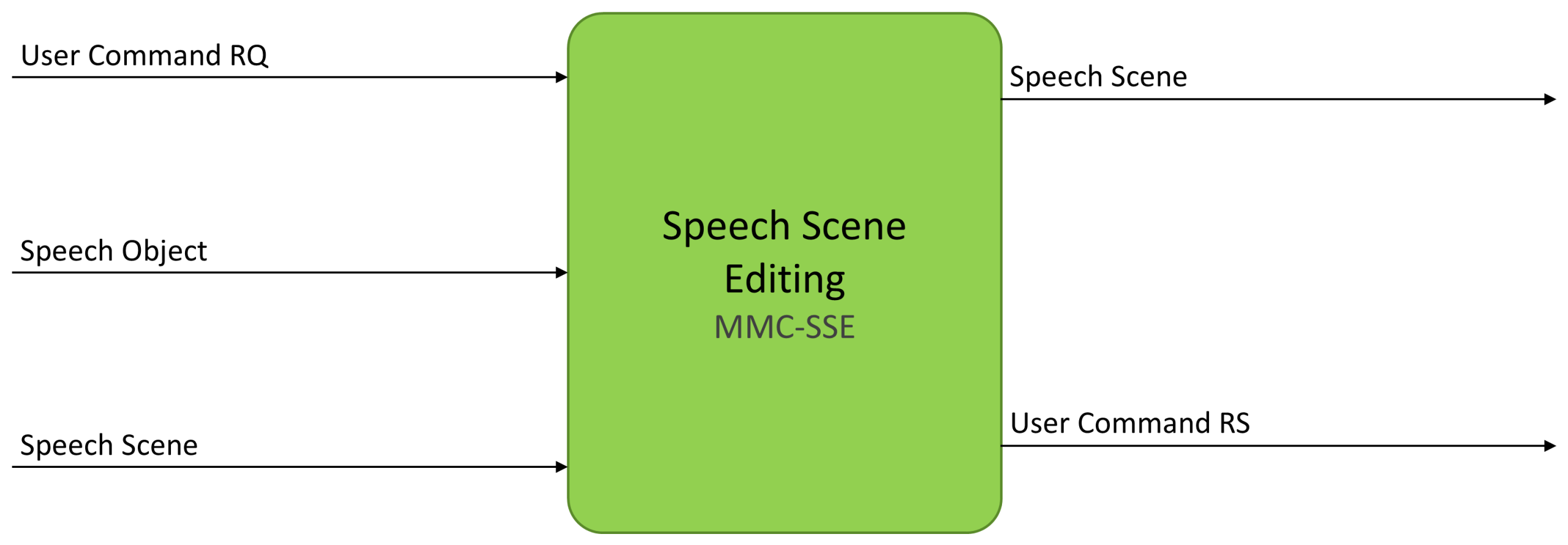
Figure 1 – The Reference Model of the Speech Scene Editing (MMC-SSE) AIM
3 I/O Data
Table 1 specifies the Input and Output Data of the Speech Scene Editing (MMC-SSE) AIM. A Port is addressed by its Data Type and its Port Number (#); where the metadata gives none, none is shown.
| Input | Description |
|---|---|
| Speech Object (OSD-SPO) | A Speech Object that may be placed in the Scene, from Speech Object Editing. Optional. |
| Speech Scene Descriptors (OSD-SSD) | The Speech Scene to open. Optional. |
| User Command RQ (CAE-UCM) | Instruction directing the operation of the MMC‑SSE AIM. It carries the User Point of View (UserPoV). Optional. |
| Output | Description |
| Speech Scene Descriptors (OSD-SSD) | The open Speech Scene after the User Command. |
| User Command RS (CAE-UCM) | The response to the User Command. Optional. |
4 SubAIMs
No SubAIMs.
5 JSON Metadata
https://schemas.mpai.community/MMC/V2.5/AIMs/SpeechSceneEditing.json
6 Profiles
No Profiles.
7 Reference Software
Not part of this specification.
8 Conformance Testing
Table 2 provides the Conformance Testing Method for the Speech Scene Editing (MMC-SSE) AIM.
If a schema contains references to other schemas, conformance of data for the primary schema implies that any data referencing a secondary schema shall also validate against the relevant schema, if present, and conform with the Qualifier, if present.
| Receives | Speech Object (OSD-SPO) | Shall validate against the Speech Object schema. |
| Speech Scene Descriptors (OSD-SSD) | Shall validate against the Speech Scene Descriptors schema. | |
| User Command RQ (CAE-UCM) | Shall validate against the User Command schema, and contain a UserCommandRQ. | |
| Produces | Speech Scene Descriptors (OSD-SSD) | Shall validate against the Speech Scene Descriptors schema. |
| User Command RS (CAE-UCM) | Shall validate against the User Command schema, and contain a UserCommandRS. |
9 Performance Assessment
Not part of this specification.