
Go to MPAI-MMC V2.5 AI Modules
Function
Ref. Model
I/O Data
SubAIMs
JSON MData
Profiles
Ref. Software
Conformance
Performance
1 Functions
The Human‑CAV Interaction (MMC‑HCI) AIM recognises the human owner or renter, responds to humans’ commands and queries, converses with humans, manifests itself as a perceptible entity, exchanges information with the Autonomous Motion Subsystem in response to humans’ requests, and communicates with HCIs on board other CAVs.
| Receives | Point of View | User’s Point of View looking at environment. |
| Audio‑Visual Scene Descriptors | Audio‑Visual representation of the environment. | |
| Audio Object | From environment. | |
| Text Object | From User. | |
| Visual Object | From environment. | |
| AMS‑HCI Message | AMS response to HCI request. | |
| Ego‑Remote HCI Message | Remote HCI to Ego HCI message. | |
| Produces | Text Object | HCI’s Text. |
| Speech Object | HCI’s avatar Speech. | |
| Audio Object | HCI’s avatar or FED Audio. | |
| Visual Object | HCI’s avatar or FED Visual. | |
| AMS‑HCI Message | HCI request to AMS, e.g., Route or Point of View. | |
| Ego‑Remote HCI Message | Ego HCI to Remote HCI message. |
2 Reference Model
Figure 1 depicts the Reference Model of the Human‑CAV Interaction (MMC‑HCI) AIM.
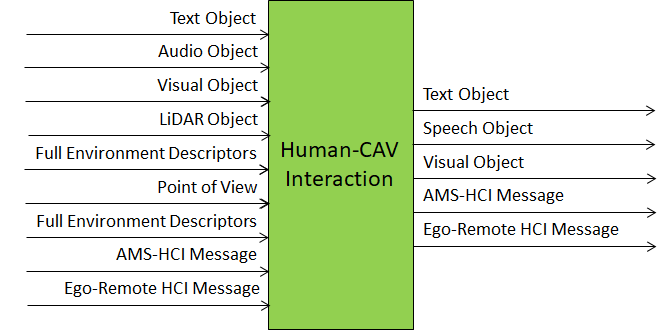
Figure 1 – The Human‑CAV Interaction (MMC‑HCI) AIM
3 I/O Data
Table 1 specifies the Input and Output Data of the Human‑CAV Interaction (MMC‑HCI) AIM.
Table 1 – I/O Data of the Human‑CAV Interaction (MMC‑HCI) AIM
| Input | Description |
|---|---|
| Point of View | Passenger’s Point of View looking at environment. |
| Audio‑Visual Scene Descriptors | Audio‑Visual representation of the environment. |
| Audio Object | User authentication, command/interaction with HCI, and environment audio. |
| Text Object | Text complementing/replacing User input. |
| Visual Object | Environment perception, User authentication, command/interaction with HCI, and environment visual. |
| AMS‑HCI Message | AMS response to HCI request. |
| Ego‑Remote HCI Message | Remote HCI to Ego HCI. |
| Output | Description |
| Text Object | HCI’s output Text. |
| Speech Object | HCI’s avatar Speech. |
| Audio Object | HCI’s avatar or FED Audio. |
| Visual Object | HCI’s avatar or FED Visual. |
| AMS‑HCI Message | HCI request to AMS, e.g., Route or Point of View. |
| Ego‑Remote HCI Message | Ego HCI to Remote HCI. |
4 SubAIMs
4.1 Reference Model
Figure 2 depicts the Reference Model of the Human‑CAV Interaction (MMC‑HCI) AIM.
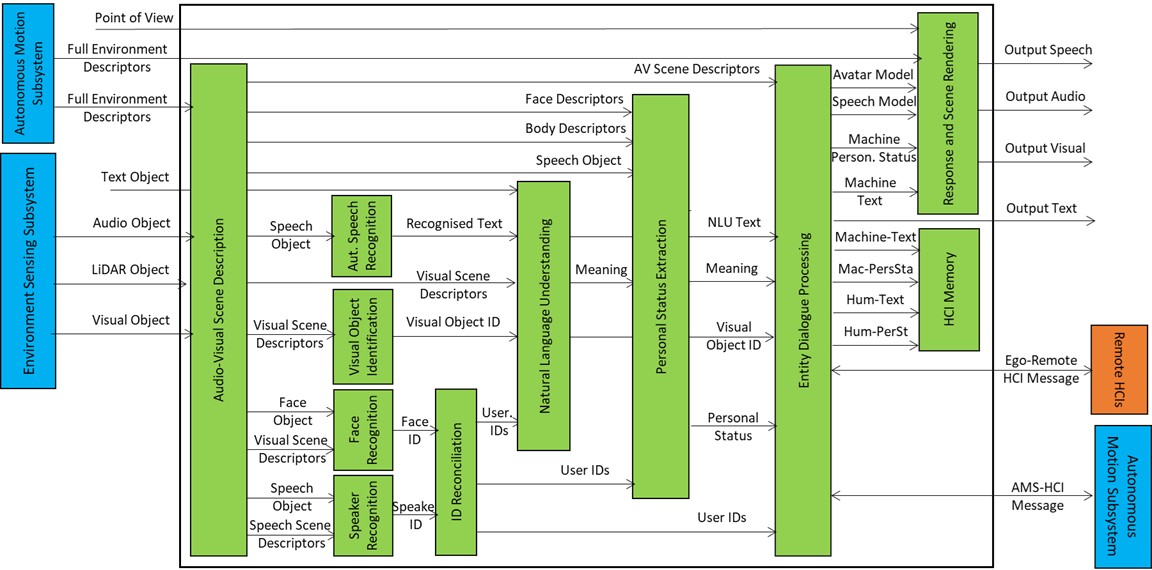
Figure 2 – Reference Model of the Human‑CAV Interaction (MMC‑HCI) Composite AIM.
4.2 Operation
The operation of the HCI subsystem is described by the following scenario where a group of humans is approaching the CAV outside or is sitting inside the CAV:
- Audio‑Visual Scene Description (OSD‑AVS) produces:
- Speech Scene Descriptors in the form of Speech Objects corresponding to each speaking human in the environment.
- Visual Scene Descriptors in the form of Descriptors of Faces and Bodies.
- All non‑Speech Objects are removed from the Speech Scene or signalled in the Audio Scene.
- Automatic Speech Recognition (MMC‑ASR) recognises the speech of each human and produces Recognised Text supporting multiple Speech Objects as input properly identified by their Spatial Attitudes.
- Visual Object Identification (OSD‑VOI) produces Instance IDs of Visual Objects indicated by humans.
- Natural Language Understanding (MMC‑NLU) produces Refined Text and extracts Meaning from the Recognised Text of each input Speech using the spatial information of Visual Object Identifiers.
- Speaker Identity Recognition (MMC‑SIR) and Face Identity Recognition (PAF‑FIR) identify the humans the HCI is interacting with. If FIR provides Face IDs corresponding to the Speaker IDs, Entity Dialogue Processing can correctly associate the Speaker IDs with the Face IDs.
- Personal Status Extraction (MMC‑PSE) extracts the Personal Status of the humans.
- Entity Dialogue Processing (MMC‑EDP):
- Communicates with the Autonomous Motion Subsystem of the Ego CAV to request to move the CAV to a destination, view the Full Environment Descriptors, be informed about the CAV’s situation, or receive relevant information for passengers.
- Communicates with Remote CAVs to exchange Environment Descriptors.
- Produces the Machine Text and Machine Personal Status.
- Personal Status Display (PAF‑PSD) produces the Machine Portable Avatar conveying Machine Speech, Machine Personal Status, and any other relevant information for the Audio‑Visual Rendering AIM.
- Response and Scene Rendering (PAF‑AVR) renders Audio and Visual information using the Machine Portable Avatar or the Autonomous Motion Subsystem’s Full Environment Descriptors based on the Point of View provided by the human.
- Entity Dialogue Processing (MMC‑EDP) also:
- Requests the AMS to provide candidate Routes in response to a human requesting to be taken to a destination.
- Processes responses from AMS and converts them to multimodal messages understandable by the human.
- Processes messages from Ego AMS or Remote HCI and converts them to multimodal messages understandable by the human.
The HCI interacts with the humans in the cabin in several ways:
- By responding to commands/queries from one or more humans at the same time, e.g.:
- Commands to go to a waypoint, park at a place, etc.
- Commands with an effect in the cabin, e.g., turn off air conditioning, turn on the radio, call a person, open window or door, search for information.
- By conversing with and responding to questions from one or more humans at the same time about travel‑related issues, e.g.:
- Humans request information, e.g., time to destination, route conditions, weather at destination.
- CAV offers alternatives to humans, e.g., long but safe way, short but likely to have interruptions.
- Humans ask questions about objects in the cabin.
- By following the conversation on travel matters held by humans in the cabin if:
- The passengers allow the HCI to do so, and
- The processing is carried out inside the CAV.
4.3 Functions of SubAIMs
Table 2 gives the functions of the Human‑CAV Interaction (MMC‑HCI) SubAIMs.
| SubAIM | Function |
|---|---|
| Audio‑Visual Scene Description | Receives Audio and Visual Objects from the appropriate devices and produces Audio‑Visual Scene Descriptors. |
| Automatic Speech Recognition | Receives Speech Objects and produces Recognised Text. |
| Visual Object Identification | Receives Visual Scene Descriptors and provides Instance ID of indicated Visual Object. |
| Natural Language Understanding | Receives Recognised Text, uses context information (e.g., Instance ID of object), and produces Natural Language Understanding Text and Meaning. |
| Speaker Identity Recognition | Receives Speech Object of a human and Speech Scene Geometry and produces Speaker ID. |
| Personal Status Extraction | Receives Speech Object, Meaning, Face Descriptors and Body Descriptors of a human with a Participant ID and produces the human’s Personal Status. |
| Face Identity Recognition | Receives Face Object of a human and Visual Scene Geometry and produces Face ID. |
| Entity Dialogue Processing | Receives Speaker ID, Face ID, AV Scene Descriptors, Meaning, Natural Language Understanding Text, Visual Object ID, and Personal Status, as well as AMS‑HCI Messages and Ego‑Remote HCI Messages. Produces Machine Text Object and Personal Status, as well as AMS‑HCI Messages and Ego‑Remote HCI Messages. |
| Personal Status Display | Receives Machine Text Object and Machine Personal Status and produces Machine’s Portable Avatar. |
| Response and Scene Rendering | Receives AV Scene Descriptors, Portable Avatar, and Point of View and produces Output Speech, Output Audio, and Output Visual. |
4.4 I/O Data of SubAIMs
Table 3 gives the Input and Output Data of the Human‑CAV Interaction (MMC‑HCI) SubAIMs.
4.5 AIMs and JSON Metadata
Table 4 provides the links to the AIM specifications and JSON schemas. AIM1 indicates the Composite AIM and AIM2 its SubAIMs.
| AIM1 | AIM2 | Name | JSON |
|---|---|---|---|
| MMC‑HCI | Human‑CAV Interaction | X | |
| OSD‑AVS | Audio‑Visual Scene Description | X | |
| MMC‑ASR | Automatic Speech Recognition | X | |
| OSD‑AVA | Audio‑Visual Alignment | X | |
| OSD‑VOI | Visual Object Identification | X | |
| MMC‑NLU | Natural Language Understanding | X | |
| MMC‑SIR | Speaker Identity Recognition | X | |
| MMC‑PSE | Personal Status Extraction | X | |
| MMC‑EDP | Entity Dialogue Processing | X | |
| PAF‑FIR | Face Identity Recognition | X | |
| PAF‑PSD | Personal Status Display | X | |
| PAF‑AVR | Response and Scene Rendering | X |
5 JSON Metadata
https://schemas.mpai.community/MMC/V2.5/AIMs/HumanCAVInteraction.json
6 Profiles
No Profiles.
7 Reference Software
Not part of this specification.
8 Conformance Testing
Table 5 provides the Conformance Testing Method for the Human‑CAV Interaction (MMC‑HCI) Composite AIM. Conformance Testing of the individual SubAIMs is given by the individual AIM specifications.
If a schema contains references to other schemas, conformance of data for the primary schema implies that any data referencing a secondary schema shall also validate against the relevant schema, if present, and conform with the Qualifier, if present.
| Receives | Point of View | Shall validate against Point of View schema. |
| Audio‑Visual Scene Descriptors | Shall validate against Audio‑Visual Scene Descriptors schema. | |
| Audio Object | Shall validate against Audio Object schema. Audio Data shall conform with Audio Qualifier. | |
| Text Object | Shall validate against Text Object schema. | |
| Visual Object | Shall validate against Visual Object schema. Visual Data shall conform with Visual Qualifier. | |
| AMS‑HCI Message | Shall validate against AMS‑HCI Message schema. | |
| Ego‑Remote HCI Message | Shall validate against Ego‑Remote HCI Message schema. | |
| Produces | Text Object | Shall validate against Text Object schema. |
| Speech Object | Shall validate against Speech Object schema. | |
| Audio Object | Shall validate against Audio Object schema. Audio Data shall conform with Audio Qualifier. | |
| Visual Object | Shall validate against Visual Object schema. Visual Data shall conform with Visual Qualifier. | |
| AMS‑HCI Message | Shall validate against AMS‑HCI Message schema. | |
| Ego‑Remote HCI Message | Shall validate against Ego‑Remote HCI Message schema. |
9 Performance Assessment
Not part of this specification.