
Function
Ref. Model
I/O Data
SubAIMs
JSON MData
Profiles
Ref. Software
Conformance
Performance
1 Functions
The Autonomous Motion Subsystem (CAV-AMS) Composite AIM enables a CAV to plan and actuate a Route. It performs the following:
- Receive requests to reach a destination from the Human‑CAV Interaction Subsystem (HCI).
- Request the current Point of View from the Environment Sensing Subsystem (ESS).
- Converse with HCI (and HCI with humans) and settles on a final Route.
- Make requests of Full Environment Descriptors subsets to selected CAVs in range.
- Produce its own Full Environment Descriptors.
- Receive and responds to requests of Full Environment Descriptors subsets from CAVs in range.
- Issue AMS‑MAS Messages to the Motion Actuation Subsystem (MAS).
- Process AMS‑MAS Messages from the Motion Actuation Subsystem.
- Store Data received and produced in AMS Memory for future use by AMS SubAIMs.
| Receives | Basic Environment Descriptors | From Environment Sensing Subsystem. |
| Full Environment Descriptors | From Environment Sensing Subsystem. | |
| AMS‑HCI Message | From Human‑CAV Interaction Subsystem. | |
| AMS‑MAS Message | From Motion Actuation Subsystem. | |
| Full Environment Descriptors | From Remote AMSs. | |
| Alert | From Environment Sensing Subsystem. | |
| Produces | AMS‑HCI Message | To Human‑CAV Interaction Subsystem. |
| AMS‑MAS Message | To Motion Actuation Subsystem. | |
| Full Environment Descriptors | To Remote CAVs and Environment Sensing Subsystem. | |
| AMS Data | To authorised external applications (e.g., law enforcement) that may read the recorded AMS Data. | |
| AMS Data | To external device (black box). |
2 Reference Model
Figure 1 depicts the Reference Model of the Autonomous Motion Subsystem (CAV-AMS) AIM.
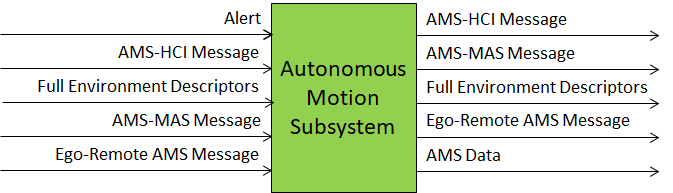
Figure 1 – The Reference Model of the Autonomous Motion Subsystem (CAV‑AMS) AIM
3 I/O Data
Table 1 gives the Input and Output Data of the Autonomous Motion Subsystem (CAV-AMS) AIM.
Table 1 – I/O Data of the Autonomous Motion Subsystem (CAV‑AMS) Composite AIM
| Input | Description |
|---|---|
| Basic Environment Descriptors | CAV’s environment representation from ESS. |
| Full Environment Descriptors | From Environment Sensing Subsystem. |
| AMS‑HCI Message | Human commands, e.g., “take me home”. |
| AMS‑MAS Message | Message from the Motion Actuation Subsystem. |
| Full Environment Descriptors | From Remote AMSs. |
| Alert | Critical information from an EST in ESS. |
| Output | Description |
| Full Environment Descriptors | To Ego CAV’s ESS and to Remote CAVs. |
| AMS‑HCI Message | AMS response to HCI. |
| AMS‑MAS Message | Message to MAS, e.g., “in 5s assume a given Spatial Attitude”. |
| AMS Data | AMS recording data accessible by authorised external applications (e.g., law enforcement, offline analysis). |
4 SubAIMs
4.1 Reference Model
Figure 2 depicts the Reference Model of the Autonomous Motion Subsystem (CAV‑AMS) Composite AIM.
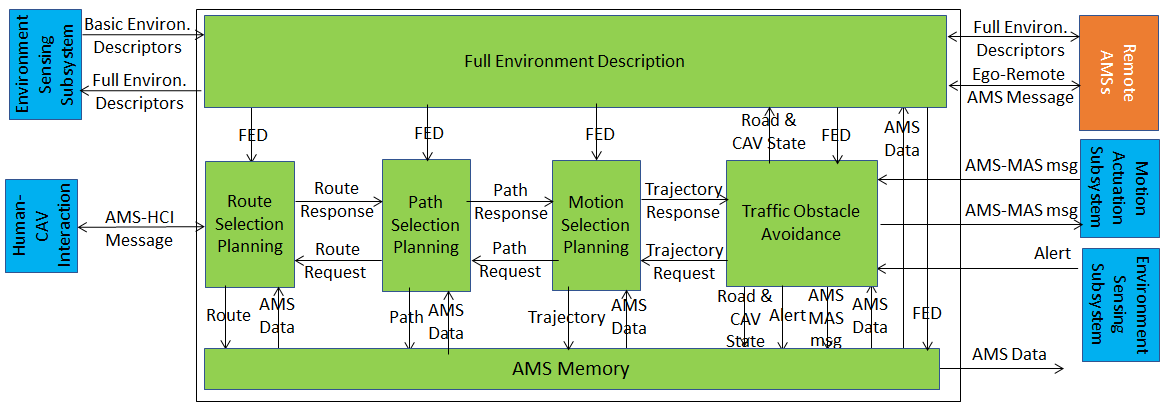
Figure 2 – Reference Model of the Autonomous Motion Subsystem (CAV‑AMS) Composite AIM
4.2 Operation
The operation of the Autonomous Motion Subsystem unfolds as follows:
- A human requests the Human‑CAV Interaction to take them to a destination.
- HCI interprets the request and passes the interpretation to the AMS.
- The AMS activates Route Selection Planning to generate a set of Waypoints starting from the current Point of View (obtained from the ESS) up to the destination.
- The AMS:
- Receives Basic Environment Descriptors from the ESS.
- Requests subsets of Remote AMSs’ Full Environment Descriptors and responds to similar requests from Remote AMSs.
- Integrates all sources of Environment Descriptors into Full Environment Descriptors.
- The Route’s Waypoints cause Path Selection Planning to generate a set of Points of View to reach the next Waypoint.
- Motion Selection Planning generates a Trajectory to reach the next Point of View in each Path.
- Traffic Obstacle Avoidance receives the Trajectory and checks if an Alert was received.
- If an Alert was received, Traffic Obstacle Avoidance detects whether the Trajectory creates a collision:
- If a collision is detected, Traffic Obstacle Avoidance requests a new Trajectory from Motion Selection Planning.
- If no collision is detected, Traffic Obstacle Avoidance issues an AMS‑MAS Message to the MAS.
- The MAS sends an AMS‑MAS Message to the AMS informing it about the execution of the command.
- The AMS, based on the received AMS‑MAS Messages, may:
- Discontinue the execution of the earlier AMS‑MAS Message.
- Issue a new AMS‑MAS Message.
- Inform Traffic Obstacle Avoidance and Full Environment Description.
- The decision of each element of the chain may be recorded in the AMS Memory (“black box”).
4.3 Functions of SubAIMs
Table 2 gives the functions of the Autonomous Motion Subsystem’s SubAIMs.
Table 2 – Functions of the Autonomous Motion Subsystem (CAV‑AMS) SubAIMs
| SubAIM | Function |
|---|---|
| Full Environment Description | Creates an internal environment representation by fusing information received from ESS, Remote AMSs, and other CAV‑Aware entities. Updates the CAV State. |
| Route Selection Planning | Computes a set of possible Routes through the road network from the current to the target destination. |
| Path Selection Planning | Generates a set of Paths considering: (1) Route; (2) Full Environment Descriptors (Spatial Attitude, Road State, etc.); (3) Traffic Rules. |
| Motion Selection Planning | Defines a Trajectory to reach a Goal using the Spatial Attitude considering: (1) CAV’s kinematic and dynamic constraints; (2) Full Environment Descriptors; (3) Passengers’ comfort. |
| Traffic Obstacle Avoidance | Checks whether Trajectory is compatible with Alert information: if not, requests a new Trajectory from Motion Selection Planning; if so, instructs the MAS to execute the Trajectory and receives AMS‑MAS Messages about the execution. |
| AMS Memory | Records decisions by Route Selection Planning, Path Selection Planning, Motion Selection Planning, Traffic Obstacle Avoidance, and Full Environment Description. |
4.4 I/O Data of SubAIMs
Table 3 gives, for each SubAIM, the Input and Output Data of the Autonomous Motion Subsystem.
Table 3 – I/O Data of the Autonomous Motion Subsystem (CAV‑AMS) SubAIMs
4.5 AIMs and JSON Metadata
Table 4 provides the links to the AIM specifications and JSON schemas. AIM1 indicates the Composite AIM and AIM2 its SubAIMs.
Table 4 – AIMs and JSON Metadata of the Autonomous Motion Subsystem (CAV‑AMS)
| AIM1 | AIM2 | Name | JSON |
|---|---|---|---|
| CAV‑AMS | Autonomous Motion Subsystem | X | |
| CAV‑FED | Full Environment Description | X | |
| CAV‑RSP | Route Selection Planning | X | |
| CAV‑PSP | Path Selection Planning | X | |
| CAV‑MSP | Motion Selection Planning | X | |
| CAV‑TOA | Traffic Obstacle Avoidance | X | |
| CAV‑AMM | AMS Memory | X |
5 JSON Metadata
https://schemas.mpai.community/CAV2/V1.1/AIMs/AutonomousMotionSubsystem.json
6 Profiles
No Profiles.
7 Reference Software
Not part of this specification.
8 Conformance Testing
Table 5 provides the Conformance Testing Method for the Autonomous Motion Subsystem (CAV-AMS) Composite AIM. Conformance Testing of the individual SubAIMs is given by the individual AIM specifications.
If a schema contains references to other schemas, conformance of data for the primary schema implies that any data referencing a secondary schema shall also validate against the relevant schema, if present, and conform with the Qualifier, if present.
Table 5 – Conformance Testing Method for the Autonomous Motion Subsystem (CAV‑AMS) Composite AIM
| Receives | Basic Environment Descriptors | Shall validate against Basic Environment Descriptors schema. |
| Full Environment Descriptors | Shall validate against Full Environment Descriptors schema. | |
| AMS‑HCI Message | Shall validate against AMS‑HCI Message schema. | |
| AMS‑MAS Message | Shall validate against AMS‑MAS Message schema. | |
| Full Environment Descriptors (from Remote AMSs) | Shall validate against Full Environment Descriptors schema. | |
| Alert | Shall validate against Alert schema. | |
| Produces | Full Environment Descriptors | Shall validate against Full Environment Descriptors schema. |
| AMS‑HCI Message | Shall validate against AMS‑HCI Message schema. | |
| AMS‑MAS Message | Shall validate against AMS‑MAS Message schema. | |
| AMS Data(to Remote AMSs) | Shall validate against AMS Data schema. | |
| AMS Data | Shall validate against AMS Data schema. |
9 Performance Assessment
Not part of this specification.