
<–References Go to ToC AI Modules–>
| 1 Introduction
2 The A‑User Architecture Reference Model |
6 Context Description (CXT) | 11 Personality Alignment (PAL)
13 Private Storage of the Module
|
1 Introduction
Technical Specification: Pursuing Goals in the Metaverse (MPAI-PGM) – Autonomous User Architecture (PGM-AUA) says how an Autonomous User (A-User) works in a metaverse instance (M-Instance), and how it talks to another User in the same or in another M-Instance.
An M-Instance is a virtual space populated by Processes, as specified by Technical Specification: MPAI Metaverse Model (MPAI-MMM) – Technologies (MMM-TEC). Users are Processes. Every Process works under the responsibility of a human. A User can be left a lot of freedom, up to complete autonomy: this is the A-User.
The User the A-User talks to is either another A-User or an H-User, a User directly controlled by a human.
In short, an A-User:
- looks at and listens to the User, and to the space around it;
- works out the User State: how the User is, what it feels and what it wants;
- decides what to say and what to do;
- answers with a Portable Avatar that speaks and moves its face and body;
- performs Process Actions in the M-Instance, within the Rights it holds and the Rules of the M-Instance;
- asks the responsible human when it cannot decide by itself.
How much the A-User decides alone depends on how much the human intervenes.
2 The A-User Architecture Reference Model
The A-User is a Module as specified by Technical Specification: AI Framework (MPAI-AIF) V3.0: AIMs connected by Channels, run by a Controller. Three parts work together, and they are kept separate:
- The Module is made of the AIMs of the A-User, listed below. It contains neither the Controller nor the User Agent.
- The Controller (AIF Controller) builds and runs the Module. It gets and checks the AIMs, opens the Channels, connects the AIMs to the Private Storage, starts and stops them, and keeps their status (Alive, Degraded, Dead). It carries the Requests, the Responses and the data between the AIMs and the User Agent.
- The User Agent (AIF User Agent) is the interface of the Module with the worlds it lives between. It receives what comes from outside and delivers what the A-User produces. It does not decide, does not touch the AIMs and does not touch the storage: it speaks only to the Controller.
An A-User has two worlds on the other side of its boundary. It acts in the metaverse, which is its real world. The responsible human lives in the universe. One User Agent serves both: it takes the commands and the media of the human, and it takes the actions of the A-User to the M-Instance and brings back the answers.
The Module works like this. A human says to the User Agent “go and open the doors”. The User Agent gives the Controller the audio, or the speech, of the human. The Controller makes a Human Command Request from it, as a CAV Controller makes a Goal from “take me home”. The Human Command is how the Goal reaches the AIMs.
A-User Control is an AIM like the others. It governs what the A-User does by sending Requests and receiving Responses. The Controller governs the life of the Module. Requests and Responses are Messages on Channels, like any other data exchanged between AIMs.
Figure 1 provides the Reference Model of the A-User Architecture.
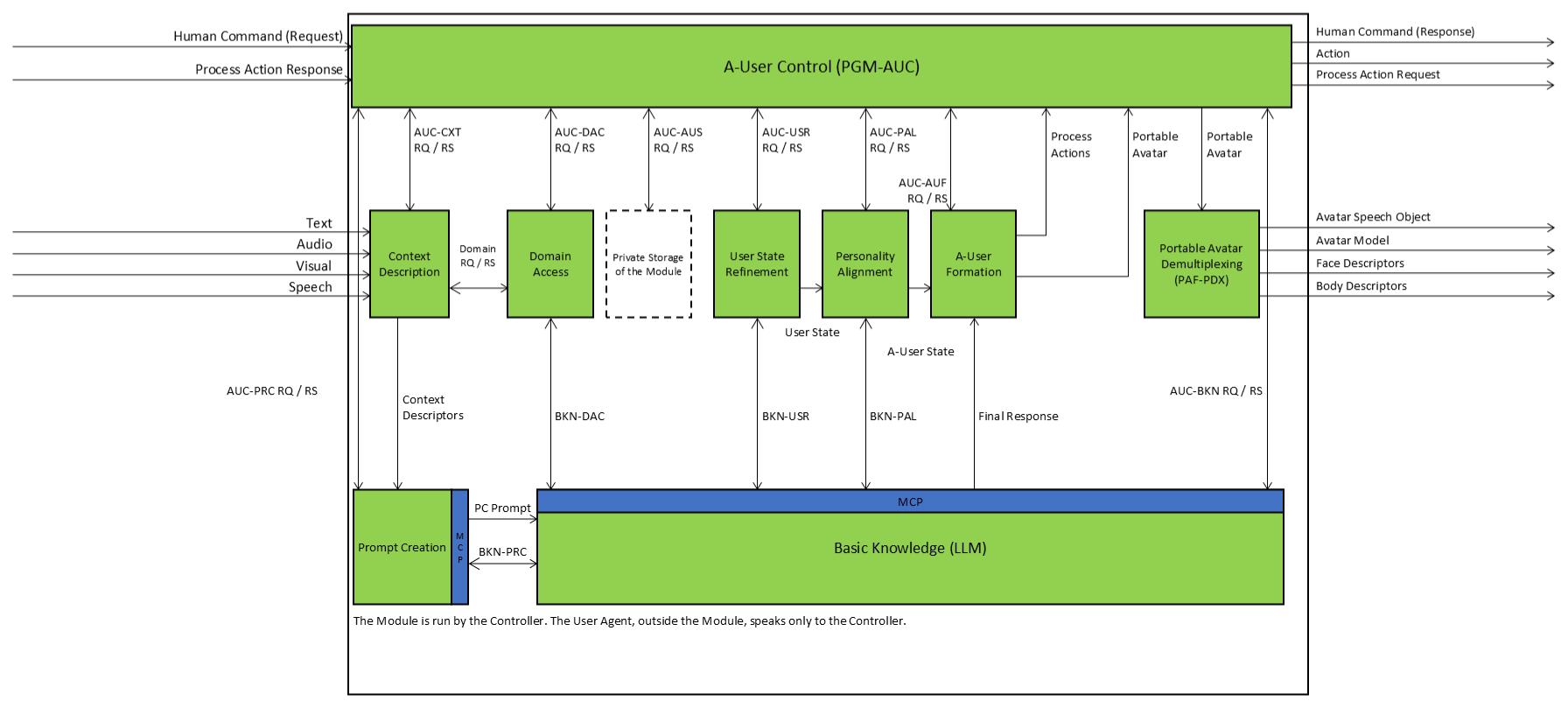
Figure 1 – Autonomous User Architecture
The example goes through the AIMs as follows:
- The User Agent captures the audio of the human with a Unit and passes it to the Controller. If it recognises that the audio is speech, it passes a Speech Object instead. Text and visual objects are captured in the same way.
- The Controller passes the Human Command Request to A-User Control. The same objects go to Context Description.
- Context Description describes the space around the A-User, finds the speech in the audio, and gives a first User State. Prompt Creation puts it together with the Interaction History in a PC Prompt for Basic Knowledge.
- Basic Knowledge decides what to say and do. It asks Domain Access for rules, User State Refinement for a better User State and Personality Alignment for the A-User State. Its Final Response holds the text (“OK”), the Action Objects and the Process Actions: “move to the door”, then “open the door”.
- The whole Final Response goes to A-User Formation, and only to it.
- Motion Object Generation, an AIM inside A-User Formation, looks at each Process Action. “Move to the door” concerns the A-User itself, because its subject is the Persona of the A-User: it becomes Motion Objects. “Open the door” concerns another Item: it goes to A-User Control unchanged. The Motion Objects go to the AIMs that describe the face and the body of the avatar. With the text, the Motion Objects and the A-User State, A-User Formation produces the Portable Avatar and gives it to A-User Control.
- A-User Control agrees or stops. If it agrees, it sends the Process Actions to the Controller, and the User Agent takes them to the M-Instance, which answers each one. The Portable Avatar goes to Portable Avatar Demultiplexing, an AIM of the Module, which separates the speech, the avatar model and the face and body descriptors. The Controller gives them to the User Agent, which delivers the speech and the animated avatar through its Units.
- A-User Control answers the human with a Human Command Response (accepted, rejected, escalated or ignored) as soon as it has decided, not when the Goal is reached.
The animation is made before A-User Control agrees. If A-User Control stops, the work of A-User Formation is lost. The first step of the example, the movement of the Persona, becomes Motion Objects. The second, the opening of the door, is a Process Action on another Item, subject to the Rights of the A-User.
Data that must last are not held by an AIM. They are held by the Private Storage of the Module (AIF Storage). The Controller connects the AIMs to it, under rules set by A-User Control (Section 13).
3 Types of AI Modules
The AIMs of the A-User are of five types.
- Control – A-User Control (AUC) receives the Human Commands, sends Requests to the AIMs and receives their Responses. It agrees to or stops what leaves the A-User: the Process Actions and the Portable Avatar. It holds the Rights and the Wallet of the A-User, applies the Rules of the M-Instance, and sets the rules for the Private Storage.
- Perception – Context Description (CXT) captures Text, Audio and Visual data, describes the audio and visual scene, and derives a first User State. It asks Domain Access for the meaning of what it sees and hears.
- Interpretation – Prompt Creation (PRC) builds the PC Prompt from the Context Descriptors and the Interaction History. Basic Knowledge (BKN) decides what the A-User says and does, by talking with Prompt Creation, Domain Access, User State Refinement and Personality Alignment. It gives the Final Response to A-User Formation and to nobody else.
- Semantic providers – Domain Access (DAC) gives the meaning, the rules and the affordances of a domain. User State Refinement (USR) gives a stable User State. Personality Alignment (PAL) is the only producer of the A-User State.
- Execution – A-User Formation (AUF) forms the Portable Avatar. A Sub-AIM of it, Motion Object Generation, divides the Process Actions and makes the Motion Objects. Portable Avatar Demultiplexing separates the Portable Avatar into what the Units of the User Agent deliver. These AIMs do not reason, and they work under the control of A-User Control.
There is no Storage AIM. The Private Storage of the Module is a function of the AI Framework (Section 13).
4 Interaction Paradigms between AIMs
The AIMs exchange data as Messages on Channels (AIF Communication). The Controller opens the Channels of the Topology and gives each AIM only the ends it needs. Two kinds of exchange are used.
- Operational: one typed Request and one typed Response. Nothing is remembered between exchanges. A-User Control uses it with every AIM. Context Description uses it with Domain Access.
- Multi-turn: a conversation in which meaning is built or refined over several turns. Basic Knowledge uses it with Prompt Creation, Domain Access, User State Refinement and Personality Alignment.
4.1 Operational exchanges
An operational exchange is for facts, constraints and status. It does not interpret or decide anything. Each AIM exchanges with A-User Control one Data Type called AUC-XXX, where XXX is the acronym of the AIM (e.g., AUC-BKN). It has two modes: the Request (RQ), sent by A-User Control, and the Response (RS), sent by the AIM. The Response says what goal the AIM understood, what it achieved and, if needed, why not. This is different from the status (Alive, Degraded, Dead) that the Controller keeps for each AIM, which says whether the AIM is running.
4.2 Multi-turn exchanges
A multi-turn exchange is for meaning. Each interface is one Data Type with two modes: the Request, sent by Basic Knowledge, and the Response, sent by the partner (BKN-PRC, BKN-DAC, BKN-USR, BKN-PAL). The Model Context Protocol (MCP) is a technology for this kind of exchange. MPAI-AIF does not specify it. Here the Requests and the Responses are Data Types on Channels, and the figure shows MCP on the AIMs that use it. Multi-turn exchanges are not used to coordinate, to exchange perceptual data or to execute tasks.
4.3 Fast and slow behaviour
The Module has loops, because Basic Knowledge deliberates by talking with its partners. The Controller runs it in the continuous model (AIF Execution), so the AIMs keep working while Basic Knowledge thinks.
- Fast (reactive) behaviour is for what cannot wait: turn taking, gaze, posture, acknowledgements. It uses only results already produced (the scene descriptors, the User State, the A-User State), starts no multi-turn exchange, and is carried out by A-User Formation under A-User Control.
- Slow (deliberative) behaviour is for choosing what to say and do. It is centred on Basic Knowledge, may take time and produces the Final Response and the A-User State.
A-User Control starts the deliberation, and the fast behaviour goes on meanwhile. The scene descriptors are not changed during deliberation, as the brain does not change what the eyes send it. An AIM that must meet a period or a deadline says so in its Metadata, and the Controller refuses the Module if it cannot keep it.
5 A-User Control (PGM-AUC)
A-User Control (AUC) governs the A-User. It sends Requests to the AIMs, receives their Responses and makes sure that the A-User does what the responsible human wants, within the Rules of the M-Instance and the Rights of the A-User.
AUC knows what the A-User must achieve but does not understand the situation. The AIMs that reason do that. So a Request is binding as to the goal and its constraints, and advisory as to the conclusion. An AIM that reasons reaches its own conclusion. An AIM that executes tries to reach the goal as far as the world allows. No AIM may refuse the goal, but any AIM may report that it did not reach it, or reached it in a different way, and say why.
For this reason a Response is more than a receipt. It states the goal the AIM understood, the outcome and the reason. A Request may also tell the AIM what the Process Actions already sent to the M-Instance achieved (the PA Status, the Complements and any new limit on the goal), so that the AIM reasons knowing the state of the M-Instance.
AUC does not fix a schedule for the AIMs. It sets the goals and the constraints, lets each AIM work, looks at the report and, if needed, sends another Request with a changed goal or a correction. Every Request is answered, and the initiative always rests with AUC. In this way AUC steers the A-User by exception and does not micromanage.
What leaves the A-User. Nothing leaves the A-User without the agreement of AUC. A-User Formation gives AUC the Portable Avatar and the Process Actions that do not concern the A-User as an entity. If AUC agrees, it sends the Process Actions to the Controller, and the User Agent takes them to the M-Instance and brings back the Process Action Responses. AUC gives the Portable Avatar to Portable Avatar Demultiplexing, an AIM of the Module that separates the speech, the avatar model and the face and body descriptors. The Controller gives them to the User Agent, which delivers the speech and the animated avatar. If AUC does not agree, it stops them. AUC may decide not to send a Process Action; if the Process Action is a motion of the Persona, it stops the motion with the AUC-AUF Request. AUC may also wait to send a Process Action until the AUC-AUF Response says that the motion has reached the point where the effect occurs (the hand is on the handle).
The human. The human gives AUC a Human Command Request, which the User Agent receives and the Controller passes on. The Command may start or stop the activity of the A-User, allow or deny an action, handle an escalation, or change the level of autonomy or the constraints. AUC answers every Human Command with a Human Command Response (accepted, rejected, escalated or ignored) as soon as it has decided, not when the goal is reached. The Response goes back to the human through the Controller and the User Agent. When AUC cannot resolve a conflict, it asks the human.
Storage. AUC governs the access to the Private Storage of the Module (Section 13) but does not stand in the data path. It tells each AIM, in its Request, what to store and what it may read, and it sets the rules the Private Storage enforces.
Instructions. AUC acts under one or more of eight Instructions. Each is a phase of the life of the A-User, and AUC sends Requests to a set of AIMs under it:
- Perception and Environment Description (PED): set up the capture of the human, of the User and of the scene.
- Goal and Language Acquisition (GLA): capture and segment what the human and the User express, and give identity and position to the objects in the scene.
- Prompting and Knowledge Query (PKQ): give the perceived scene and the User State a form from which the A-User can reason.
- Goal and Intent Interpretation (GII): have Basic Knowledge decide what the A-User says and which stance it takes.
- Policy, Rights, and Feasibility (PRF): set the limits the behaviour must respect (human commands, Rules, Rights, Wallet, User State, what the domain allows), and the Private Storage access rights. The limits go in the Requests, in particular in the Actions property of the AUC-BKN Request.
- Plan Construction and Execution (PCE): carry out the behaviour on the basis of the Responses: speech, movements of the Portable Avatar, Process Actions.
- Conflict Management and Escalation (CME): spot conflicts and refusals of Process Actions, and escalate to the human if needed.
- Avatar Formation and Rendering (AFR): have the Portable Avatar formed from the Final Response and the A-User State.
Table 1 shows which AIMs receive a Request under which Instruction (an X in the cell). The Requests are normally sent in the order of the columns.
Table 1 – Instructions and affected AIMs
| PED | GLA | PKQ | GII | PRF | PCE | CME | AFR | |
| CXT (Context Description) | X | X | X | – | – | – | – | – |
| PRC (Prompt Creation) | – | – | X | X | X | X | X | – |
| BKN (Basic Knowledge – LLM) | – | – | X | X | X | X | X | – |
| DAC (Domain Access) | – | X | X | X | X | X | X | – |
| USR (User State Refinement) | – | – | X | X | X | X | X | – |
| PAL (Personality Alignment) | – | – | – | X | X | X | X | X |
| AUF (A-User Formation) | – | – | – | – | – | X | X | X |
Note: under PED and GLA the Requests to Context Description do not use the reasoning LLM, because Context Description must work in real time. The first User State it gives under PKQ comes from signal processing and Domain Access, not from the reasoning core. Prompt Creation, on the other hand, uses the LLM through an MCP interface, because there is time to wait for the answer.
Process Actions and Action Objects. The A-User acts in two ways. Some actions have an effect in the M-Instance, e.g., moving an Item or making a payment. They are Process Actions, whose vocabulary, syntax and outcomes (the PA Status) are in MMM-TEC V2.2. Other actions concern only the Portable Avatar, e.g., a gaze, a nod, a gesture or an expression. They need not be Process Actions. They are carried by Action Objects, whose Qualifier names the vocabulary used. MPAI recognises the vocabularies it needs; this specification does not list them. The process is as follows:
- AUC asks for actions with the Actions property of the AUC-BKN Request. For Process Actions, it says whether they are required, optional or not requested, which may be used, how many steps at most, in which M-Locations, with which Rights and up to which limit of the Wallet. For the actions of the Portable Avatar, it names the vocabularies that may be used.
- Prompt Creation, driven by the Actions element of the AUC-PRC Request, puts in the PC Prompt what Basic Knowledge needs to know: the Process Actions that may be used, the vocabularies, the Rights, the Rules and the affordances of the Space from Domain Access.
- Basic Knowledge deliberates. It may ask Domain Access whether a Process Action can be done. Domain Access answers with the PA Status vocabulary of MMM-TEC (Ack, or the reason for a refusal).
- Basic Knowledge produces the Final Response – the text, the Action Objects and the Process Actions – and gives it to A-User Formation, and only to it. It reports to AUC with the AUC-BKN Response what it produced and how it met the Request. Basic Knowledge does not perform any Process Action.
- In A-User Formation, Motion Object Generation divides the Process Actions. If the subject of a Process Action is the Persona of the A-User, that is, its avatar (its position, its movement, its gestures), the Process Action concerns the A-User as an entity, and Motion Object Generation splits it into a sequence of Motion Objects (mini-Process Actions) that animate the Portable Avatar through the AIMs that describe its face and body. If the subject is another Item or Process, A-User Formation passes the Process Action unchanged to AUC. It reports the progress of the motions in the AUC-AUF Response, with the PA Status. A-User Formation never sends a Process Action to the M-Instance.
- AUC receives the Portable Avatar and the other Process Actions, agrees or stops, and sends what it agrees to as described above. It interprets the Process Action Responses.
- If a Process Action is refused or not sent, AUC sends Basic Knowledge a further AUC-BKN Request (a continuation) with a Correction that gives the refusal and its reason, or escalates to the human. Basic Knowledge decides its own conclusion and says in the AUC-BKN Response whether it took the Correction in full, in part or not at all.
This specification does not say how Basic Knowledge is prompted, how it generates the Process Actions and the Action Objects, or how A-User Formation splits a Process Action into Motion Objects.
6 Context Description (CXT)
The function of Context Description (PGM-CXT) is to capture perceptual information from the environment surrounding the User and to produce a coherent, enriched description of the Space together with a first‑pass User State. Context Description operates on audio and visual information in real time, without the benefit of the deliberative information that becomes available later.
Context Description performs the following operations:
- Captures media data (Text, Audio, Visual, and 3D Model) produced by the responsible human in the Universe or by the User in the M‑Instance, ensuring temporal synchronisation and modality coherence of the captured perceptual data.
- Takes the speech of the responsible human who gives a command, as a Speech Object from the User Agent.
- Describes the captured Space by producing:
- the Audio Scene Descriptors, through modality‑specific processing including spatial, environmental, and salience‑related enrichment, with object identity;
- the Visual Scene Descriptors, through modality‑specific processing including depth, occlusion, possible actions (affordances), salience‑related enrichment, and object identity.
- Aligns the audio and visual descriptions, establishing coherent multi-modal object correspondence within the environment.
- Derives a first‑pass User State from the perceptual evidence and the available Domain information.
- Requests Domain information by querying Domain Access for the semantics relevant to spatial environments (e.g., office, workshop, or kitchen), audio and visual object interpretation and affordances, the User State, and the contextual constraints governing interpretation.
- Produces outputs:
- the Audio Scene Descriptors and Visual Scene Descriptors, with their audio‑visual alignment information, sent to Prompt Creation;
- the first‑pass User State, sent to Prompt Creation;
- the Domain Request sent to Domain Access;
- the AUC-CXT Response, reporting the scope and outcome of processing to A‑User Control.
The internal decomposition of Context Description into SubAIMs, including the Audio and Visual Scene Description SubAIMs, the audio‑visual alignment, the User State derivation, and the interface that governs its interaction with the Private Storage of the Module, is specified in the AI Modules sections.
7 Prompt Creation (PRC)
The function of Prompt Creation is to assemble, organise, and expose a structured representation of the A‑User’s understanding of the current situation regarding the Space and the User, and to submit this representation to Basic Knowledge for deliberation.
Prompt Creation does not perform perception, semantic interpretation, reasoning, or behaviour determination. Rather, its role is to bind together perceptual, state, contextual, and Historical Information into a coherent representation, the PC Prompt, suitable for deliberative processing by Basic Knowledge.
Prompt Creation receives the following inputs:
- The Audio Scene Descriptors and Visual Scene Descriptors, with their audio‑visual alignment information, produced by Context Description.
- The first‑pass User State produced by Context Description.
- Relevant references to Space‑ and User‑related information retained in the Private Storage of the Module, including persistent attributes, long‑term Context, and previously established facts.
- The Interaction History associated with the current session.
Prompt Creation performs the following operations:
- Assembles the descriptors, the first‑pass User State, stored references, and Interaction History into the PC Prompt, capturing the current Context understanding of the A‑User.
- Ensures that spatial, referential, and temporal relationships across modalities are coherent within the PC Prompt.
- Initiates and mediates semantic (MCP‑based) interactions as required by Basic Knowledge, ensuring session continuity for multi‑stage clarification.
- Responds to requests from Basic Knowledge by re‑structuring, refining, or clarifying elements of the PC Prompt, including resolving references to Space or User attributes.
Prompt Creation may be activated by:
- A Request from A-User Control to construct or update the PC Prompt.
- A request from Basic Knowledge to refine, restructure, or clarify elements of an existing PC Prompt.
- Changes in the descriptors, the User State, or the Interaction History that require updating of the PC Prompt.
Prompt Creation acts as a Context Representation Provider. It is the sole AIM responsible for assembling the descriptors, the User State, stored references, and Interaction History into a coherent situation representation.
8 Basic Knowledge (BKN)
During a Goal and Intent Interpretation Instruction, the Basic Knowledge LLM executes an iterative deliberative processing pipeline to determine the appropriate communicative behaviour of the A‑User with respect to the Context.
- Basic Knowledge receives the PC Prompt from Prompt Creation. This representation includes:
- The Audio Scene Descriptors and Visual Scene Descriptors and the first‑pass User State produced by Context Description.
- Relevant references to Context‑related information stored in the Private Storage of the Module.
- The Interaction History associated with the current session.
- Basic Knowledge reasons over this representation to determine:
- the communicative stance the A‑User should assume, and
- the spoken or acted response appropriate to the current situation.
- Throughout this process, Basic Knowledge integrates semantics from multiple supporting AIMs through the following interaction loops.
Loop 1 – Context Structuring (Prompt Creation)
Basic Knowledge may query Prompt Creation via MCP to refine, restructure, or clarify elements of the PC Prompt, including spatial, referential, or temporal relationships. Prompt Creation does not introduce new semantics, but restructures available information.
Loop 2 – Domain Semantics (Domain Access)
Basic Knowledge queries Domain Access via MCP to obtain domain rules, constraints, possible actions (affordances), and semantics required to interpret entities, relations, and feasible actions within the Context, including whether a Process Action that it is considering can be performed.
Loop 3 – User Semantics (User State Refinement)
Basic Knowledge queries User State Refinement via MCP to obtain a refined or temporally stabilised User State. When authorised by A‑User Control, User State Refinement integrates information from the Private Storage of the Module and M‑Instance services (e.g., Rights and/or preferences) to provide the best available User State.
Loop 4 – A‑User State and Personality Alignment (PAL)
Basic Knowledge queries Personality Alignment via MCP for the A‑User State that aligns the A‑User’s Personality with the User State, the interaction context, and long‑term behavioural constraints. Personality Alignment, the sole producer of the A‑User State, receives User State when ready. Persistent updates of the User State or A‑User State are stored in the Private Storage of the Module as governed by A‑User Control.
Upon completion of deliberative processing, Basic Knowledge produces the Final Response, made of the text to be uttered by the A-User (a Basic Text Object) and of the Action Objects that carry the actions of its face and body that accompany the text, and provides it to A-User Formation, and only to it. If A-User Control has requested it, the Final Response also holds the Process Actions that carry the response out (Section 5). The AUC-BKN Response reports what was produced and how the Request was met. The accompanying A‑User State is provided by Personality Alignment.
9 Domain Access (DAC)
Domain Access provides authoritative domain‑level semantics to (1) capture‑level semantic grounding and (2) deliberative reasoning. These two uses are logically distinct: capture‑level domain access is situational and is not goal‑directed, while reasoning‑level domain access is goal‑directed and deliberative.
Domain Access supplies object classes, relations, possible actions (affordances), constraints, and behavioural expectations derived from domain knowledge, without performing perception or reasoning as such. At the request of Basic Knowledge, while it deliberates, or of A-User Control it also validates the feasibility of Process Actions that are being considered, answering for each with the PA Status vocabulary of MMM-TEC.
- Provides Domain Semantics to Context Description and Basic Knowledge, including object and event classes, relations, possible actions (affordances), scene constraints, and expected behaviours.
- Supports domain grounding of perceptual and situational elements, enabling consistent interpretation of entities, actions, and relations detected or inferred by other AI Modules.
- Exposes two interaction interfaces, corresponding to the two interaction paradigms:
- A Directed Semantic Query Interface, used by Context Description for single‑shot semantic grounding and validation without session continuity.
- A Dialogic Semantic Interface based on the Model Context Protocol (MCP), used by Basic Knowledge for multi-turn semantic clarification and integration (Prompt Creation, Basic Knowledge, User State Refinement, and Personality Alignment) for multi‑turn semantic clarification and integration.
- Returns structured, typed domain knowledge, including confidence and constraint information, suitable for direct consumption by perception pipelines or for semantic reasoning via MCP.
- Does not maintain perception state, user state, or session state beyond that required for MCP interactions, and does not modify perceptual or user descriptors produced by other AI Modules.
10 User State Refinement (USR)
User State Refinement acts as the semantic authority for user modelling during deliberative processing. It transforms distributed internal and external user‑related evidence into a coherent, queryable User State suitable for reasoning and Personality alignment.
User State Refinement derives and provides authoritative, session‑level user semantics by consolidating user‑related evidence originating from other AI Modules under the governance of A‑User Control:
- Consumes user‑related evidence from the Private Storage of the Module, including:
- the first‑pass User State produced by Context Description;
- user‑related semantic interpretations generated by perception‑ and interpretation‑level AI Modules;
- Interaction History and previously authorised user‑related records.
- Draws additional user‑related information from authorised M‑Instance services, when available and permitted by A‑User Control, including:
- identity and role information obtained from authentication or identity services;
- persistent or ephemeral user profile attributes managed by the M‑Instance.
- Refines the User State by integrating behavioural cues, interaction patterns, session‑level preferences, historical fragments, and authorised M‑Instance information, producing an authoritative but ephemeral User State valid for the current deliberative context.
- Provides the refined User State to Basic Knowledge to support determination of the A‑User’s communicative behaviour, and to Personality Alignment upon request, enabling derivation of the A‑User State.
- Can refine the first‑pass User State produced by Context Description and can continue interpreting User semantics, based on Requests received from A‑User Control and on authorised access to the Private Storage of the Module.
11 Personality Alignment (PAL)
Personality Alignment acts as the semantic authority for aligning Personality, ensuring that the A‑User’s behaviour and responses are consistent with the active Personality while remaining based upon the User State.
Personality Alignment is the sole producer of the A‑User State, which it derives by aligning the A‑User’s Personality with the User State and with communicative, expressive, and behavioural constraints. The resulting A‑User State is authoritative but ephemeral.
- Consumes User semantics from User State Refinement, including the authoritative, session‑level User State required to perform Personality alignment.
- Draws Personality‑related evidence from the Private Storage of the Module, including previously authorised A‑User State fragments, Personality preferences, and Personality indicators derived from interactions.
- May draw additional Personality‑related information from M‑Instance services when permitted by A‑User Control, including externally defined Personality profiles, role‑ or context‑specific Personality constraints, and policy‑driven expressive or behavioural guidelines.
- Constructs and refines the A‑User State by integrating Personality traits, communicative modulation rules, expressive and behavioural constraints, and User‑specific adaptations provided by User State Refinement.
- Provides the A‑User State to A‑User Formation for rendering and to Basic Knowledge on request.
12 A‑User Formation (AUF)
A-User Formation (AUF) gives the A-User its visible and audible behaviour. It turns the Final Response of Basic Knowledge and the A-User State of Personality Alignment into the Portable Avatar, which speaks and moves its face and body. It does not reason and does not model the User. Its function is that of Response and Scene Rendering (PAF-RSR) of MPAI-PAF, to which A-User Formation adds the Request and the Response of A-User Control and the division of the Process Actions.
A-User Formation:
- takes the Final Response (the text, the Action Objects and the Process Actions) and the A-User State, and reads the Avatar Model and the Speech Model from the Private Storage of the Module;
- divides the Process Actions, in Motion Object Generation: those that concern the A-User as an entity, that is, whose subject is the Persona of the A-User, become Motion Objects; the others go to A-User Control unchanged;
- makes the speech of the text, with prosody and timing that follow the Personal Status (Text-To-Speech);
- describes the face (expression, lips, gaze, mostly from the speech) and the body (posture, gesture, movement) from the text, the speech, the Personal Status and the Motion Objects (Entity Face Description, Entity Body Description);
- puts the Avatar Model, the speech and the descriptions together in the Portable Avatar (Portable Avatar Multiplexing);
- gives the Portable Avatar and the Process Actions it did not turn into motions to A-User Control, and nothing to the M-Instance or the User Agent.
The AUC-AUF Request controls the formation by element (Speech, Face, Body and Avatar) and each motion, and A-User Control can use it to stop a motion. The AUC-AUF Response says what each element achieved, how the Process Actions were divided and how far the motions have gone (PA Status).
13 Private Storage of the Module
The data that persist across executions of the A‑User are not held by an AIM. They are held by the Private Storage of the Module, as specified in MPAI‑AIF V3.0 Storage. Each AIM reaches the storage directly through handles bound by the Controller to the identity of the AIM; the Controller stamps every write with the Module, the AIM and the time. The Private Storage records and exposes authorised Interaction History elements related to perception, user‑related evidence and Personality adaptations.
13.1 Governance
A‑User Control is the StorageControl of the Module and is therefore the sole authority governing the Private Storage. The general rules of each category of data are those of A‑User Control: who may write, who may read, and the longest time a datum is kept. A writer may restrict the rules of its own datum and may not extend them. A‑User Control reads everything. It authorises:
- Which AIMs may write.
- Which categories of information may be recorded.
- Which persistence scope (until the Module stops, until the session ends, or longer) applies.
- Which AIMs may read specific stored elements.
Every datum is written under the rules of Category, Readers, Time and Trace; the Trace is written by the Controller and not by the writer. A call that the rules do not allow returns NOT_AUTHORISED.
13.2 Information stored
Subject to the rules set by A‑User Control, the Private Storage may hold:
- Perceptual context snapshots and scene descriptors produced by Context Description.
- User‑related evidence and authorised fragments derived from interactions.
- Fragments related to Personality, with authorised adaptations.
- Interaction History and associated session metadata.
- The Trace of the stored data.
- Process Action outcomes and associated M‑Instance state changes recorded by A‑User Control.
13.3 Write access
Under explicit authorisation by A‑User Control:
- A‑User Control writes the outcomes of Process Actions performed in the M‑Instance (requests issued, responses received with their PA Status, resulting changes to Rights or Wallet).
- Context Description writes perceptual context snapshots and scene descriptors.
- Prompt Creation may record data, references and session metadata related to the PC Prompt.
- User State Refinement may record authorised User‑related evidence fragments or updates, but does not store the authoritative User State unless explicitly authorised.
- Personality Alignment may record authorised A‑User State fragments.
- Basic Knowledge may record authorised reasoning outcomes, annotations or decisions as structured data when required for orchestration, traceability or audits.
13.4 Read access
Subject to the rules set by A‑User Control:
- A‑User Control reads all stored data for orchestration, governance, auditing and life‑cycle management.
- Context Description reads spatial and User information from previous sessions.
- Prompt Creation reads Interaction History elements to assemble the PC Prompt.
- Basic Knowledge reads authorised data to support deliberation and traceability.
- User State Refinement reads user‑related evidence, Interaction History and authorised profile fragments.
- Personality Alignment reads authorised user semantics and Personality fragments.
