
Functions
Ref. Model
I/O Data
SubAIMs
JSON MData
Profiles
Ref. Software
Conformance
Performance
1 Functions
The Connected Autonomous Operation (CAV-CAO) AIM:
| Receives | Basic Visual Object | From the Visual sensors. |
| GNSS Object | From the GNSS receiver. | |
| Basic Offline Map Object | The Offline Map. | |
| Spatial Data | From the CAV’s motion sensors. | |
| Weather Data | From the CAV’s weather sensors. | |
| Brake Response | From the brakes. | |
| Motor Response | From the motor. | |
| Wheel Response | From the steered wheels. | |
| Basic Audio Object | From the cabin’s microphones. | |
| Point of View | From the cabin. | |
| Ego-Remote AMS Message | From Remote CAVs in range. | |
| Ego-Remote HCI Message | From Remote CAVs in range. | |
| Produces | Brake Command | To the brakes. |
| Motor Command | To the motor. | |
| Wheel Command | To the steered wheels. | |
| Basic Speech Object | To the passengers. | |
| Basic Text Object | To the passengers. | |
| Recognised Text | To the passengers. | |
| Face Descriptors | To the passengers. | |
| User ID | Outside the CAV. | |
| AMS Data | Outside the CAV. | |
| Ego-Remote AMS Message | To Remote CAVs in range. | |
| Ego-Remote HCI Message | To Remote CAVs in range. |
The AIM is the CAV: one Module, run by one Controller of MPAI-AIF V3.0, with one identity for the city it moves in. It converses with the passengers, senses the environment, plans and decides the CAV’s motion, and actuates it; it exchanges with the CAVs in range what they perceive. The User Agent feeds its boundary – the sensors, the cabin, the responses of the devices – and delivers its commands to the devices.
2 Reference Model
Figure 1 depicts the Reference Model of the Connected Autonomous Operation (CAV-CAO) AIM.
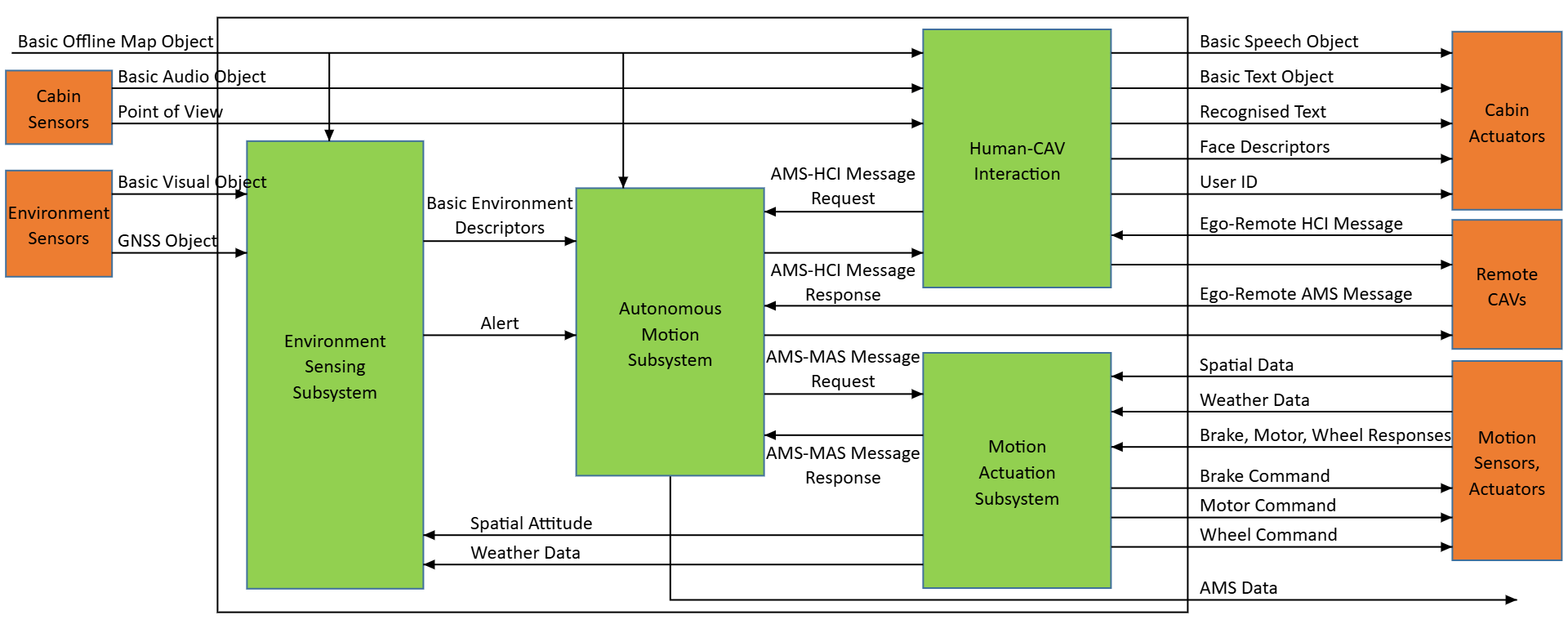
Figure 1 – The Connected Autonomous Operation (CAV-CAO) AIM
3 I/O Data
Table 1 specifies the Input and Output Data of the Connected Autonomous Operation (CAV-CAO) AIM.
| Input | Data Type | Description |
|---|---|---|
| Basic Visual Object (optional) | Basic Visual Object | What the cameras capture. |
| GNSS Object (optional) | GNSS Object | The CAV’s position as GNSS gives it. |
| Basic Offline Map Object | Basic Offline Map Object | The roads, lanes, speed limits and named places, for the ESS, the AMS and HCI. |
| Spatial Data | Spatial Data | Odometer, speedometer, accelerometer and inclinometers. |
| Weather Data (optional) | Weather Data | Temperature, precipitation, ice reported. |
| Brake Response (optional) | Brake Response | What the brakes executed. |
| Motor Response (optional) | Motor Response | What the motor executed. |
| Wheel Response (optional) | Wheel Response | What the steered wheels executed. |
| Basic Audio Object | Basic Audio Object | What the passengers say. |
| Point of View (optional) | Point of View | Where the passenger looks from. |
| Ego-Remote AMS Message (optional) | Ego-Remote AMS Message | What another CAV perceives. |
| Ego-Remote HCI Message (optional) | Ego-Remote HCI Message | What another CAV’s HCI sends. |
| Output | Data Type | Description |
| Brake Command (optional) | Brake Command | The braking to apply. |
| Motor Command (optional) | Motor Command | The acceleration to give. |
| Wheel Command | Wheel Command | The angle to steer. |
| Basic Speech Object | Basic Speech Object | What the CAV says. |
| Basic Text Object | Basic Text Object | What the CAV says, as text. |
| Recognised Text (optional) | Basic Text Object | What the CAV heard the passenger say. |
| Face Descriptors (optional) | Face Descriptors Object | The face of the CAV’s avatar. |
| User ID (optional) | Instance Identifier | Who the passenger is. |
| AMS Data | AMS Data | The record of every decision. |
| Ego-Remote AMS Message (optional) | Ego-Remote AMS Message | What the CAV perceives. |
| Ego-Remote HCI Message (optional) | Ego-Remote HCI Message | What the CAV’s HCI sends. |
4 SubAIMs
4.1 Functions of SubAIMs
Table 2 specifies the Functions of the SubAIMs of the Connected Autonomous Operation (CAV-CAO) AIM.
| SubAIM | Function |
|---|---|
| Human-CAV Interaction | Converses with the passengers: understands the Destination they ask for, proposes the Routes, tells the Route’s state and the arrival. |
| Environment Sensing Subsystem | Senses the environment and describes it as the Basic Environment Descriptors; raises Alerts. |
| Autonomous Motion Subsystem | Places the environment on the map, plans the Route, the Path and the Trajectory, and decides the AMS-MAS Messages. |
| Motion Actuation Subsystem | Executes the AMS-MAS Messages by the commands of the devices; answers with the Spatial Attitude and the Road State. |
4.2 Operation
The four subsystems are the Sub-AIMs of one Module, run continuously by one Controller: each AIM runs as its data arrive, and Channels carry what one subsystem gives another.
A passenger tells Human-CAV Interaction where to go. HCI understands the Destination – checked against the named places of the Offline Map – and sends it to the Autonomous Motion Subsystem as an AMS-HCI Message Request; the AMS answers with the Routes, HCI proposes them, and the Route the passenger agrees to is executed. HCI tells the Route’s state and the arrival.
The Environment Sensing Subsystem describes the environment on the ego frame, anchored by the Motion Actuation Subsystem’s Spatial Attitude and GNSS. The AMS places it on the map, with what Remote CAVs report, and gives the MAS the AMS-MAS Message Request; the MAS commands the devices and answers with its Spatial Attitude and the Road State.
4.3 I/O Data of SubAIMs
Table 3 specifies the Input and Output Data of the SubAIMs.
| SubAIM | Input | Output |
|---|---|---|
| Human-CAV Interaction | Audio Input – Basic Audio Object Visual Input – Basic Visual Object LiDAR Input – Basic LiDAR Object AMS-HCI Message Response – AMS-HCI Message Basic Offline Map Object – Basic Offline Map Object Ego-Remote HCI Message – Ego-Remote HCI Message Full Environment Descriptors – Basic Audio-Visual Scene Descriptors Point of View – Object Point of View |
Output Speech – Basic Speech Object Output Face Descriptors – Face Descriptors Object Output Text – Basic Text Object Output Recognised Text – Basic Text Object Output User ID – Instance Identifier AMS-HCI Message Request – AMS-HCI Message Ego-Remote HCI Message – Ego-Remote HCI Message |
| Environment Sensing Subsystem | Audio Field – Basic Audio Object Visual Field – Basic Visual Object RADAR Field – Basic RADAR Object LiDAR Field – Basic LiDAR Object Ultrasound Field – Basic Ultrasound Object Basic Offline Map Object – Basic Offline Map Object GNSS Object – GNSS Object Spatial Attitude – Spatial Attitude Weather Data – Weather Data Full Environment Descriptors – Full Environment Descriptors |
Basic Environment Descriptors – Basic Environment Descriptors Alert – Alert |
| Autonomous Motion Subsystem | Basic Offline Map Object – Basic Offline Map Object Basic Environment Descriptors – Basic Environment Descriptors Full Environment Descriptors – Full Environment Descriptors Full Environment Descriptors – Full Environment Descriptors Ego-Remote AMS Message – Ego-Remote AMS Message AMS-HCI Message Request – AMS-HCI Message AMS-MAS Message Response – AMS-MAS Message Alert – Alert |
AMS-HCI Message Response – AMS-HCI Message Ego-Remote AMS Message – Ego-Remote AMS Message AMS-MAS Message Request – AMS-MAS Message AMS Data – AMS Data |
| Motion Actuation Subsystem | Spatial Data – Spatial Data Weather Data – Weather Data AMS-MAS Message Request – AMS-MAS Message Brake Response – Brake Response Motor Response – Motor Response Wheel Response – Wheel Response |
Spatial Attitude – Spatial Attitude Weather Data – Weather Data AMS-MAS Message Response – AMS-MAS Message Brake Command – Brake Command Motor Command – Motor Command Wheel Command – Wheel Command |
4.4 AIMs and JSON Metadata
Table 4 gives the AIMs and their JSON Metadata.
5 JSON Metadata
https://schemas.mpai.community/CAV2/V2.0/AIMs/ConnectedAutonomousOperation.json
6 Profiles
No Profiles.
7 Reference Software
The reference software runs the CAV as one Module under one Controller of MPAI-AIF V3.0, its four subsystems its Sub-AIMs, continuously; the simulation waits for the CAV at every step. It is part of the reference software of CAV-TEC V2.0 (see N4195, An introduction to the reference software): C# on .NET 10, released under the BSD 3-Clause licence, obtained from MPAI.
Tested from a spoken Destination to arrival; a place unknown, one named ambiguously, a Route declined, a Destination changed while driving; two CAVs, each a CAO in its own simulation, sharing what they perceive.
8 Conformance Testing
Table 5 provides the Conformance Testing Method for the Connected Autonomous Operation (CAV-CAO) AIM: the data it receives and produces. If a schema references other schemas, conformance of data for the primary schema implies that data referencing a secondary schema shall also validate against that schema, if present, and conform with the Qualifier, if present.
| Receives | Basic Visual Object | Shall validate against the Basic Visual Object schema. |
| GNSS Object | Shall validate against the GNSS Object schema. | |
| Basic Offline Map Object | Shall validate against the Basic Offline Map Object schema. | |
| Spatial Data | Shall validate against the Spatial Data schema. | |
| Weather Data | Shall validate against the Weather Data schema. | |
| Brake Response | Shall validate against the Brake Response schema. | |
| Motor Response | Shall validate against the Motor Response schema. | |
| Wheel Response | Shall validate against the Wheel Response schema. | |
| Basic Audio Object | Shall validate against the Basic Audio Object schema. | |
| Point of View | Shall validate against the Point of View schema. | |
| Ego-Remote AMS Message | Shall validate against the Ego-Remote AMS Message schema. | |
| Ego-Remote HCI Message | Shall validate against the Ego-Remote HCI Message schema. | |
| Produces | Brake Command | Shall validate against the Brake Command schema. |
| Motor Command | Shall validate against the Motor Command schema. | |
| Wheel Command | Shall validate against the Wheel Command schema. | |
| Basic Speech Object | Shall validate against the Basic Speech Object schema. | |
| Basic Text Object | Shall validate against the Basic Text Object schema. | |
| Basic Text Object | Shall validate against the Basic Text Object schema. | |
| Face Descriptors Object | Shall validate against the Face Descriptors Object schema. | |
| Instance Identifier | Shall validate against the Instance Identifier schema. | |
| AMS Data | Shall validate against the AMS Data schema. | |
| Ego-Remote AMS Message | Shall validate against the Ego-Remote AMS Message schema. | |
| Ego-Remote HCI Message | Shall validate against the Ego-Remote HCI Message schema. |