
<–References Go to ToC AI Modules–>
(Tentative)
| Function | Reference Model | Input/Output Data |
| Functions of AI Modules | Input/output Data of AI Modules | AIW, AIMs, and JSON Metadata |
1 Function
The A-User Architecture is represented by an AI Workflow that
- May receive a command from a human.
- Captures Text Objects, Audio Objects, 3D Model Objects, and Visual Objects of an Audio-Visual Scene in an M-Instance that includes one User that can be Autonomous (A-User) or Human (H-User) as a result of an Action performed by the A-User or requested by a Human Command.
- Produces an Action or a Process Action Request that may reference the A-User’s Persona, i.e., the speaking Avatar generated by the A-User in response to the input data.
- Receives Process Action Responses to Process Action Requests made.
2 Reference Model
Figure 1 gives the Reference Model of the AI Workflow implementing the Autonomous User.
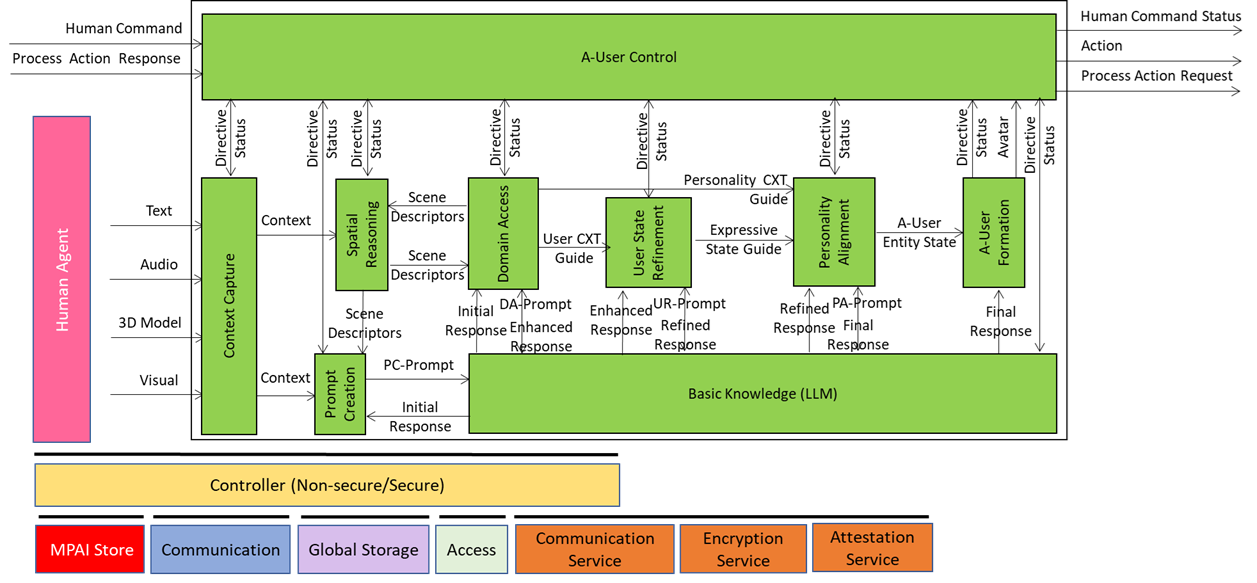
Figure 1 – Reference Model of Autonomous User Architecture (PGM-AUA)
Let’s walk through this model.
The A-User Control AIM drives A-User operation by controlling how it interacts with the environment and performs Actions and Process Actions based on the Rights it holds and the M-Instance Rules. It does so by:
- Performing or requesting another Process to perform an Action.
- Controlling the operation of AIMs, in particular A-User Rendering.
The responsible human may take over or modify the operation of the A-User Control by exercising Human Commands. Figure 2 summarises the input and output data of the A-User Control AIM

Figure 2 – Simplified view of the Reference Model of A-User Control
A Human Command received from a human will generate a Human Command Status in response. A Process Action Request to a Process – that may include another User – will generate a Process Action Response. Various types of Commands (called Directives) to the Autonomous User AI Modules (AIM) will generate responses (called Statuses). The Figure singles out the A-User Rendering Directives issued to the A-User Rendering AIM. This will generate a response typically including a Speaking Avatar that the A-User Control AIM will MM-Add or MM-Move in the metaverse. The complete Reference Model of A-User Control can be found here.
The Context Capture AIM, prompted by the A-User Control, perceives a particular location of the M-Instance – called M-Location – where the User, i.e., the A-User’s conversation partner, has MM-Added its Avatar. In the metaverse, the A-User perceives by issuing an MM-Capture Process Action Request. The multimodal data captured is processed and the result is called Context – a time-stamped snapshot of the M-Location – composed of:
- Audio and Visual Scene Descriptors describing the spatial content.
- Entity State, describing the User’s cognitive, emotional, and attentional posture.
Thus, Context represents the initial A-User’s understanding of the User and the M-Location where it is embedded.
The Spatial Reasoning AIM – composed of two AIMs, Audio Spatial Reasoning and Visual Spatial Reasoning – analyses Context and sends an enhanced version of the Audio and Visual Scene Descriptors, containing audio source relevance, directionality, and proximity (Audio) and object relevance, proximity, referent resolutions, and affordance (Visual) to
- The Domain Access AIM seeking additional domain-specific information. Domain Access responds with further enhanced Audio and Visual Scene Descriptors, and
- The Prompt Creation AIM sending to the Basic Knowledge, a basic LLM, the PC-Prompt integrating:
- User Text and Entity State (from Context Capture).
- Enhanced Audio and Visual Scene Descriptors (from Spatial Reasoning).
This is depicted in Figure 3.

Figure 3 – Basic Knowledge receives PC-Prompt from Prompt Creation
The Initial Response to PC-Prompt is sent by Basic Knowledge to Domain Access that
- Processes the Audio and Visual Scene Descriptors and the Initial Response by accessing domain-specific models, ontologies, or M-Instance services to retrieve:
- Scene-specific object roles (e.g., “this is a surgical tool”)
- Task-specific constraints (e.g., “only authorised Users may interact”)
- Semantic affordances (e.g., “this object can be grasped”)
- Produces and sends four flows:
- Enhanced Audio and Visual Scene Descriptors to Spatial Reasoning to enhance its scene understanding.
- User Context Guide to User State Refinements to enable it to update User’s Entity State.
- Personality Context Guide to Personality Alignment.
- DA-Prompt, a new prompt to Basic Knowledge including initial reasoning and spatial semantics.

Figure 4 – Domain Access serves Spatial Reasoning, Basic Knowledge, User State Refinement, and Personality Alignment
Basic Knowledge produces and sends an Enhanced Response to the User State Refinement AIM.
User State Refinement refines its understanding of User State using the User Context Guide, produces and sends:
- UR-Prompt to Basic Knowledge.
- Expressive State Guide to Personality Alignment providing A-User with the means to adopt a Personality that is congruent with the User’s Entity State.
Basic Knowledge produces and sends a Refined Response to Personality Alignment.
This is depicted in Figure 5.

Figure 5 – User State Refinements feeds Personality Alignment
Personality Alignment
- Selects a Personality based Refined Response and Expressive State Guide and conveying a variety of elements such as : Expressivity (e.g., Tone, Tempo, Face, Gesture) and Behavioural Traits (e.g.: verbosity, humour, emotion), Type of role (e.g., assistant, mentor, negotiator, entertainer), etc.
- Formulates and sends
- An A-User Entity State reflecting the Personality to A-User Rendering.
- A PA-Prompt to Basic Knowledge reflecting the intended speech modulation, face and gesture), synchronisation cues across modalities
Basic Knowledge sends a Final Response that conveys semantic content, contextual integration, expressive framing, and personality coherence.
This is depicted in Figure 6.

Figure 6 – Personality Alignment feeds A-User Rendering
A-User Rendering uses Final Response, A-User Entity Status and A-User Control Command from A-User Control to synthesise and shape a speaking Avatar contained in the A-User Control. This is depicted in Figure 7.

Figure 7 – The result of the Autonomous User processing is fed to A-User Control
With the exception of Basic Knowledge, A-User AIMs are not required to have language and reasoning capabilities. Prompt Creation, Domain Access, User State Refinement, and Personality Alignment convert their output Data to/from text to JSON Schemas whose names are given in Table 2. The propagation of information through the Basic Knowledge AIMs takes place from the AIMs in the first column to the left through the AIMs, e.g., Prompt Creation to Basic Access and then to Domain Access from the right to the left.
Table 2 – the flow of Prompts and Responses though the A-User’s Basic Knowledge
| Prompt Creation | PC-Prompt Plan | PC-Prompt | Basic Knowledge |
| Domain Access | DA Input | Initial Response | |
| DA-Prompt Plan | DA-Prompt | ||
| User State Refinement | UR Input | Enhanced Response | |
| UR-Prompt Plan | UR-Prompt | ||
| Personality Alignment | PA Input | Refined Response | |
| PA-Prompt Plan | PA-Prompt | ||
| A-User Output | Final Response |
3 Input/Output Data
Table 3 gives the Input/Output Data of the Autonomous User AIW.
Table 3 – Input/output data of the Autonomous User
| Input | Description |
| Human Command | A command from the responsible human overtaking or complementing the control of the A-User. |
| Process Action Response | Generated by the M-Instance Process sin response to the A-User’s Process Action Request |
| Text Object | User input as text. |
| Audio Object | The Audio component of the Scene where the User is embedded. |
| 3D Model Object | The 3DModel component of the Scene where the User is embedded. |
| Visual Object | The Visual component of the Scene where the User is embedded. |
| Output | Description |
| Human Command Status | |
| Action | Action performed by A-User. |
| Process Action Request | A-User’s Process Action Request. |
4 Functions of AI Modules
Table 4 gives the functions performed by PGM-AUA AIMs.
Table 4 – Functions of PGM-AUA AIMs
Note: The table does not analyse Directive/Status Data to and from A-User Control to PGM-AUA.
| Acronym | Name | Definition |
| PGM-AUC | A-User Control | Performs Actions and Process Action Requests, such as utter a speech or move its Persona (Avatar) as a result of its interactions with the User. |
| PGM-CXT | Context Capture | Captures at least one of Text, Audio, 3D Model, and Visual, and produces Context, a representation of the User and the environment where the User is located. |
| PGM-ASR | Audio Spatial Reasoning | Transforms raw Audio Scene Descriptors and Audio cues into semantic outputs that Prompt Creation (PRC) uses to enhance User Text and to Domain Access (DAC) seeking additional information. |
| PGM-VSR | Visual Spatial Reasoning | Transforms raw Visual Scene Descriptors (objects, gesture vectors, and gaze cues) into semantic outputs that Prompt Creation (PRC) uses to enhance User Text and to Domain Access (DAC) seeking additional information. |
| PGM-PRC | Prompt Creation | Transforms into natural language prompts (PR-Prompts) to Basic Knowledge semantic inputs received from – Context Capture (CXC) – Audio and Visual Spatial Reasoning (SPR) and, – Domain Access (DAC) as responses provided to SPR (indirectly). |
| PGM-BKN | Basic Knowledge | A language model – not necessarily general-purpose – receiving the enriched texts from PC Prompt Creation (PCR), Domain Access (DAC), User State Refinement (USR), and Personality Alignment (PAL) and converts into responses used by the various AIMs to gradually produce the Final Response. |
| PGM-DAC | Domain Access | Performs the following main functions: – Interprets the Audio and Visual Spatial Outputs from Audio and Visual Space Reasoning and any User-related semantic inputs. – Selects and activates domain-specific behaviours to deal with specific inputs from SPR and BKN. – Produces semantically enhanced outputs to SPR and BKN. |
| PGM-USR | User State Refinement | Modulates the Enhanced Response from BKN into a User State and Context-aware UR-Prompt, which is then sent to BKN. |
| PGM-PAL | Personality Alignment | Modulates the Refined Response into an A-User Personality Profile-aware PA-Prompt, which is then sent to BKN. |
| PGM-AUR | A-User Rendering | Receives the Final Response from BKN, A-User Personal Status from Personality Alignment (PAL), and Command from A-User Control and renders the A-User as a speaking Avatar. |
| PGM-AUC | A-User Control | The User Control AIM (PGM-USC) governs the operational lifecycle of the A-User though its AIMs and orchestrates its interaction with both the M-Instance and the human User. |
5 Input/output Data of AI Modules
Table 5 provides acronyms, names, and links to the specification of the AI modules composing the PGM-AUA AIW and their input/output data. The current specification is tentative but is expected to evolve from input from Responses to the Call for Technologies.
Table 5 – Input/output Data of AI Modules
6 AIW, AIMs, and JSON Metadata
Table 6 provides the links to the AIW and AIM specifications and to the JSON syntaxes.
Table 6 – AIW, AIMs, and JSON Metadata
| AIW | AIMs | Name | JSON |
| PGM-AUA | Autonomous User | X | |
| PGM-AUC | A-User Control | X | |
| PGM-CXT | Context Capture | X | |
| PGM-ASR | Audio Spatial Reasoning | X | |
| PGM-VSR | Visual Spatial Reasoning | X | |
| PGM-PRC | Prompt Creation | X | |
| PGM-BKN | Basic Knowledge | X | |
| PGM-DAC | Domain Access | X | |
| PGM-USR | User State Refinement | X | |
| PGM-PAL | Personality Alignment | X | |
| PGM-AUR | A-User Rendering | X |